Axiom VI: Data is Relational
Axiom V gave James typed dataclasses for orders, customers, and products: Pyright catching structural errors before runtime. But types describe individual objects. A CustomerOrder knows its own shape. It knows nothing about the customer who placed it, the products inside it, or the fifty other orders that customer has made. When the team asked James to build a dashboard showing order history by customer, with filters for date range, status, and product category, he hit a wall that types alone could not solve. His data had relationships, and nothing in his system understood them.
His data lived in a JSON file: orders.json. Each order was a dictionary with a customer_name string, a product_name string, and a status field. To find all orders for "Acme Corp," he loaded the entire file into memory and looped through every record. To find overdue orders across all customers, he looped again. To count how many orders each customer had placed, he looped a third time, building a dictionary by hand. The file was 2,000 records. The dashboard took eleven seconds to load.
Then the product team changed a customer's name from "Acme Corp" to "Acme Corporation." James updated the customer record. He forgot to update the 47 orders that referenced the old name. Now the dashboard showed two customers: "Acme Corp" with 47 historical orders and "Acme Corporation" with zero. The data was inconsistent, and the JSON file had no way to tell him.
"It's a data format problem," James said before Emma could finish examining the dashboard. "I'll switch to YAML, or maybe use separate JSON files for customers and orders. Cleaner structure, same flexibility."
"Build it," Emma said. "Separate files. Show me how you would fix the Acme Corp problem."
James sketched it out. A customers.yaml with IDs and names. An orders.yaml with customer ID references instead of names. "Change the name in the customers file, orders still point to the right ID. Problem solved."
"Delete customer number 7," Emma said.
James paused. The orders referencing customer 7 would still exist: pointing to a customer that was gone. Nothing in the YAML file would stop him. Nothing would warn him that twenty orders now referenced a ghost. "I would have to write code to enforce that myself."
"And the original problem: what if someone types 'Acme Corp' in one order file and 'Acme Corporation' in another?"
"The YAML file would accept both," James said slowly. He stared at the dashboard showing two "Acme" customers. "The format was never the issue. YAML would have the same problem. CSV would have the same problem. I need something that enforces the connections, that rejects bad data before it gets in. Like a spreadsheet where instead of typing a customer name in every order row, you have a separate customers sheet and each order just points to a row number. Change the name in the customers sheet, and every order still points to the right place."
Emma paused. "That is actually a better analogy than the one I usually use. I have been explaining normalization with entity-relationship diagrams for years. The spreadsheet version is clearer."
Emma opened a terminal and typed twelve lines of SQL. The same dashboard query that took eleven seconds and forty lines of Python returned in three milliseconds. The customer name lived in one place. The relationships were enforced by the database. The data could not become inconsistent because the system would not allow it.
The difference between JSON-as-database and a relational database is Axiom VI.
The Problem Without This Axiom
James's orders.json was not a beginner's mistake. It was the path every developer follows when data starts simple and grows relational. The trajectory is predictable:
| Stage | What Happens | Consequence |
|---|---|---|
| Week 1 | JSON file stores 20 records | Fast, simple, readable |
| Month 2 | File grows to 500 records | Queries require loading everything into memory |
| Month 4 | Second entity added (customers separate from orders) | Relationships expressed by duplicating strings |
| Month 6 | Name change breaks data consistency | No constraints, no validation, no way to detect the problem |
| Month 9 | Dashboard needs cross-entity queries | 40 lines of Python to do what SQL does in 3 |
| Month 12 | AI agent asked to query the data | Agent writes custom loops because JSON has no query language |
Without recognizing that structured data is inherently relational, developers fall into three traps. The JSON Graveyard: projects accumulate JSON files (orders.json, customers.json, products.json) with no way to express relationships between them. James was building one. The Flat File Spiral: as complexity grows, developers invent ad-hoc query languages, build custom indexing, implement their own transaction logic (slowly reinventing a database, badly). The NoSQL Trap: developers reach for document stores because the API feels familiar, but when the data is relational, fighting its nature creates complexity that a relational database handles natively.
Each path leads to the same destination: a system that cannot answer basic questions about its own data without heroic effort from the developer.
The Axiom Defined
Axiom VI: Structured data follows relational patterns. SQL is the default for persistent structured data. SQLite for single-user, PostgreSQL for multi-user. Use an ORM only when it doesn't obscure the SQL.
This axiom makes three claims, each of which James learned the hard way:
- Structured data is relational by nature. When you have entities with attributes and connections between them, you have relational data (whether or not you store it relationally). James's JSON file contained relational data. It just could not enforce the relationships.
- SQL is the default choice. Not the only choice, but the one you should deviate from consciously with good reason.
- The ORM serves you, not the reverse. If your ORM hides the SQL so completely that you cannot reason about what queries execute, it has become an obstacle.
From Principle to Axiom
In Chapter 18, you learned Principle 5: Persisting State in Files: the general durability rule that work products must survive beyond a single session. James was already following this principle. His team's markdown knowledge base (Axiom II) and his typed Python modules (Axiom III) all persisted in files.
But Axiom VI refines this principle for a specific category of state: structured data with relationships. Not all persistent data belongs in the same format. The distinction matters:
| State Type | Storage | Why |
|---|---|---|
| Knowledge, documentation, specs | Markdown files | Human-readable, version-controlled, AI-parseable |
| Configuration | YAML/TOML files | Declarative, mergeable, environment-specific |
| Structured entities with relationships | SQL database | Queryable, constrained, normalized, concurrent-safe |
| Binary assets | File system | Git LFS or object storage for large files |
Principle 5 tells you to persist state. Axiom VI tells you HOW to persist structured data: relationally, with SQL, using the right engine for the job.
The Paper That Gave Data a Theory
In 1970, an English mathematician named Edgar F. Codd published a paper at IBM's San Jose Research Laboratory: "A Relational Model of Data for Large Shared Data Banks." At the time, databases were navigational: programs traversed pointers from record to record, like walking through a maze. If the structure of the maze changed, every program that navigated it broke. Codd proposed something radical: separate the logical structure of data from its physical storage. Define data as tables with rows and columns. Express queries as mathematical operations on those tables. Let the database, not the programmer, figure out how to retrieve the data efficiently.
IBM's own database team resisted. They had built IMS, a hierarchical database that powered most of the company's revenue. Codd's relational model threatened that product. IBM delayed implementation for years. But a young programmer named Larry Ellison read Codd's paper, saw its implications, and in 1977 founded a company to build the first commercial relational database. He called it Oracle.
The relational model won because it solved James's exact problem at industrial scale: when data has relationships, a system that understands relationships will always outperform one that does not. Codd's tables, foreign keys, and constraints are the reason Emma's twelve-line SQL query returned in three milliseconds what James's forty-line Python loop took eleven seconds to produce. The database optimizer (the component Codd's model made possible) chose the execution path. James did not have to.
More than half a century later, SQL remains the dominant language for structured data. It has survived the rise and fall of object databases (1990s), the XML movement (2000s), the NoSQL revolution (2010s), and the graph database wave (2020s). Each found legitimate niches. None displaced SQL for general-purpose structured data, because Codd's insight addresses a property of data itself: when entities have relationships, a relational system is the natural fit.
Why SQL Works
| Property | What It Means | Why It Matters |
|---|---|---|
| Declarative | You say WHAT you want, not HOW to get it | The database optimizer chooses the execution strategy |
| Relational | Data is organized into related tables | Reflects how real-world entities connect |
| Constrained | Schema enforces structure, types, and relationships | Invalid data is rejected before it enters the system |
| Optimized | Decades of query planner research | Complex queries execute efficiently without manual tuning |
| Transactional | ACID guarantees (Atomicity, Consistency, Isolation, Durability) | Data is never left in a half-updated state |
| Universal | One language across SQLite, PostgreSQL, MySQL, SQL Server | Skills transfer between databases |
The declarative nature deserves emphasis. This is why Emma's query was so much shorter than James's Python loop. When you write:
SQL is a language for working with databases. You will use it in Part 6. For now, read the structure, not the syntax: tables have columns, rows have values, and relationships connect tables through shared keys.
The pattern:
  data lives in tables (rows and columns)
  each row is one record, each column is one property
  tables connect to each other through shared keys
  you ask questions by describing WHAT you want, not HOW to find it
SELECT tasks.title, projects.name
FROM tasks
JOIN projects ON tasks.project_id = projects.id
WHERE tasks.status = 'overdue'
ORDER BY tasks.due_date;
You have not specified HOW to find this data. You have not said "scan the tasks array, for each task look up the project, filter by status, then sort." You described the RESULT you want, and the database figures out the fastest path to deliver it. This is the same declarative philosophy behind CSS, HTML, and configuration files, and it is why AI agents work so effectively with SQL.
Relational Thinking: Entities and Relationships
Emma started James's education by drawing three boxes on a whiteboard: the same three entities that his JSON file had tangled together.
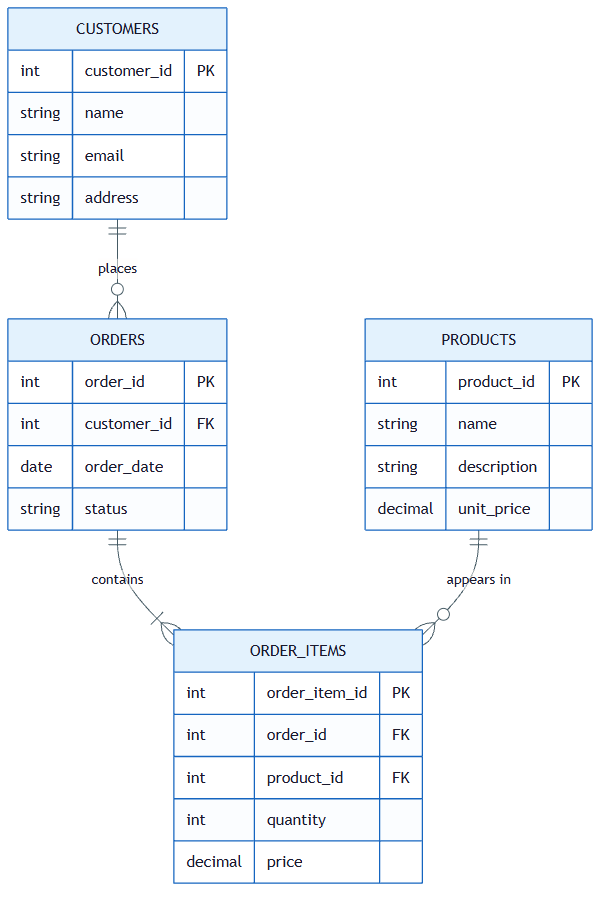
1. Entities (Tables)
An entity is a distinct "thing" in your domain. In James's order system:
- Customer: a company or person who places orders
- Order: a transaction with a status, date, and total
- Product: an item that can be ordered
Each entity becomes a table. Each row is one instance. The key insight: in James's JSON file, these three entities were mashed into a single list of dictionaries. In a relational database, each lives in its own table with its own structure.
This lesson introduces SQL and Python database code. You have not learned either language yet. SQL is new here, and Python has not been covered yet. Read these code blocks for the concept: what data is being defined, what constraints are being enforced, how tables connect to each other. The specific syntax will make sense when you reach the hands-on chapters.
2. Attributes (Columns)
Each entity has typed properties, and this is where Axiom V meets Axiom VI. The schema is a type definition for your data:
CREATE TABLE customers (
    id INTEGER PRIMARY KEY,
    name TEXT NOT NULL UNIQUE,
    email TEXT NOT NULL,
    created_at TEXT NOT NULL DEFAULT (datetime('now'))
);

CREATE TABLE orders (
    id INTEGER PRIMARY KEY,
    status TEXT NOT NULL DEFAULT 'pending' CHECK (status IN ('pending', 'shipped', 'delivered')),
    total_amount REAL NOT NULL,
    created_at TEXT NOT NULL DEFAULT (datetime('now')),
    customer_id INTEGER NOT NULL REFERENCES customers(id)
);
Notice the constraints: NOT NULL means required, UNIQUE prevents duplicates, CHECK restricts values to a valid set, REFERENCES declares relationships. When Emma showed this to James, he recognized the pattern from Axiom V: these constraints are guardrails, enforced by the database instead of the type checker.
3. Relationships (Foreign Keys)
Relationships connect entities (the part James's JSON could not express):
- A Customer has many Orders (one-to-many)
- An Order belongs to a Customer (many-to-one)
- An Order contains Products (many-to-many, via a junction table)
Foreign keys enforce referential integrity: you cannot create an order for a customer that does not exist. This is what prevented James's "Acme Corp" vs "Acme Corporation" disaster: the customer name lives in one row of the customers table, and every order references it by id, not by duplicated string.
-- This FAILS if customer_id 999 doesn't exist (the database protects you)
INSERT INTO orders (status, total_amount, customer_id)
VALUES ('pending', 149.99, 999);
-- Error: FOREIGN KEY constraint failed
Compare this to JSON, where nothing prevents "customer_id": 999 even if no such customer exists. The relational database catches the error. The JSON file silently accepts it.
The SQLite / PostgreSQL Decision
"Which database should I use?" James asked. Emma's answer was a decision framework, not a preference. The axiom specifies two databases. Here is when to use each:
| Factor | SQLite | PostgreSQL |
|---|---|---|
| Writers | Single process | Many concurrent users |
| Deployment | Embedded in your application | Separate server process |
| Setup | Zero configuration (just a file) | Requires installation and configuration |
| Size | Up to ~1 TB practical | Petabytes with proper architecture |
| Concurrency | Single-writer, multiple readers | Full MVCC (Multi-Version Concurrency Control): concurrent reads and writes without blocking |
| Use case | CLI tools, mobile apps, prototypes, embedded | Web apps, APIs, multi-user systems |
| Backup | Copy the file | pg_dump or streaming replication |
| AI agent work | Local projects, personal tools | Production deployments |
The Decision Framework
Ask these three questions:
-
How many processes write to this database simultaneously?
- One process: SQLite
- Multiple processes: PostgreSQL
-
Does this need to run as a network service?
- No (CLI tool, desktop app, local agent): SQLite
- Yes (web API, shared service): PostgreSQL
-
Is this a prototype or production?
- Prototype: SQLite (migrate to PostgreSQL later if needed)
- Production multi-user: PostgreSQL from the start
SQLite in Practice
SQLite is not a toy database. It is the most widely deployed database engine in the world: present in every smartphone, every web browser, and most operating systems. For James's order dashboard (a single-user internal tool), it was exactly the right choice. No server to maintain, no connection strings to manage, no Docker containers. Just a file:
import sqlite3

conn = sqlite3.connect("orders.db")
cursor = conn.cursor()

# The schema Emma wrote (James's orders.json replaced in 12 lines)
cursor.execute("""CREATE TABLE IF NOT EXISTS customers (
    id INTEGER PRIMARY KEY AUTOINCREMENT,
    name TEXT NOT NULL UNIQUE,
    email TEXT NOT NULL
)""")

cursor.execute("""CREATE TABLE IF NOT EXISTS orders (
    id INTEGER PRIMARY KEY AUTOINCREMENT,
    status TEXT NOT NULL DEFAULT 'pending',
    total_amount REAL NOT NULL,
    customer_id INTEGER NOT NULL REFERENCES customers(id),
    created_at TEXT NOT NULL DEFAULT (datetime('now'))
)""")

# Insert with parameterized queries (SAFE, see anti-patterns below)
cursor.execute("INSERT INTO customers (name, email) VALUES (?, ?)",
               ("Acme Corporation", "orders@acme.com"))
customer_id = cursor.lastrowid

cursor.execute("INSERT INTO orders (status, total_amount, customer_id) VALUES (?, ?, ?)",
               ("shipped", 149.99, customer_id))
conn.commit()

# The dashboard query (3 milliseconds instead of 11 seconds)
cursor.execute("""
    SELECT customers.name, COUNT(orders.id), SUM(orders.total_amount)
    FROM customers
    JOIN orders ON orders.customer_id = customers.id
    GROUP BY customers.id
    ORDER BY SUM(orders.total_amount) DESC
""")

for name, count, total in cursor.fetchall():
    print(f"{name}: {count} orders, ${total:.2f} total")

conn.close()
This replaced James's entire forty-line Python loop. The database is a single file (orders.db) that you can copy, back up, or inspect with any SQLite tool. When the team later moved the dashboard to a multi-user web app, the SQL transferred directly to PostgreSQL: same queries, different connection string. This is the universality of SQL: learn it once, apply it everywhere.
SQL and AI: Why Agents Love Relational Data
This is where Axiom VI connects to everything this book teaches, and where the lesson becomes urgent rather than merely architectural. When James asked an AI agent to "show me all overdue orders for Acme Corp" against his JSON file, the agent generated this:
import json
from datetime import datetime, timedelta

with open("orders.json") as f:
    data = json.load(f)

cutoff = datetime.now() - timedelta(days=30)
results = []
for order in data["orders"]:
    # Hope that "customer" is spelled consistently
    if "Acme" in order.get("customer_name", ""):
        if order.get("status") == "pending":
            created = datetime.fromisoformat(order["created_at"])
            if created < cutoff:
                results.append(order)
The code works until someone stores the customer name as "customer" instead of "customer_name", or formats dates differently, or nests orders inside customer objects. The AI had no schema to consult, so it guessed at field names, assumed a flat structure, and produced brittle string matching. Every assumption is a silent failure waiting to happen.
When he asked the same question against his SQL schema, the agent generated:
SELECT orders.id, orders.total_amount, orders.created_at
FROM orders
JOIN customers ON orders.customer_id = customers.id
WHERE customers.name = 'Acme Corporation'
AND orders.status = 'pending'
AND orders.created_at < datetime('now', '-30 days');
The difference is structural. SQL has a constrained vocabulary: approximately 30 keywords that matter. Compare this to Python's thousands of library functions. Fewer choices mean fewer hallucination opportunities. SQL is declarative: it describes WHAT you want, not HOW to get it. Natural language intent maps almost word-for-word to SQL. The schema is the specification: when you give an AI agent your CREATE TABLE statements, it knows exactly what data exists, what types each column holds, and how tables relate. The schema is to data what type annotations are to code: a machine-readable contract.
SQL is Verifiable
Unlike generated Python, SQL queries can be verified mechanically before touching real data:
- Syntax check: Does the query parse?
- Schema check: Do the referenced tables and columns exist?
- Type check: Are comparisons between compatible types?
- Result check: Does
EXPLAINshow a reasonable query plan?
This makes SQL ideal for AI-generated code. James could verify every AI-generated query against the schema without running it against production data: the same principle as Pyright catching type errors before runtime.
Practical tip: Keep a schema.sql file in your project's docs/ directory (the same knowledge base from Axiom II). When an AI agent needs to work with your data, it reads one file and has the complete map: every table, every column, every relationship, every constraint. Emma called it "the system prompt for your database." James added his on the same day and never removed it. Every AI prompt that touched the order system started with @docs/schema.sql.
This is a natural stopping point. If you need a break, bookmark this spot and return when you are ready. Everything above covers the core concept; everything below applies it through exercises and practice.
The ORM code below shows how Python classes can mirror database tables. You will use these tools (SQLModel, Alembic) when you reach the hands-on chapters. For now, notice the pattern: one definition serves both your code and your database.
ORMs: When to Use, When to Avoid
James noticed that his Python code and his SQL schema were expressing the same structure in two languages: his CustomerOrder dataclass mirrored his orders table. An ORM (Object-Relational Mapper) bridges that gap, letting you define the structure once. In Python, SQLModel (built on SQLAlchemy) is the recommended choice for agentic development because it unifies Pydantic validation with SQLAlchemy's database layer:
from sqlmodel import SQLModel, Field, Session, create_engine, select
from typing import Optional
from datetime import UTC, datetime

class Customer(SQLModel, table=True):
    id: Optional[int] = Field(default=None, primary_key=True)
    name: str = Field(index=True, unique=True)
    email: str

class Order(SQLModel, table=True):
    id: Optional[int] = Field(default=None, primary_key=True)
    status: str = Field(default="pending")
    total_amount: float
    customer_id: int = Field(foreign_key="customer.id")
    created_at: datetime = Field(default_factory=lambda: datetime.now(UTC))

# Create database and tables
engine = create_engine("sqlite:///orders.db")
SQLModel.metadata.create_all(engine)

# Use the ORM (James recognized his dataclasses, now backed by a database)
with Session(engine) as session:
    customer = Customer(name="Acme Corporation", email="orders@acme.com")
    session.add(customer)
    session.commit()
    session.refresh(customer)

    order = Order(status="shipped", total_amount=149.99, customer_id=customer.id)
    session.add(order)
    session.commit()

    # Query (still readable, maps directly to SQL concepts)
    statement = select(Order).where(Order.status != "delivered")
    for order in session.exec(statement):
        print(f"[{order.status}] ${order.total_amount:.2f}")
James noticed something: the SQLModel classes looked almost identical to his Axiom V dataclasses. That was the point. The ORM unified his type definitions with his database schema, one structure serving both purposes.
The ORM Rule
The axiom says: "Use an ORM only when it doesn't obscure the SQL."
This means:
| Use the ORM When | Avoid the ORM When |
|---|---|
| CRUD operations (Create, Read, Update, Delete) | Complex analytical queries with multiple JOINs |
| Type safety matters (Python type hints on models) | Performance-critical paths where you need query plan control |
| Schema definition (models as documentation) | You cannot explain what SQL the ORM generates |
| Migrations (Alembic integrates with SQLAlchemy) | The ORM syntax is more complex than raw SQL |
The test is simple: Can you explain the SQL that your ORM code generates? If yes, the ORM is adding value. If no, write the SQL directly. A useful heuristic: if you spend more than two minutes reading ORM documentation to express a JOIN or GROUP BY, the ORM has become the obstacle. Write the SQL.
There is an agentic angle here too. AI agents are significantly better at generating raw SQL than complex ORM-specific syntax. SQL is a constrained, universal language with decades of training data. ORM DSLs (like SQLAlchemy's legacy session.query(Order).filter(Order.status == 'pending').join(Customer)) are framework-specific dialects that AI is more likely to hallucinate. When you need AI to write a query, raw SQL is the more agent-native language.
Emma showed James the dividing line with two examples from his own codebase:
# Good: ORM for simple CRUD (the SQL is obvious)
order = session.get(Order, order_id)
order.status = "delivered"
session.commit()

# Better as raw SQL: James's dashboard query (complex aggregation)
cursor.execute("""
    SELECT customers.name, COUNT(orders.id) AS total,
           SUM(orders.total_amount) AS revenue
    FROM customers
    JOIN orders ON orders.customer_id = customers.id
    GROUP BY customers.id ORDER BY revenue DESC
""")
Preview: Migrations, Schema Evolution Over Time
Three months after migrating to SQL, James needed to add a priority column to the orders table. He could not just edit the CREATE TABLE statement (the database already existed with real data). Emma showed him migrations: versioned scripts that transform your schema from one state to the next, like version control for your database structure.
Without migrations, schema changes are manual commands run against production databases with no record, no rollback, and no reproducibility. With migrations, every schema change is:
- Versioned: Each migration has a sequence number
- Reversible: Each migration defines both "upgrade" and "downgrade"
- Reproducible: Run all migrations to recreate the database from scratch
- Auditable: Git tracks who changed the schema and when
In the Python ecosystem, Alembic (built on SQLAlchemy) handles migrations:
# alembic/versions/001_add_priority_to_tasks.py
"""Add priority column to tasks table"""

from alembic import op
import sqlalchemy as sa

def upgrade():
    op.add_column('tasks', sa.Column('priority', sa.Integer(), nullable=True))
    op.create_index('ix_tasks_priority', 'tasks', ['priority'])

def downgrade():
    op.drop_index('ix_tasks_priority', 'tasks')
    op.drop_column('tasks', 'priority')
This migration adds a priority column and an index. If something goes wrong, downgrade() reverses it cleanly. The migration file lives in version control alongside your code: schema and application evolve together. You will use Alembic in hands-on chapters when you build your own database-backed applications.
Anti-Patterns
You have seen the JSON graveyard. Every team has one. It is the project folder with data.json, users.json, config.json, and backup_data_old_FINAL_v2.json: the one where every new feature means another JSON file, every query means another Python loop, every relationship means another duplicated string.
It is the system where a developer once changed a customer name and broke six months of reports because the name was copied into 2,000 order records instead of referenced by ID. It is the project where the AI agent was asked to "find all orders from last quarter" and generated forty lines of json.load(), nested loops, and datetime parsing, code that a single SQL query would replace.
The JSON graveyard was not built by bad developers. It was built by developers who started with twenty records and did not recognize the moment when their data became relational.
| Anti-Pattern | What Goes Wrong | The Fix |
|---|---|---|
| JSON files as database | No queries, no relations, no constraints, loads everything into memory | Use SQLite (same simplicity, relational power) |
| NoSQL as default | Fighting relational data with document model, denormalization headaches | Start relational. Move to NoSQL only for genuinely non-relational data (logs, events, documents) |
| Raw string SQL | SQL injection vulnerabilities, crashes on special characters | Always use parameterized queries (? placeholders) |
| No migrations | Manual schema changes, inconsistent environments, no rollback | Use Alembic or equivalent migration tool |
| Ignoring indexes | Queries slow to a crawl as data grows (full table scans) | Index columns used in WHERE, JOIN, and ORDER BY |
| Over-normalization | Dozens of tables for simple domains, JOIN-heavy queries for basic reads | Normalize to 3NF, denormalize consciously with measured justification |
The String Concatenation Trap
James wrote his first search feature using f-strings: f"SELECT * FROM orders WHERE customer_id = {user_input}". Emma stopped him before the code left his machine. "Type this into the search box," she said, and dictated: '; DROP TABLE orders; --
James stared at the resulting SQL: SELECT * FROM orders WHERE customer_id = ''; DROP TABLE orders; --'. His entire orders table would have been deleted by a user typing twenty-four characters into a search box.
"This is SQL injection," Emma told him. "The OWASP Top 10 has listed it as a critical risk for over two decades, and it is still one of the most common vulnerabilities in production software. The rule is absolute: never interpolate user-provided values into SQL strings. Always use parameterized queries."
# DANGEROUS (SQL injection vulnerability)
cursor.execute(f"SELECT * FROM orders WHERE customer_id = '{user_input}'")

# SAFE (parameterized query; the database treats user_input as DATA, never as SQL)
cursor.execute("SELECT * FROM orders WHERE customer_id = ?", (user_input,))
Parameterized queries are not optional. They are a non-negotiable safety requirement. This applies to AI-generated code as well. When asking an AI to generate database queries, include in your prompt: "All queries must use parameterized statements. No string interpolation for user input." James added this line to every AI prompt that touched the database.
Try With AI
Use these prompts to build practical understanding of relational data modeling and SQL for agent development.
Prompt 1: The Duplicated Contact List
I want to understand why duplicating information causes problems.

Imagine you manage a club with 50 members. You keep a spreadsheet where
every row is an event attendance record: member name, phone number, email,
event name, date, attended (yes/no).

The same member's name, phone, and email appear on dozens of rows, one
for every event.

Help me explore:
1. A member changes their phone number. How many rows need updating?
   What happens if you miss one?
2. You need a list of all members (just names and emails, no duplicates).
   How hard is this to extract from the spreadsheet?
3. You want to know: "Which members attended BOTH the March meeting AND
   the April meeting?" Walk me through how painful this is with duplicated
   data.
4. Now redesign: what if you had TWO lists, a "Members" list (name,
   phone, email, member ID) and an "Attendance" list (member ID, event
   name, date)? How do the same three problems change?

Connect this to James's orders.json story from this lesson: how is his
duplicated customer name problem the same as the duplicated phone number
problem?
What you're learning: The core problem that relational thinking solves: data duplication creates inconsistency. When the same information exists in multiple places, updates become error-prone and queries become painful. By splitting data into separate lists connected by IDs, you store each fact once and link to it everywhere else. This is exactly what Emma did when she replaced James's orders.json with SQL tables.
Prompt 2: Spot the Relationships
Here are five real-world systems. For each one, identify the "things"
(entities) and how they connect (relationships):

1. A library: books, members, loans
2. A school: students, teachers, classes, grades
3. A hospital: patients, doctors, appointments, prescriptions
4. A restaurant: customers, orders, menu items, tables
5. A music streaming service: users, playlists, songs, artists

For each system:
- List the 3-4 main entities
- For each pair of connected entities, say whether the relationship is
  one-to-many (one teacher teaches many classes) or many-to-many (many
  students take many classes)
- Identify ONE piece of information that should be stored in only ONE
  place (like a student's name) and explain what goes wrong if it is
  duplicated instead

Then pick the system closest to a project you might build, and explain:
if you stored all this data in a single flat list (like James's JSON
file), what questions would be hard to answer?
What you're learning: Recognizing relational structure in everyday systems. Every domain has entities with connections, and once you see them, you understand why a flat list (or a JSON file) cannot represent them faithfully. The "stored in one place" exercise builds the instinct that prevented James's "Acme Corp" vs "Acme Corporation" disaster.
Prompt 3: Design a Data Organization Plan
Pick a domain you know well (your school, your workplace, a hobby, a
side project) or one of these examples:
- A small online store (products, customers, orders)
- A sports league (teams, players, matches, scores)
- A study group (members, subjects, sessions, notes)

Help me design how to organize this data:

1. What are the 3-5 main "things" (entities) in this domain?
2. What information does each entity have (name, date, status, etc.)?
3. Which pieces of information should NEVER be duplicated, and why?
4. Draw the connections: which entity links to which, and how?
   (e.g., "one customer places many orders")
5. Now imagine someone searches for "all orders from last month by
   customer X." Compare how easy this is when data is organized
   relationally (separate linked lists) vs stored in one big flat list.

Finally: if you gave this data organization plan to an AI assistant and
asked it to answer questions about the data, would the AI do better with
a flat list or with your organized structure? Why?
What you're learning: How to apply Axiom VI to your own domain. You are practicing the same skill Emma taught James: decomposing a messy data problem into clean, connected entities where each fact lives in one place. When you eventually learn SQL (in the hands-on chapters), you will already understand WHY tables, relationships, and constraints exist.
PRIMM-AI+ Practice: Data is Relational
Predict [AI-FREE]
Enter Plan Mode in Claude Code (Shift+Tab). A teacher keeps student grades in a notebook. Each page has: the student's full name, the subject, and the grade. The student "Amara Johnson" appears on 12 different pages (one for each assignment).
One day, the teacher learns her legal name is actually "Amara K. Johnson."
Predict:
- How many pages need updating in the notebook system?
- What happens if the teacher updates 11 pages but forgets page 7?
- Now imagine a different system: each student has ONE index card with their name, and each grade page uses the student's card number instead of their name. How many places need updating when the name changes?
Write your answers. Rate your confidence from 1 to 5.
Run
In Claude Code, type: "Compare two ways of tracking student grades: (1) writing the student's full name on every grade page, versus (2) giving each student a unique ID number and writing only the ID on grade pages, with the name stored once on an index card. What happens in each system when a student's name changes? Which prevents data inconsistency?"
Compare. Did you correctly predict the number of updates needed in each system?
Answer Key: What actually happens
In the notebook system, all 12 pages need updating: every page where "Amara Johnson" was written by hand. If the teacher updates 11 but forgets page 7, the system now contains two versions of the same student's name. Any search for "Amara K. Johnson" will miss the assignments on page 7. Any report grouping grades by student will show two separate students. The data is silently inconsistent, and nothing in the notebook warns the teacher.
In the card system, exactly ONE place needs updating: Amara's index card. Every grade page references her card number (say, #42), not her name. When the name on card #42 changes, every grade page automatically reflects the correct name. It is impossible to have an inconsistent state because the name exists in only one location.
The key insight: duplication creates the opportunity for inconsistency. Linking (referencing by ID instead of copying) eliminates that opportunity structurally, not by being careful, but by making the error impossible.
Investigate
Write in your own words why storing information in ONE place and LINKING to it (instead of copying it everywhere) prevents errors. What is the specific failure that duplication causes?
Now connect this back to the lesson's story. The teacher's notebook is James's orders.json: customer names copied into every order record, with no way to keep them synchronized. When "Acme Corp" became "Acme Corporation," James updated one place but forgot the 47 order records that duplicated the old name. The card system is Emma's SQL schema: the customer name stored once in the customers table, referenced by customer_id everywhere else. Change the name once, and every order automatically reflects it.
Apply the Error Taxonomy: duplicate data becoming inconsistent (11 pages say "Amara K. Johnson" but page 7 still says "Amara Johnson") is a data/edge-case error. The system has no mechanism to ensure all copies stay synchronized. James's dashboard showing two separate customers ("Acme Corp" and "Acme Corporation") was the same error at production scale.
Modify
The teacher adds a new subject to the curriculum. In the notebook system, they write the student's full name again on a new page. In the card system, they just add a new grade line with the card number.
Now a student transfers to another school. How many changes are needed in each system to remove all their records? What mistakes could happen in the notebook system that are impossible in the card system?
Make [Mastery Gate]
Think of 3-5 things in your life that are connected to each other (for example: students and classes, friends and events, books and authors, recipes and ingredients, playlists and songs).
Draw or describe the relationships:
- Which thing connects to which?
- Is the relationship one-to-many (one author writes many books) or many-to-many (many students take many classes)?
- Where would you store each piece of information so it exists in only ONE place?
This relationship map is your mastery gate. You should be able to explain why duplicating information (like writing a student's name on every grade page) causes problems that linking (using an ID number) prevents.
James leaned back and stared at his refactored schema. "It's like warehouse inventory," he said. "We used to keep one giant spreadsheet. Customer name on every row. Every time someone changed a phone number, you had to find it in forty places. Then we moved to a proper system where the customer existed once and everything else just pointed to it."
"That is the relational model," Emma said. "Entities, attributes, relationships. Codd figured this out in 1970."
"And SQL is how you talk to it." James pulled up the twelve-line query that had replaced his forty lines of Python loops. "This I can actually verify. I can read it, the AI can read it, and the database tells us if we're wrong."
Emma paused. "I'll be honest, I'm still not entirely sure when to reach for SQLite versus PostgreSQL on a new project. The line is blurrier than people think. But the SQL itself transfers between both, so the choice is less permanent than it feels."
"What about ORMs? Those seemed convenient."
"Convenient until you can't explain what they're doing. Use them for the routine stuff. But if you can't read the SQL underneath, write it yourself." She glanced at his parameterized queries. "And those placeholders are non-negotiable. Two dozen characters in a search box can delete a table."
James nodded slowly. "So I've got structure, types, composition, and now relational data. But how do I know all of it actually works together?"
"That," Emma said, "is exactly what the next axiom answers. You need a way to define what 'correct' means before you build anything. Tests as specification, not afterthought."