The IDFA Skill
In Lesson 8, you retrofitted a legacy coordinate-based model to IDFA compliance: converting formulas one by one, validating outputs at each step. Now you have the complete methodology: three layers, four guardrails, naming conventions, the delegated calculation workflow, and the retrofitting process. All of that knowledge lives in your head. The IDFA plugin makes it live in every agent you use.
A SKILL.md file is a structured document that follows the agentskills.io open standard. The Panaversity team has packaged the complete IDFA methodology as a Claude Code plugin: idfa-financial-architect: available from the agentfactory-business-plugins catalog, so you install the skill with two commands and it auto-activates on every financial modelling task. The agent reads it at the start of every session. It does not need to be prompted. It does not need to be reminded. The skill becomes part of how the agent thinks: and when someone mentions a financial model, a spreadsheet formula, or a model audit, the agent applies the full IDFA methodology automatically.
What the Plugin Contains
The IDFA plugin has this structure:
idfa-financial-architect/
├── .claude-plugin/
│   └── plugin.json            ← Plugin metadata (name, version, author)
├── skills/
│   ├── financial-architect/   ← The methodology
│   │   ├── SKILL.md           ← Behavioural guidance, four guardrails
│   │   └── references/
│   │       ├── IDFA-reference.md   ← Enterprise governance, sector naming
│   │       └── IDFA-whitepaper.md  ← Research foundation
│   └── idfa-ops/              ← The operations — the agent's "hands"
│       ├── SKILL.md           ← "Use these scripts for Named Range operations"
│       └── scripts/
│           ├── idfa_ops.py    ← Write, read, inspect, formula, create-range
│           ├── idfa_audit.py  ← Compliance auditor
│           └── recalc_bridge.py ← LibreOffice recalculation
├── README.md
└── LICENSE                    ← Proprietary
The plugin includes two skills working together. The financial-architect skill encodes every concept you learned in Lessons 1 through 8 (the methodology, the guardrails, the naming conventions. The idfa-ops skill gives the agent its "hands") the scripts that actually read from, write to, and audit Excel models programmatically. When the methodology skill says "write the assumption to the model," the operations skill provides the tool to do it.
Here is how the methodology skill opens:
---
name: idfa-financial-architect
description: >-
  Use this skill for hands-on Excel financial model work: building models
  from scratch (SaaS, three-statement, revenue/COGS/EBITDA), auditing a
  spreadsheet for formula errors, explaining or mapping out model logic,
  converting cell references to named ranges, running what-if or scenario
  analysis, goal-seeking (what input value produces a target output?), or
  running Monte Carlo simulations. Also use when someone has inherited an
  unfamiliar model, calls it a "black box", or needs a specific formula
  (like WACC) checked. The trigger is a user who has a spreadsheet and
  needs to do something with it. Do NOT use for accounting theory, tax
  questions, investment advice, or finance questions with no model attached.
license: Proprietary
metadata:
  author: Panaversity
  research-lead: Zia Khan
  version: "1.0"
---
The YAML frontmatter tells the agent when to activate. The description field describes the categories of hands-on spreadsheet work (building, auditing, explaining, retrofitting, what-if, goal-seeking, Monte Carlo) that cause the agent to load the full IDFA methodology. Below the frontmatter, the SKILL.md contains the Core Principle, the Three Layers, all Four Guardrails with compliance tests, the Naming Conventions, the Worked Example, the Agent Decision Table, Common Mistakes, and Trigger Phrase mappings. It is the complete methodology in a machine-readable format.
The references/ directory contains the extended reference guide: enterprise governance standards, the five capability tests, retrofitting guidance, complex formula reference (WACC, NPV, Terminal Value, IRR), and sector-specific naming extensions. The agent loads this when the main SKILL.md is insufficient for an advanced task.
Installation Paths
Cowork (Primary Path)
If you use Claude through the Cowork tab in the Claude desktop app:
- Open the Cowork sidebar
- Click Customize
- Click Browse plugins → Personal → click + → Add marketplace from GitHub
- Enter
https://github.com/panaversity/agentfactory-business-plugins - Find IDFA Financial Architect and click Install
The IDFA skill auto-activates in all Cowork sessions when you mention financial models. Both skills (the methodology and the operations) install together as a single plugin.
Plugins in Cowork are saved locally to your machine. For team-wide deployment, your IT team can pre-provision plugins across the organisation through the admin console: see Lesson 10 on governance.
Claude Code (CLI)
If you use Claude Code in the terminal:
/plugin marketplace add panaversity/agentfactory-business-plugins
/plugin install idfa-financial-architect@agentfactory-business
Claude Code reads both SKILL.md files and makes them available in every session. When a conversation mentions financial models, named ranges, or any trigger phrase listed in the skill, Claude activates the IDFA methodology automatically.
Other Agents (GitHub Copilot, VS Code, Codex, Cursor)
The plugin contains a standard SKILL.md file. For agents that do not support the Claude Code plugin format, download skills/financial-architect/SKILL.md from the GitHub repository and place it in the platform's custom instructions path:
| Agent | Path |
|---|---|
| GitHub Copilot | .github/copilot-instructions.md |
| VS Code | .vscode/copilot-instructions.md |
| Codex (OpenAI) | Project instructions or system prompt |
| Cursor | .cursorrules or project-level instructions |
The skill content is identical everywhere. You install the plugin once for Claude Code; for other agents, you copy the same SKILL.md from the plugin repo into the platform-specific directory.
The agentskills.io standard means the methodology is identical everywhere. The plugin packages it for Claude Code and Cowork; the SKILL.md inside the plugin works directly in any other skills-compatible agent. When a new agent announces skills support, installation is a single file copy from the plugin repo.
The Agent Decision Table in Practice
The Agent Decision Table is the operational core of the skill. It tells the agent exactly what to do for every category of financial modelling task. Here is how it works when the skill is active:
| Task | What the Agent Does Automatically |
|---|---|
| Building a new model | Extracts every input from the intent statement, names each with Inp_, writes all calculations in Named Range notation, verifies complex formulas in LaTeX, and attaches Intent Notes |
| Auditing an existing model | Inspects the model, checks every Calculation layer formula for coordinate references, flags violations, reports compliance percentage, and quantifies the dollar impact of any hardcoded values that diverge from stated assumptions: "$352K COGS overstatement" gets CFO attention; "hardcoded value in D7" does not |
| Retrofitting a legacy model | Inspects the model, identifies all hardcoded values, proposes Named Ranges, uses idfa_ops.py create-range for every new Named Range (audit trail), rewrites formulas one at a time, and validates that outputs match at each step |
| What-if analysis | Writes the assumption to the model, lets the spreadsheet engine recalculate, and reads back the results: never calculates internally |
| Goal-seeking | Iterates writing assumptions and reading results until the target output is reached, then reports the required input value |
| Stochastic simulation | Identifies uncertain inputs, defines distributions with the user, iterates N times via write → recalculate → read, analyses the distribution of outputs, and restores the model to its base case |
| Explaining a formula | Reads the formula from the model, states the business rule in plain English, and checks for an Intent Note |
| Checking compliance | Verifies all four guardrails: Named Ranges, LaTeX verification, Intent Notes, and Delegated Calculation workflow |
Without the skill installed, you would need to prompt for each of these behaviours explicitly. With the plugin installed, the agent applies the correct workflow based on what you ask it to do.
Trigger Phrases: How the Skill Activates
The description field in the YAML frontmatter lists specific phrases that activate the skill. When a user says any of these, the agent applies the full IDFA methodology:
| What You Say | What Happens |
|---|---|
| "Explain how this model works" | The agent produces a Logic Map in Named Range notation |
| "This model is a black box" | The agent offers a full audit: inspecting all formulas, inputs, and dependencies |
| "I inherited this model" | The agent proposes an IDFA compliance audit and retrofitting sequence |
| "What if revenue grows at 15%?" | The agent writes the assumption to the model, recalculates, and reads back the result |
| "Check this formula" | The agent verifies Named Range compliance, LaTeX correctness, and Intent Note presence |
The trigger phrases are not rigid pattern matches. They are examples that teach the agent the category of request. "This spreadsheet makes no sense" will activate the skill just as "this model is a black box" does, because the agent understands the intent behind the phrase.
Common Mistakes
These mistakes appear in the SKILL.md as a safeguard. When the skill is active, the agent checks its own output against these rules:
-
Never mix layers. A hardcoded
0.60in a Calculation formula violates layer isolation. The skill teaches the agent to move it to Assumptions asInp_COGS_Pct_Y1. -
Never calculate internally. If you ask "what is Year 3 Gross Profit?", the agent must delegate to the spreadsheet engine (never calculate internally. The model's deterministic output and the agent's estimate can differ) and in finance, only the model result is audit-valid.
-
Never skip LaTeX for WACC, IRR, NPV, or DCF. These four formulas are where errors are most common and most consequential. The skill requires LaTeX verification before any of them are committed to the model.
-
Never retrofit by deleting and rebuilding. The skill enforces one-formula-at-a-time conversion with output validation at each step.
-
Never name a range with spaces.
Inp_Rev_Y1, notInp Rev Y1. Excel rejects spaces in formula references; the skill prevents the agent from creating them. -
Never create Named Ranges via raw openpyxl during retrofit. Always use
idfa_ops.py create-rangeso that every structural change is logged in the audit trail. Direct openpyxl calls bypass the traceability that makes retrofits reviewable. -
Never reference a cell coordinate for a prior-year value. In multi-year layouts,
=B6*(1+Inp_Rev_Growth)violates Guardrail 1 even though only one reference is a coordinate. The prior-year cell must also be a Named Range:=Rev_Y1*(1+Inp_Rev_Growth): so every term in the formula carries intent.
Beyond the Four Guardrails
Through eval-driven iteration, the IDFA skill has grown beyond the original four guardrails to include specialised protocols for advanced workflows:
| Protocol | What It Does | Why It Matters |
|---|---|---|
| Audit Dollar-Impact Rule | Quantifies the dollar impact of hardcoded values that diverge from assumptions | Audit findings need business magnitude: "$352K COGS overstatement" moves a CFO; "hardcoded value in D7" does not |
| Goal-Seeking Protocol | Binary search via the write → recalculate → read delegation loop until a target output is reached | Formalises the iterative delegation pattern so the agent never solves for the input algebraically |
| Stochastic Simulation Protocol | Monte Carlo via delegated calculation: write each trial's inputs, recalculate, read the output, repeat N times, then restore the base case | Demonstrates why eval() in Python defeats IDFA: only the spreadsheet engine's output is audit-valid |
| Output Expectations | Every analysis produces a .md results file alongside the model | The .xlsx alone is not reviewable without Excel; the Markdown summary makes findings portable |
| Graceful Degradation | Defines behaviour when LibreOffice is unavailable for recalculation | Teaches the distinction between "estimated via formula tracing" and "model-verified": the agent must disclose which mode it is operating in |
These protocols emerged from real eval failures: audits that flagged violations without quantifying their impact, goal-seeking prompts that the agent tried to solve algebraically, and Monte Carlo runs where the agent used Python eval() instead of delegating to the spreadsheet engine. Each protocol closes a gap that the original four guardrails left open.
Exercise: Three Ways to Activate the IDFA Skill
You installed the IDFA plugin in the Chapter 29 prerequisites. In Lessons 3-8, the skill auto-activated when you mentioned financial models: you did not need to reference it by name. Now you will learn two more activation methods and understand when each is appropriate.
Step 1: Prompt: Auto-Activation (What You Have Been Doing)
Open Cowork with a fresh session. Type a financial modelling prompt that mentions IDFA concepts:
Build an IDFA-compliant 5-year SaaS revenue model. Inputs: $5M ARR
growing 30% YoY, 70% gross margins improving to 80% by Year 5.
Use Named Range notation for all formulas. Project revenue, COGS,
and gross profit for all five years.
The skill should auto-activate from trigger phrases like "revenue model," "gross margins," and "Named Range." But auto-activation depends on Cowork recognising those trigger phrases: it is not guaranteed.
Step 2: Prompt: Explicit Skill Invocation
Now invoke the skill directly by typing /financial-architect in Cowork:
/financial-architect

Audit the SaaS model you just built. Check every formula for Named
Range compliance, verify layer isolation, and confirm Intent Notes
are attached. Report the compliance percentage.
When you type /financial-architect, you are telling Cowork to load the skill explicitly: the full methodology, the Agent Decision Table, the guardrail checks, and the naming conventions all activate at once. This is different from auto-activation: explicit invocation guarantees the skill is loaded, while auto-activation depends on trigger phrases being recognised.
Step 3: Prompt: Configure the Instructions Pane
Both auto-activation and explicit invocation depend on the agent deciding to load the skill for that particular message. For persistent activation across an entire session, you can configure the Instructions pane to tell Cowork to use IDFA on every interaction.
- In the Cowork right sidebar, click Instructions (under "outputs"): this opens the Folder Instructions modal
- In the editor, add this natural-language instruction:
Always apply the IDFA Financial Architect methodology when working
with financial models. Use Named Range notation for all formulas,
verify complex formulas in mathematical notation, attach Intent Notes,
and delegate all calculations to the spreadsheet engine.
- Save the instructions and return to the chat
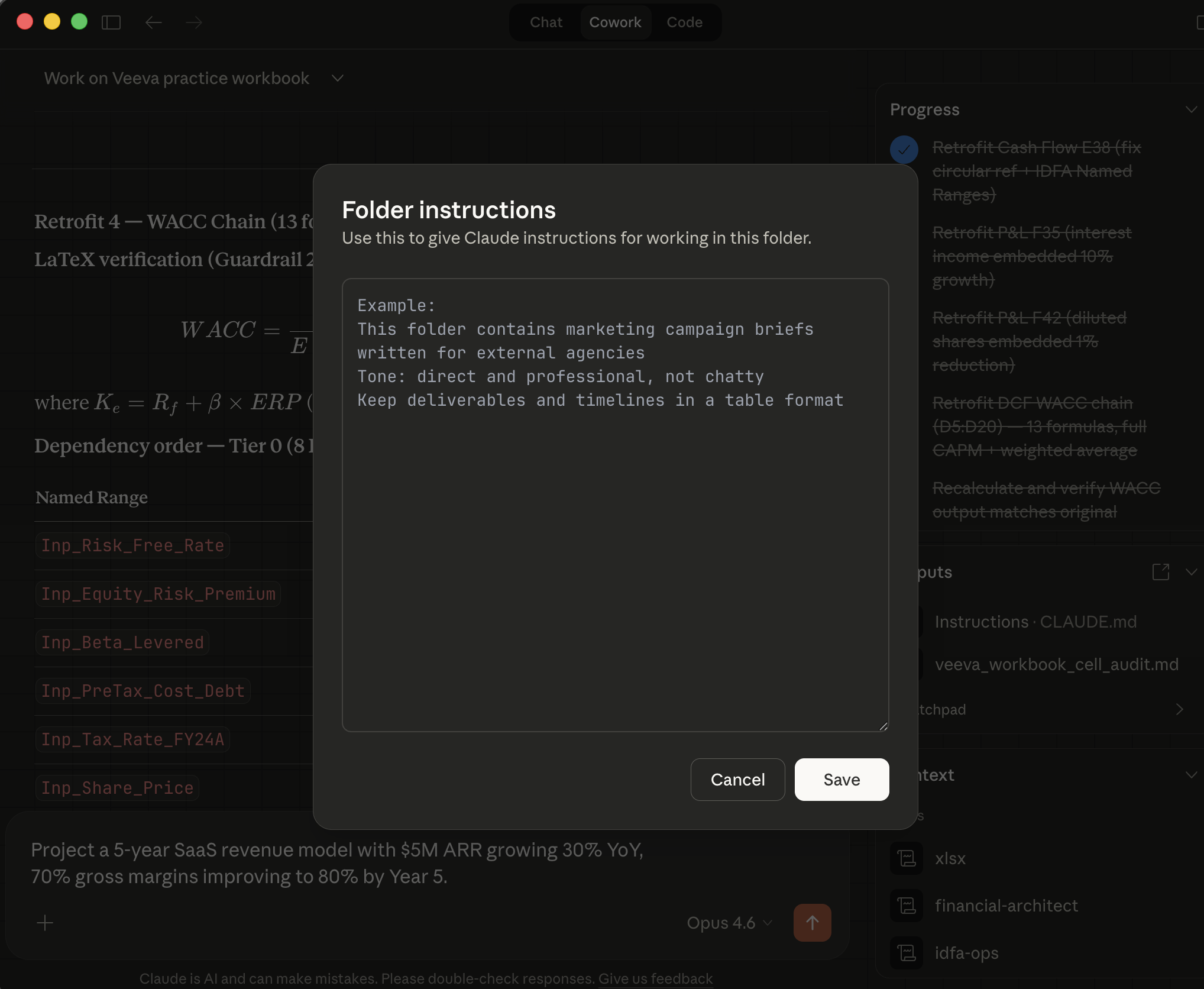
This writes to Cowork's equivalent of a CLAUDE.md file: persistent instructions that apply to every message in this session. Unlike auto-activation (which depends on trigger phrases) or explicit invocation (which you must type each time), Instructions pane configuration is always on for the session.
Now test it with a prompt that has no obvious trigger phrases:
Add a customer acquisition cost calculation to the SaaS model.
CAC is $500 in Year 1, decreasing 10% per year. Calculate
payback period using gross profit per customer.
Check the output. Even though the prompt does not mention "financial model" or "Named Ranges," the Instructions pane ensures the IDFA methodology is applied.
Step 4: Verify: Check the Context Panel
After Cowork processes your prompt, look at the Context section in the right sidebar. When a skill is invoked (whether through auto-activation, explicit invocation, or Instructions) it appears in the Context panel as a loaded skill. This tells you exactly which skills Cowork is using for the current interaction.
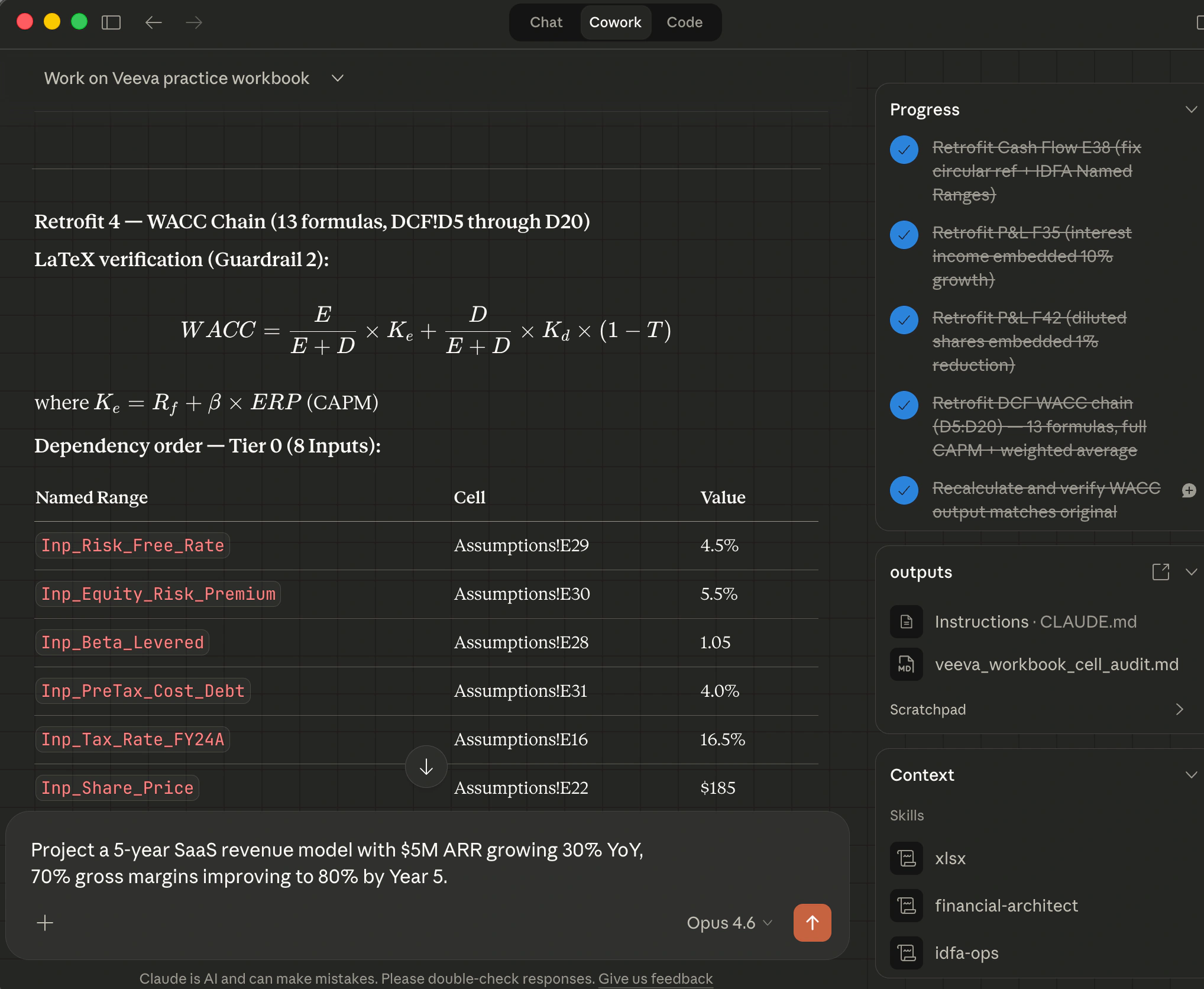
In the screenshot above, notice the Context section at the bottom right: it shows financial-architect and idfa-ops as loaded skills, confirming the IDFA plugin is active. The outputs section shows Instructions: CLAUDE.md: the persistent instructions you configured in Step 3.
Verify the output against the four guardrails:
| Guardrail | What to Check |
|---|---|
| Named Range Priority | Are all inputs named with Inp_ prefix? Are all formulas written in Named Range notation with zero coordinates? |
| LaTeX Verification | If the model includes complex formulas (like payback period), did Cowork verify them in mathematical notation? |
| Intent Notes | Did Cowork include Intent Note format for generated formulas? |
| Delegated Calculation | Did Cowork describe the write/read workflow rather than calculating results internally? |
Step 5: Extend: Compare All Three Approaches
| Approach | How It Works | When to Use | Reliability |
|---|---|---|---|
| Auto-activation | Trigger phrases in prompt activate the skill | Natural prompts about financial models | High; but depends on phrase recognition |
/financial-architect | Explicit skill invocation typed in the chat | Audits, compliance checks, one-off tasks | Certain: skill is explicitly loaded |
| Instructions pane | Persistent NLP instructions applied to every message | Sessions where every interaction should use IDFA | Always on: no prompt dependency |
For everyday model building (Lessons 3-8), auto-activation is sufficient. For formal audits or one-off checks, invoke /financial-architect explicitly. For dedicated IDFA sessions (building a complete model, retrofitting a legacy workbook, or preparing for an audit) configure the Instructions pane so the methodology is active without relying on trigger phrases.
The Business Bottom Line
One plugin install. Every agent. Every model interaction governed by the same four guardrails. For non-Claude agents, the same SKILL.md file from the plugin repo installs directly into the platform's custom instructions path.
Everything you learned in Lessons 1 through 8 is knowledge in your head. The IDFA plugin is knowledge in every agent you use. The investment is a single install command: the return is consistent IDFA compliance across every tool that supports the agentskills.io standard.
This also connects back to Chapter 26, where you learned the plugin architecture for Agent Skills. The IDFA plugin is not a custom configuration: it is a standard-format skill that any skills-compatible agent can read. The same investment that makes Claude apply IDFA also makes Copilot, Codex, Gemini CLI, and future agents apply it. The skill travels with your project, not with any single tool.
Try With AI
Use these prompts in Cowork or your preferred AI assistant with the IDFA plugin installed (see Chapter 29 prerequisites if you have not installed it yet). For the most reliable results, configure the Instructions pane as described in the exercise above. Start a fresh session so the skill is loaded.
Prompt 1: Test skill activation with a new intent statement:
I need to build a financial model for a hardware startup.
Year 1 unit sales are 10,000 at $200 per unit. Unit sales grow
25% YoY. Manufacturing cost is $120 per unit in Year 1,
decreasing 5% per year through supply chain optimisation.
Project revenue, COGS, and gross profit for 5 years.
What you are learning: Whether the skill activates automatically from a financial modelling request. Check the output for Inp_ prefixed Named Ranges, Named Range-only formulas, and the delegated calculation workflow. If the agent produces coordinate-based formulas or calculates results internally, the skill is not active: verify the plugin is installed and restart the session.
Prompt 2: Test trigger phrase activation:
I inherited this model from a colleague who left the company.
It has 300 formulas across 8 tabs. I need to understand what
it does before the board meeting next week.
What you are learning: Whether trigger phrases activate the correct IDFA workflow. The phrase "I inherited this model" should trigger the agent to offer an IDFA compliance audit, inspect the model to map all formulas, and suggest a retrofitting sequence. If the agent responds with generic spreadsheet advice instead of the IDFA methodology, the skill's trigger phrases are not being read.
Prompt 3: Build a complete model with the skill active:
Build a 3-year consulting firm profitability model.
Inputs: 50 consultants at $150K average salary, growing to
65 consultants by Year 3. Average billable rate $250/hour.
Utilisation rate starts at 70% and improves to 78% by Year 3.
Assume 1,800 available hours per consultant per year.
Project revenue, personnel costs, gross profit, and
gross margin percentage for all three years.
What you are learning: Whether the skill governs a complete model-building workflow end to end. The output should include: every input extracted and named with Inp_, all calculation formulas in Named Range notation, LaTeX verification for any multi-step formulas, Intent Notes for each generated formula, and the delegated calculation workflow. This is the full test: if all four guardrails appear without prompting, the IDFA skill is fully operational.
Next: Lesson 10: Enterprise Governance: where you design the organisational controls that the plugin cannot enforce: accountability, tracking, approval workflows, and compliance metrics.