Building Jurisdiction and Entity Skills
"The difference between a tool that assists generic accounting work and an agent that performs as a competent member of your specific team is institutional knowledge: and institutional knowledge lives in skills."
In Lesson 7, you walked through the CA/CPA plugin ecosystem: scheduling reconciliations, generating management accounts, and producing board-ready presentations. The plugins executed every step correctly. But every output used generic account descriptions, default IFRS treatments, and standard formatting. If you ran that workflow against your actual client's data, the first thing you would do is manually recode the journal entries to match your chart of accounts. The second thing would be correcting the tax computations for your jurisdiction. The third would be adding the documentation your firm requires for each account type.
That manual correction work is the institutional knowledge gap. The plugins know accounting. They do not know your accounting. This lesson closes that gap by creating Cowork skills that encode your jurisdiction's tax rules and your organisation's chart of accounts: transforming a generic finance agent into one that works the way your practice works.
Three Ways to Create Skills in Cowork
Cowork provides three native methods for creating domain skills. You will use all three in this lesson and Lesson 9.
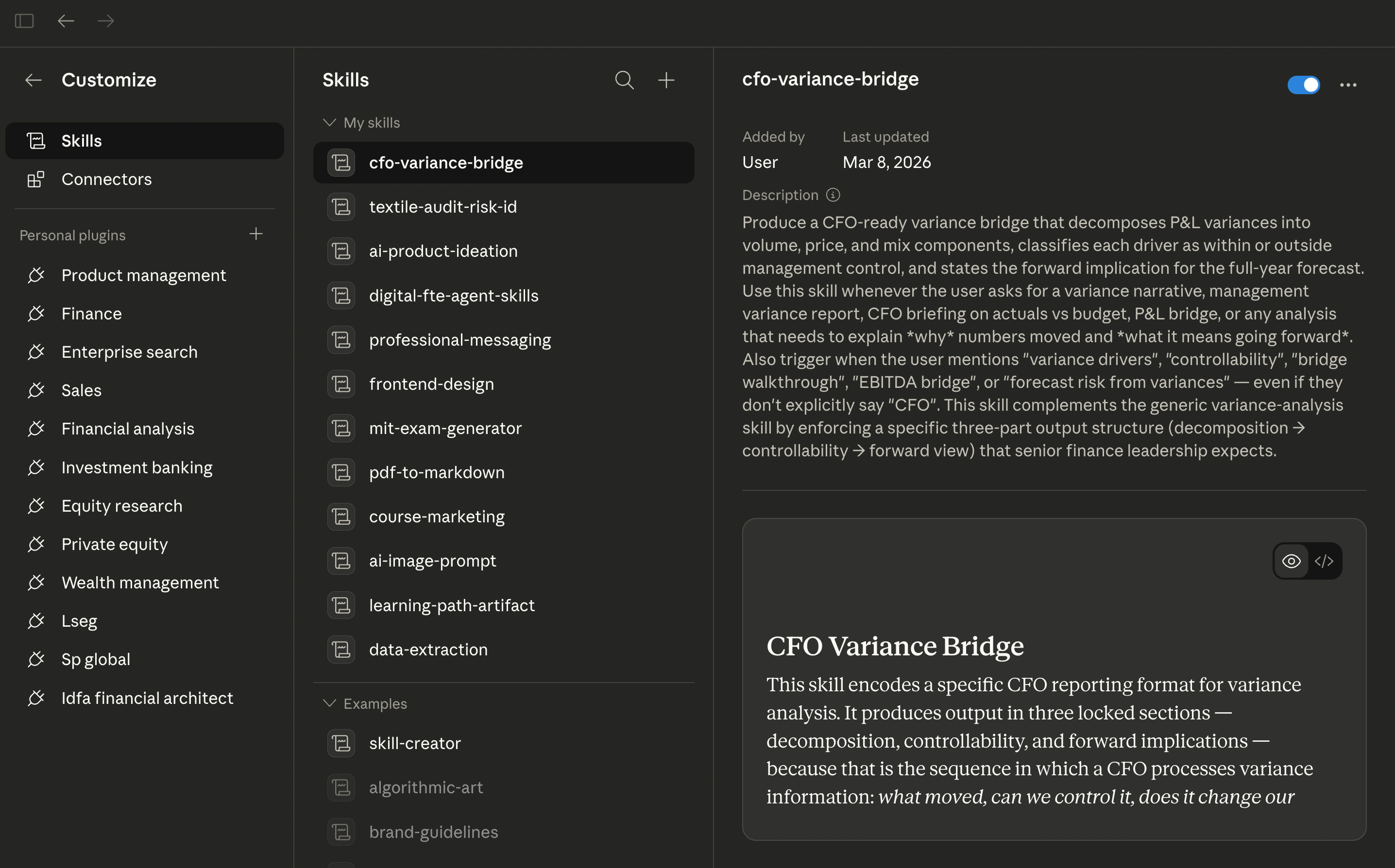
Open the Cowork sidebar → Customize → Skills to see your current skills panel:
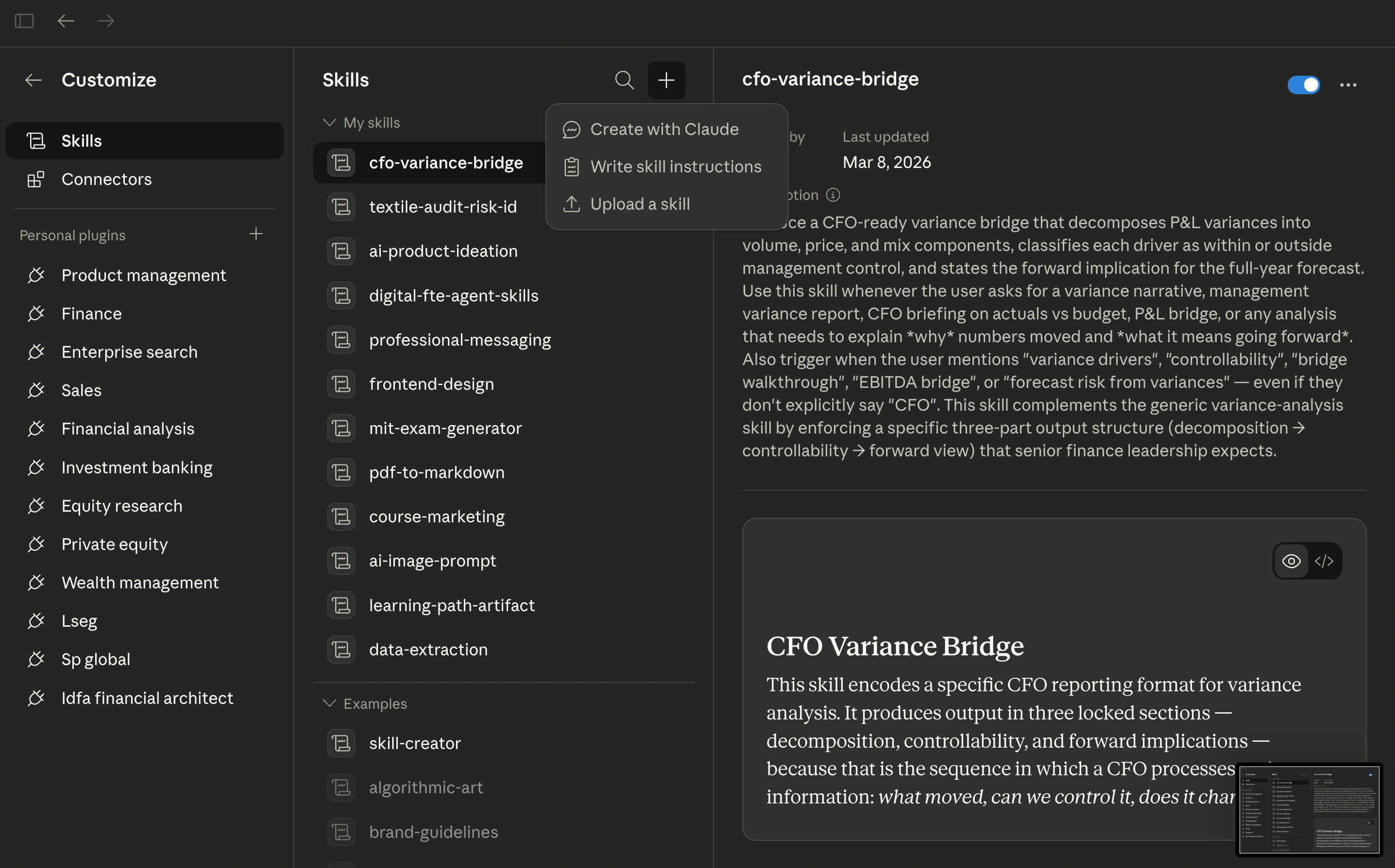
Click the + button to see the three creation methods:
Write skill instructions. Select Write skill instructions from the menu. A form appears with three fields:
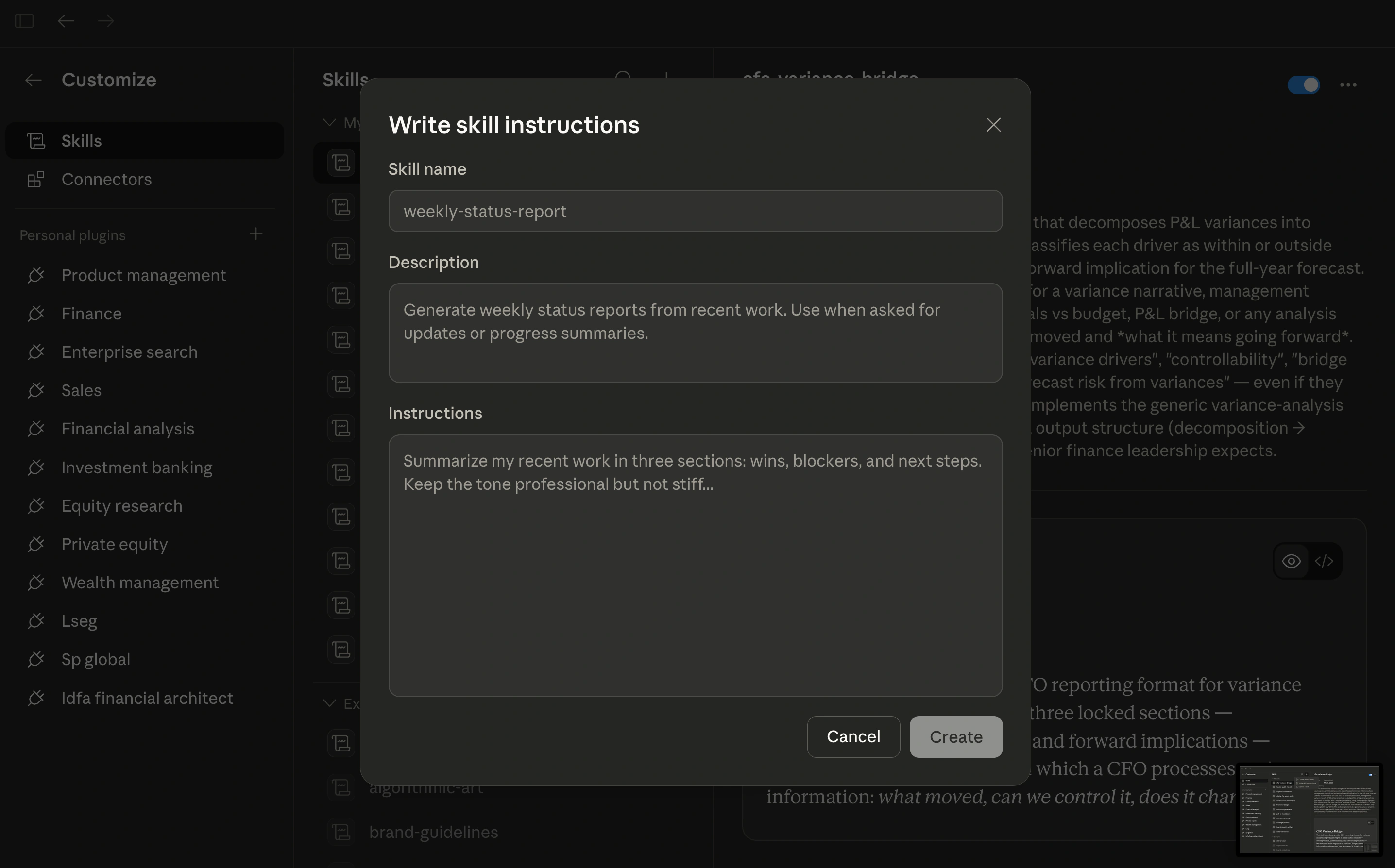
| Field | What to enter | Example |
|---|---|---|
| Skill name | A short identifier for the skill | pakistan-tax-jurisdiction |
| Description | When the agent should activate this skill: the trigger conditions | "Pakistan jurisdiction tax rules for CA/CPA practice. Use when processing tax computations or preparing tax returns for entities under Pakistan's ITO 2001." |
| Instructions | The domain knowledge: your "When [condition], [action]" rules | The tax rates, filing deadlines, penalty provisions, and escalation rules |
Click Create and the skill is immediately active in all your Cowork sessions.
Create with Claude. Click + → Create with Claude. Cowork opens a conversation where you describe what you need ("I need a skill for Pakistan tax jurisdiction rules covering corporate rates, withholding, filing deadlines, and penalties") and Claude helps you build the skill through dialogue, asking clarifying questions and drafting instructions for your review.
Upload a skill. Click + → Upload a skill. Import a pre-built skill file: such as the reference skills in the companion repository. Upload, review, and customise for your specific jurisdiction or entity.
Starting from scratch? Use Create with Claude (the conversation helps you surface knowledge you might not think to write down. Know exactly what you want? Use Write skill instructions) faster, no back-and-forth. Starting from a reference? Use Upload a skill from the companion repo, then edit in the Skills panel to customise for your jurisdiction.
Why Generic Plugins Are Not Enough
The finance plugins in Cowork: /journal-entry, /reconciliation, /income-statement, /variance-analysis, /sox-testing: provide powerful baseline capability. But consider what they do not know:
- Your jurisdiction's tax law. The plugins apply IFRS or US GAAP by default. They do not know that your clients operate under Pakistani tax law with a 29% corporate rate, specific industry exemptions, and FBR-mandated filing formats.
- Your chart of accounts. The journal entry and reconciliation commands produce entries using generic account descriptions. They do not know that your organisation uses account code 5110 for direct labour or that intercompany accounts follow a specific entity numbering convention.
- Your documentation standards. Some accounts in your system require board resolutions before posting. Others require attached bank statements. The plugins generate the entry: your team adds the paperwork.
Generic plugins provide the framework. Domain skills encode the institutional knowledge. This is the same principle established in Chapter 28 for finance domain agents: and for CA/CPA practice, this skill layer is not optional. It is the difference between an agent that assists and an agent that performs.
The companion repository contains reference skill files under reference-skills/ (complete Pakistan-default implementations for all five skills. You can upload these directly into Cowork via Upload a skill, then customise for your jurisdiction. Study them as you build your own, but do not use them uncustomised) the value of the skill is in encoding your jurisdiction's rules and your firm's practices.
Tax rates, withholding percentages, filing deadlines, and penalty amounts throughout this lesson (and Lessons 9 and 11) are illustrative based on the Income Tax Ordinance 2001 as amended through Finance Act 2024. Pakistan's Finance Act changes these figures annually. Always verify current rates at fbr.gov.pk before applying to client work. The same principle applies to every jurisdiction: US rates change with Congressional action, UK rates with the Finance Act and Autumn Statement. Treat every rate in a skill as a parameter to be verified, not a permanent constant.
The building block of every skill is a single format: When [condition], [action]. Every instruction you write follows this pattern. The condition defines when the agent should apply the knowledge. The action defines what it should do. Precision in the condition clause determines whether the skill activates correctly: too broad and it fires on irrelevant work; too narrow and it misses cases it should handle.
Skill 1: Jurisdiction-Specific Tax Rules
What the generic plugin lacks. The /variance-analysis and accounting commands apply IFRS or US GAAP by default. They do not know that your clients operate under Pakistani tax law, that the applicable corporate tax rate is 29%, that specific industry exemptions apply, or that the FBR (Federal Board of Revenue) requires specific formats for particular returns.
What the skill adds. A jurisdiction-specific tax skill that encodes the applicable tax code, rates, filing deadlines, penalty provisions, and FBR/SBP (State Bank of Pakistan) requirements as standing instructions. When the agent processes any tax computation, it applies these rules automatically.
Pakistan Worked Example
Here is what you would enter when creating this skill in Cowork. Each instruction follows the "When [condition], [action]" format:
Skill name: pakistan-tax-jurisdiction
Description: Pakistan jurisdiction tax rules for CA/CPA practice. Use when processing tax computations, preparing tax returns, or advising on tax positions for entities operating under Pakistan's Income Tax Ordinance 2001 and related legislation.
Instructions:
# Pakistan Tax Jurisdiction

## Corporate Tax Rates

When computing corporate income tax for a public company listed on PSX,
apply a rate of 29% on taxable income.

When computing corporate income tax for a private (unlisted) company,
apply a rate of 29% on taxable income.

When computing corporate income tax for an Association of Persons (AOP),
apply the individual slab rates specified in Division I of Part I of the
First Schedule to the ITO 2001.

When computing corporate income tax for a Small and Medium Enterprise
meeting the criteria under Section 2(59A), apply the reduced rate of 20%.

## Withholding Tax Rates

When processing salary payments, apply withholding under Section 149
using the slab rates in Division I of Part I of the First Schedule.

When processing dividend payments to resident shareholders, apply
withholding at 15% under Section 150 (filer) or 30% (non-filer).

When processing payments for services to a resident company, apply
withholding under Section 153(1)(b) at the rate specified in the current
FBR Withholding Tax Rate Card — rates vary by service type (e.g., 6%
filer / 12% non-filer for general services). Always consult the latest
rate card, as rates change with each Finance Act.

## Filing Deadlines

When preparing a corporate income tax return (Section 114), the deadline
is September 30 of the year following the tax year. Flag any return
preparation beginning after August 15 as HIGH PRIORITY.

When preparing a withholding tax statement (Section 165), the deadline
is the 20th day of the month following the quarter-end.

## Penalties

When a return is filed after the due date, note the penalty under
Section 182: PKR 40,000 or 0.1% of the tax payable for each day of
default, whichever is higher, subject to a maximum penalty of 50% of
the tax payable. Include this penalty risk in any communication to
the client about delayed filing.

## Escalation

When the computation involves a tax position requiring interpretation
of circulars, rulings, or ambiguous provisions of the ITO 2001,
STOP and flag for engagement partner review. Do not finalise the
computation autonomously.
To create this skill: Open Cowork sidebar → Customize → Skills → + → Write skill instructions → paste the skill name, description, and instructions into the form → Create.
Alternative: Create with Claude: Click + → Create with Claude and say: "Help me create a skill for Pakistan tax jurisdiction rules. I need it to cover corporate tax rates under the ITO 2001, withholding rates for salaries, dividends, and services, the main filing deadlines, penalty provisions, and an escalation rule for ambiguous positions." Claude will draft the skill, ask clarifying questions, and let you review before saving.
Output: The agent now applies Pakistan-specific rates, deadlines, and penalty provisions to every tax computation: without the CA/CPA typing jurisdiction-specific instructions each time. The escalation clause ensures the agent does not autonomously resolve ambiguous positions.
US (IRC): Replace ITO 2001 references with Internal Revenue Code sections. Corporate rate: 21% (flat, post-TCJA). Filing deadline: April 15 (calendar year) or the 15th day of the 4th month after fiscal year-end. Withholding: varies by payment type (wages per W-4 tables, dividends at 20%/15%/0% qualified rates).
UK (HMRC): Replace with Corporation Tax Act 2009/2010. Main rate: 25% (profits over GBP 250,000), small profits rate: 19% (profits under GBP 50,000). Filing deadline: 12 months after the end of the accounting period. Self-Assessment for individuals: January 31 following the tax year.
IFRS jurisdictions generally: Tax rate and deadline encoding follows the same Cowork skill pattern: the structure is universal; only the rates, sections, and authority names change.
Skill 2: Chart of Accounts Encoding
What the generic plugin lacks. The journal entry and reconciliation commands produce entries using generic account descriptions. They do not know that your organisation uses account code 5110 for direct labour, that your intercompany account structure follows a specific entity numbering convention, or that certain account types require specific documentation to support the journal.
What the skill adds. A chart of accounts skill that maps every account code to its description, sub-category, and documentation requirements. The agent applies this mapping in every journal entry and reconciliation output: producing entries that slot directly into the actual accounting system without manual recoding.
Pakistan Worked Example: Lahore Manufacturing Ltd
A manufacturing company operating in Lahore with multiple subsidiaries:
Skill name: chart-of-accounts-lahore-manufacturing
Description: Chart of accounts for Lahore Manufacturing Ltd. Use when generating journal entries, running reconciliations, or preparing financial statements for this entity. Apply these account codes to all outputs instead of generic descriptions.
Instructions:
# Chart of Accounts — Lahore Manufacturing Ltd

## Account Code Mapping

When generating a journal entry involving direct labour costs,
use account code 5110 — "Direct Labour — Production" under the
Cost of Goods Sold category.

When generating a journal entry involving raw material purchases,
use account code 5010 — "Raw Materials Consumed" under COGS.

When generating a journal entry involving factory overheads,
use account code 5200 — "Manufacturing Overhead — Allocated" under COGS.

When generating a journal entry involving sales revenue (domestic),
use account code 4010 — "Revenue — Domestic Sales" under Revenue.

When generating a journal entry involving sales revenue (export),
use account code 4020 — "Revenue — Export Sales" under Revenue.
Export sales must include the SBP-reported exchange rate on the
transaction date.

## Intercompany Structure

When generating intercompany entries between the parent (entity 100)
and subsidiary (entity 200), use account codes prefixed with "IC-"
followed by the counterparty entity number.

Example: A management fee charged by entity 100 to entity 200:

- Entity 100 records: DR IC-200-1510 (Intercompany Receivable)
  CR 4510 (Management Fee Income)
- Entity 200 records: DR 6510 (Management Fee Expense)
  CR IC-100-2510 (Intercompany Payable)

When netting intercompany balances at period-end, confirm that the
sum of all IC-200 accounts in entity 100 equals the sum of all
IC-100 accounts in entity 200 (opposite sign). Flag any mismatch
exceeding PKR 10,000 for investigation.

## Documentation Requirements

When posting to account 1010 (Cash and Bank — Operating Account),
attach the supporting bank statement page showing the transaction.

When posting to account 2010 (Trade Payables), attach the vendor
invoice and goods received note.

When posting to account 3010 (Share Capital), attach the board
resolution authorising the transaction. This account REQUIRES
senior partner approval before posting. Do not generate a journal
entry for this account — generate a DRAFT and flag for review.

## Restricted Accounts

When an instruction involves posting to accounts 3010 (Share Capital),
3020 (Share Premium), or 9010 (Extraordinary Items), STOP and flag
for engagement partner approval. These accounts may never be posted
to without explicit senior authorisation.
To create this skill: Use Write skill instructions in the Cowork Skills panel, or ask Claude: "Help me create a chart of accounts skill for Lahore Manufacturing Ltd. Our account structure uses 4000-series for revenue, 5000-series for COGS, intercompany accounts prefixed with IC- plus entity number, and we have restricted accounts that need partner approval."
Output: Every journal entry the agent generates now uses Lahore Manufacturing Ltd's actual account codes, follows the intercompany netting convention, and respects the documentation and approval requirements. No manual recoding needed.
US entities: Chart of accounts encoding follows the same pattern. Common differences: US entities often use a numeric range convention (1000-1999 for assets, 2000-2999 for liabilities) rather than four-digit codes with category prefixes. GAAP-specific accounts (e.g., ASC 842 lease right-of-use assets) should be included when applicable.
UK entities: FRS 102 entities may use a Companies Act 2006 format with prescribed headings. The skill should include the statutory format mapping (Format 1 or Format 2 of Schedule 1 to SI 2008/410) alongside internal account codes.
IFRS entities generally: The chart of accounts encoding is entity-specific regardless of jurisdiction. The pattern (code mapping, documentation rules, restricted accounts) is universal.
How the Two Skills Work Together
Neither skill works in isolation. Consider a scenario where the agent processes a quarter-end tax provision for Lahore Manufacturing Ltd:
- The chart of accounts skill ensures the provision journal entry uses account code 2310 (Current Tax Payable) and account code 7010 (Income Tax Expense); not generic descriptions.
- The jurisdiction tax skill ensures the computation applies the 29% corporate rate, checks whether any industry-specific exemptions reduce the effective rate, and verifies the filing deadline is September 30.
- The escalation rules from both skills combine: if the computation involves an ambiguous tax position AND touches a restricted account, both flags fire and the engagement partner receives a consolidated alert.
This layering (generic plugin capability, augmented by jurisdiction rules, augmented by entity-specific account mapping) is the architecture that transforms a finance assistant into a practice-ready agent.
Try With AI
You have just built two skills: jurisdiction tax and chart of accounts. These prompts test whether they actually work. Run each one in Cowork with your skills active.
Prompt 1: Tax Skill Smoke Test
Process this transaction and prepare the journal entry:

Our client (a private limited company) received a consulting
services invoice for PKR 2,500,000 from a registered vendor.
The service was rendered in [YOUR JURISDICTION]. Prepare the
journal entry including all applicable withholding taxes.

Show me: the gross amount, each withholding tax applied (rate
and legal basis), the net payable, and the journal entry with
account codes.
What you are checking: Did the agent apply your jurisdiction's withholding tax rate (or a generic default? Did it cite the correct tax ordinance? If you built a Pakistan tax skill, the output should reference the ITO 2001, apply the correct services WHT rate, and use FBR return categories. If it used US or IFRS defaults, your skill's description field is not triggering activation) go back and refine the trigger conditions.
Prompt 2: Chart of Accounts Collision Test
Prepare a journal entry for this transaction:

Record the monthly office rent payment of 450,000 to the
landlord. The payment was made via bank transfer. Our internal
policy requires a signed lease agreement on file for all
rent-related postings.

Use our chart of accounts. Show the full entry with account
codes, descriptions, and any documentation requirements.
What you are checking: Did the agent use your account codes (e.g., 6XXX for operating expenses) or invent its own? Did it flag the documentation requirement (signed lease)? If your chart of accounts skill is working, the output should slot directly into your ledger without recoding. If the agent used generic account descriptions like "Rent Expense" without your codes, your skill instructions need more explicit account mappings.
Prompt 3: Combined Stress Test
Process this month-end scenario:

Our client received three invoices this month:
1. Legal services from a local firm — 800,000
2. IT consulting from a foreign contractor — USD 12,000
3. Equipment purchase from a registered dealer — 3,200,000

For each invoice, prepare the journal entry with:
- All applicable taxes (withholding, sales tax, import duties
  if relevant)
- Correct account codes from our chart of accounts
- Documentation requirements per our posting rules
- Flag anything that requires senior approval per our
  restricted account rules

Summarise in a table: Invoice | Gross | Taxes Applied | Net | Account Code | Flags
What you are checking: This tests both skills simultaneously. The tax skill should handle domestic vs. foreign contractor rates differently. The chart of accounts skill should assign correct codes and flag restricted accounts. Look for: Does the foreign contractor invoice trigger a different WHT rate? Does the equipment purchase hit a capital account (not operating expense)? Does anything trigger your escalation or restricted-access rules? Mismatches here tell you exactly which skill instructions to tighten.
Flashcards Study Aid
Continue to Lesson 9: Building Methodology and Compliance Skills →