从 Digital FTE 到 Production Worker:90 分钟速成课
Course Four 已经让你构建了一个 Digital FTE:它有 Skills,有系统记录,有 MCP 边界,也能读取和写入真实业务数据。Course Five 要解决的是下一个生产问题:这个 Worker 如何在真实世界里可靠运行?如果外部事件来了怎么办?如果进程崩溃怎么办?如果人类几个小时后才审批怎么办?如果修复 bug 后需要重放失败任务怎么办?
答案是把 Worker 放进一个 durable execution runtime。本课使用 Inngest,因为它把 Production Worker 最难的几件事变成了清晰的原语:事件触发、cron、webhook、step.run、memoization、sleep、wait、retry、concurrency、throttling、batching、replay 和 human-in-the-loop。
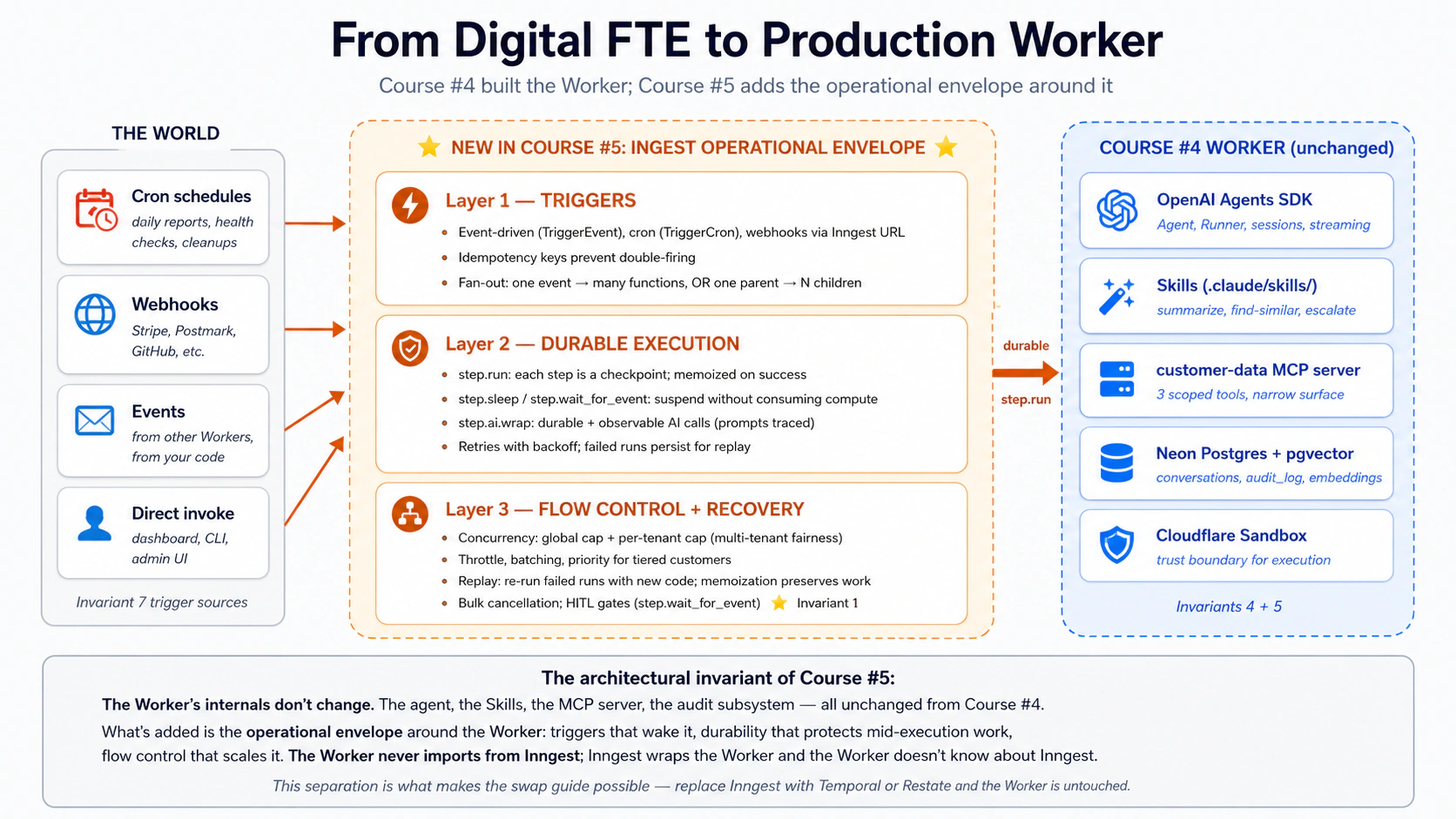
从这里开始:架构位置和 15 个概念速查表
这门课的核心句子是:Worker 的业务能力不变,生产外壳改变。 agent、Skills、MCP server、Postgres schema 和 audit log 仍然存在;新增的是让它按事件启动、在失败后恢复、按限制运行、可重放、可人工审批的运行层。
| 概念 | 主题 | 你要记住的句子 |
|---|---|---|
| 1 | Events vs requests | 生产 Worker 不应该依赖长时间打开的请求。 |
| 2 | Cron triggers | 时间也是一种触发源。 |
| 3 | Webhook triggers | 外部系统通过事件进入你的运行时。 |
| 4 | Idempotency | 同一事件可能来两次;结果不能做两次。 |
| 5 | Fan-out | 一个事件可以启动多个 Worker。 |
| 6 | step.run | 每个重要副作用都要放进 durable step。 |
| 7 | Memoization | 重试时,已完成 step 不会重复执行。 |
| 8 | step.sleep / step.wait_for_event | 时间和人工等待不应消耗 compute。 |
| 9 | Retries | 失败是常态,重试和 dead-letter 是设计。 |
| 10 | Python 里的 AI calls | Python 中用 step.run 包 AI 调用;step.ai.wrap 只在 TypeScript 中有。 |
| 11 | Concurrency | 限制同时运行数量,保护下游系统。 |
| 12 | Fairness | 多租户场景要避免一个客户吃光资源。 |
| 13 | Batching | 批处理降低成本并提高吞吐。 |
| 14 | Replay | 修复 bug 后重放失败运行。 |
| 15 | HITL gates | 人工审批也可以 durable。 |
Part 4 有完整实战:把 Course Four 的客户支持 Worker 包进 Inngest 层,加入 event trigger、cron health check、HITL escalation gate、concurrency limits 和 replay support。它仍然是 Courses 3 和 4 的 build-decision 形状,只是把“能工作”的 Worker 推到“能生产运行”的边界。
一句话架构。 Engine = OpenAI Agents SDK + Cloudflare Sandbox(Course 3)。Capability + Truth + Connector = Skills + Neon Postgres + MCP(Course 4)。Operational Envelope = Inngest triggers + durable execution + flow control(Course 5,也就是本课)。Worker 内部不从 Course 4 改写;新增的是上层运行外壳:世界可以唤醒它,失败不会丢状态,一个 Worker 可以承受一支 workforce 的流量。
十五分钟快速成效:亲眼看到 durability
在阅读 15 个概念之前,先构建一个能运行的最小版本。两个文件、几条 uv 和 npx 命令、一个 shell session。完成后你会得到:
- 一个包含
step.run和step.sleep的 Inngest function; - 本地 Inngest dev server,dashboard 地址是
http://127.0.0.1:8288; - 一个从 dashboard 触发的成功 run;
- 一个故意失败、修复后 replay 的 run,并观察已完成 step 直接从 memo 返回。
这不是 Part 4 的完整 Production Worker。Part 4 有 8 个 Decision 和更多代码。这里是一屏以内的最小体验:先让 durable execution 变成可见事实,再去理解每个概念为什么这样设计。
第 1 步。 创建新项目并安装 SDK 与 FastAPI:
mkdir hello-inngest && cd hello-inngest
uv init
uv add inngest "fastapi[standard]"
第 2 步。 保存一个 durable function 到 hello.py:
# hello.py
import logging
from datetime import timedelta

import inngest
import inngest.fast_api
from fastapi import FastAPI

inngest_client = inngest.Inngest(
    app_id="hello-inngest",
    logger=logging.getLogger("uvicorn"),
    is_production=False,
)


@inngest_client.create_function(
    fn_id="greet-customer",
    trigger=inngest.TriggerEvent(event="demo/greet"),
)
async def greet_customer(ctx: inngest.Context) -> dict[str, str]:
    name = ctx.event.data.get("name", "friend")

    greeting = await ctx.step.run("compose-greeting", lambda: f"Hello, {name}!")

    await ctx.step.sleep("wait-fifteen-seconds", timedelta(seconds=15))

    farewell = await ctx.step.run("compose-farewell", lambda: f"Goodbye, {name}.")

    return {"greeting": greeting, "farewell": farewell}


app = FastAPI()
inngest.fast_api.serve(app, inngest_client, [greet_customer])
这里有三件事要注意。函数形状仍然是普通 Python:async def 加 create_function decorator。两个 ctx.step.run 包住需要 memoize 的操作。中间的 ctx.step.sleep 会 durable suspend:进程可以崩溃、重启或 redeploy,时间到后 run 会在下一行恢复。
第 3 步。 在一个 terminal 中启动 function host:
uv run uvicorn hello:app --reload --port 8000
你应该看到 uvicorn 输出 Started server process 和 Application startup complete。function host 正在监听 http://127.0.0.1:8000/api/inngest。
第 4 步。 在第二个 terminal 中启动 Inngest dev server:
npx inngest-cli@latest dev
dev server 会打开 http://127.0.0.1:8288 dashboard,并自动发现第 3 步启动的 function host。
第 5 步。 打开 dashboard,进入 Functions,确认有 greet-customer。进入 Events,点击 Send event,粘贴:
{
  "name": "demo/greet",
  "data": { "name": "Sara" }
}
第 6 步。 进入 Runs,你会看到 greet-customer run。compose-greeting 已完成,wait-fifteen-seconds 处于 sleeping。此时你的 Python 代码没有在忙等,uvicorn terminal 是空闲的。15 秒后,run 恢复,compose-farewell 完成,状态变成 Completed,Output panel 会显示返回的 dict。
第 7 步。 故意弄坏它。在 hello.py 中加入 helper,并让最后一个 step 调用它:
def fail_on_purpose() -> str:
    raise RuntimeError("forced failure")


# ...inside greet_customer, replace the compose-farewell step:
farewell = await ctx.step.run("compose-farewell", fail_on_purpose)
保存文件,uvicorn 会自动 reload。再次发送同样的 demo/greet event。你会看到 compose-greeting 完成,sleep 完成,compose-farewell 按 backoff 重试,最后进入 Failed,trace 中能看到 RuntimeError。
第 8 步。 修复 bug,把 compose-farewell 改回原始 lambda。在 dashboard 中打开失败 run,点击 Replay。replay 时,compose-greeting 和 wait-fifteen-seconds 会几乎瞬间完成,因为它们是 memo hit;compose-farewell 用新代码真实执行并成功。run 完成。
这就是 durable function 的核心:代码可以重新从头进入,但已经成功的 step 不会重新产生副作用。如果快速成效失败,最常见原因是:
- dev server 访问不到 function host,检查 uvicorn 是否在 8000 端口运行。
- client constructor 少了
is_production=False,导致 SDK 要求 signing key。 - dashboard 看不到 function,重启 uvicorn。
- run 卡住没有错误,通常是 host 与 dev server 不同步;同时重启两者,只保留一个 function host。
第 1 部分:Triggers,世界如何调用 Worker
Course 4 的 Worker 在你调用它时运行。Production Worker 在世界发出事件时运行:客户发来邮件,webhook 到达,每天 09:00 的 cron 触发,另一个 Worker 把任务交给它。第 1 部分建立事件驱动的心智模型、三种 trigger surface,以及避免重复处理的语义。
概念 1:Events vs requests,durable 心智模型转变
request 是同步对话。有人调用,你处理,你返回,对方继续。连接保持打开,人或服务在等待。如果你崩溃,调用方看到错误。
event 是异步消息。世界里发生了事实:客户注册、邮件到达、付款成功。生产者发出一条命名记录,零个、一个或多个函数独立响应。生产者不等待结果,也不需要知道谁在监听。
# A request: I'm here, waiting, blocking
result = await agent.handle_customer_message(text=user_input)
print(result)  # I unblock when the agent finishes

# An event: I fire-and-forget
await inngest_client.send(events=[
    inngest.Event(
        name="customer/email.received",
        data={"customer_id": "c-4429", "body": email_body, "subject": subject},
    ),
])
# I return immediately. Somewhere else, one or more Inngest
# functions react to this event on their own schedule.
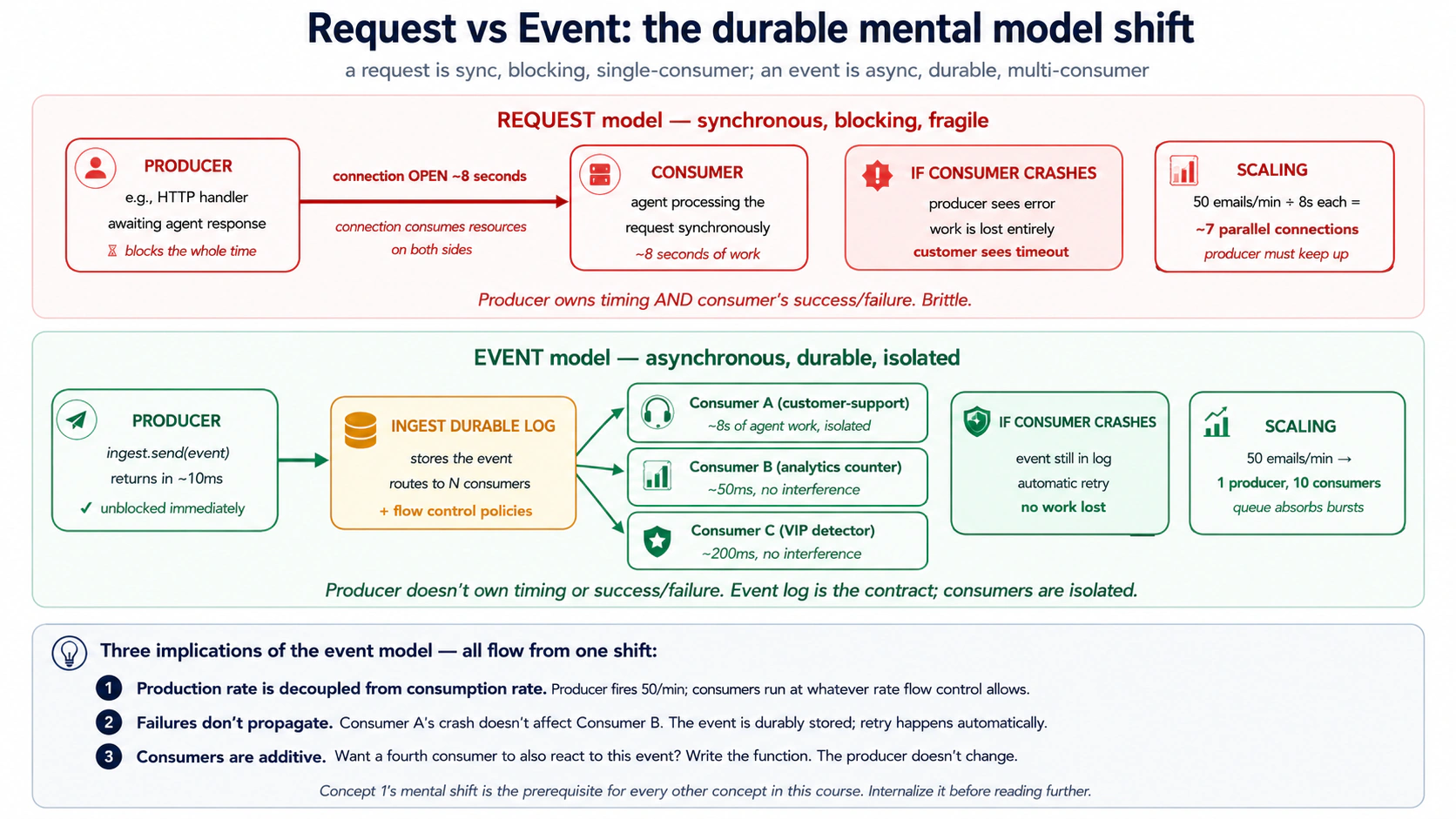
一旦用 event 思考,durability 和 scale 会自然出现:
- producer 不会被 consumer 拖慢;
- consumer 崩溃后事件仍然在 durable store 中,可重试;
- 新 consumer 可以订阅同一事件,不需要改 producer;
- backpressure 变成 flow-control policy,而不是业务代码改动。
PRIMM,预测。 客户支持 Worker 处理一封邮件需要 8 秒:3 秒推理、4 秒 MCP tool、1 秒数据库写入。高峰期每分钟 50 封邮件。如果 email parser 用 request 模型阻塞等待 agent 完成,大约需要多少并发 HTTP 连接?如果用 event 模型立即发送事件并返回,需要多少 parser 并发?
答案:request 模型约 7 个并发 handler(50/min × 8 秒),还需要 headroom。event 模型只需要一个很轻的 parser,因为它在几十毫秒内发出事件并返回。event queue 吸收峰值,Inngest functions 按你允许的 concurrency 消费队列。
用 AI 试一试
请分析三个场景。对每个场景判断它更适合 REQUEST-MODEL
还是 EVENT-MODEL,并解释原因:

A) 用户在支持门户点击 “Submit refund request”,希望 2 秒内看到
   “Refund issued: $30”。

B) 每晚 02:00 的 cron job 对 5,000 个客户运行 customer-health-check,
   然后把报告写到 Slack。

C) Stripe webhook 通知某笔退款失败。客户不在等待页面上。
概念 2:Cron triggers,时间到了就运行
最简单的 trigger 是时钟。许多 Production Worker 做的不是响应外部点击,而是计划任务:每日健康报告、每周清理、每小时重算、每月结账。Inngest 的 cron trigger 是一行代码:
import inngest

@inngest_client.create_function(
    fn_id="daily-customer-health-check",
    trigger=inngest.TriggerCron(cron="0 9 * * *"),  # 09:00 every day, UTC
)
async def daily_health_check(ctx: inngest.Context) -> dict[str, int]:
    """Run a customer-health pass for every Pro/Enterprise customer."""
    customers = await ctx.step.run("fetch-pro-customers", fetch_pro_customer_ids)

    # fan out: one event per customer, one Worker run per event
    await ctx.step.run("fan-out", fan_out_per_customer_events, customers)

    return {"customers_scheduled": len(customers)}
三点很重要。第一,schedule 是标准 cron syntax:0 9 * * * 表示每天 09:00 UTC,*/15 * * * * 表示每 15 分钟。第二,function shape 和 event-triggered function 一样:步骤、durability、flow control 都不变。第三,cron run 也是 dashboard 里的一次普通 run,有 run ID、trace、replay。
如果 service 在 cron 触发时不可达,production cron 不会“错过”。Inngest 在 schedule 触发时持久记录 run,然后按 backoff 重试 function endpoint。开发模式的差别是:本地 dev server 只有运行时才触发 cron。
概念 3:Webhook triggers,外部世界打进来
第二种 trigger surface 是 HTTP。Stripe、Postmark、GitHub、客户门户或内部 admin UI 都会发 webhook。没有 Inngest 时,你要自己写 HTTPS endpoint、解析 payload、验证来源、写 queue、写 consumer、处理 retries、处理 idempotency、加 telemetry。每一项都是基础设施工作。
使用 Inngest 时,dashboard 提供 webhook endpoint。你把 Stripe 或 Postmark 指向 https://inn.gs/e/<your-key>,入站 payload 变成 event stream 中的事件。函数只需要匹配 event name:
@inngest_client.create_function(
    fn_id="handle-stripe-refund-failed",
    trigger=inngest.TriggerEvent(event="stripe/charge.refund.failed"),
)
async def on_refund_failed(ctx: inngest.Context) -> dict[str, str]:
    """Triggered by Stripe webhook -> Inngest event -> this function."""
    charge_id = ctx.event.data["charge_id"]
    customer_id = ctx.event.data["customer_id"]

    ticket = await ctx.step.run(
        "find-ticket-for-refund", lookup_ticket_by_charge, charge_id,
    )

    await ctx.step.run(
        "notify-support-agent",
        notify_support_agent_of_refund_failure,
        ticket_id=ticket["id"], charge_id=charge_id,
    )

    return {"ticket": ticket["id"], "action": "notified"}
两个相邻模式也要记住。Generic JSON webhooks 适合任意能 POST JSON 的服务;你自己选择 vendor/event.subtype 风格的 event name。Webhook transforms 适合入站 payload 形状不干净的情况,让服务端在接收时把供应商字段转成你的事件形状,函数里就不用堆供应商特例。
概念 4:Idempotency and event semantics,同一事件来两次
webhook 不是 exactly-once,而是 at-least-once。发送方没有收到确认就会重试;网络会丢包;你的 endpoint 可能超时但实际已经成功。没有 idempotency,每个 webhook 系统最终都会重复发邮件、重复退款或重复记账。
第一层防线是事件 ID。你主动发送事件时,可以附上 idempotency key:
await inngest_client.send(events=[
    inngest.Event(
        name="customer/refund.requested",
        data={"order_id": "o-4429", "amount_cents": 5000},
        id=f"refund-request-{order_id}-{request_timestamp}",  # idempotency key
    ),
])
同一个 id 在 dedup window 内再次出现时,Inngest 会丢掉 duplicate。
第二层防线是 step-level idempotency。step.run 的名称是 memo key。函数在 step 3 后崩溃,retry 会从函数顶部重新进入,但 step 1、2、3 直接返回已存储输出,不重新执行。
@inngest_client.create_function(
    fn_id="issue-customer-refund",
    trigger=inngest.TriggerEvent(event="customer/refund.requested"),
)
async def issue_refund(ctx: inngest.Context) -> dict[str, str]:
    order = await ctx.step.run(
        "lookup-order", lookup_order_by_id, ctx.event.data["order_id"],
    )

    refund = await ctx.step.run(
        "issue-stripe-refund", call_stripe_refund_api,
        charge_id=order["stripe_charge_id"],
        amount=ctx.event.data["amount_cents"],
    )

    await ctx.step.run(
        "audit-refund", write_audit_refund_issued,
        order_id=order["id"], refund=refund,
    )

    return {"refund_id": refund["id"]}
step.run 让函数视角下已经成功的 step 不再重复执行。但如果 step body 调用 Stripe 成功后,在 Inngest 记录结果之前崩溃,retry 会再次调用 Stripe。生产级模式是 step.run 加 provider-level idempotency keys:Stripe 的 Idempotency-Key、Postmark 的 MessageID,以及你自己的 MCP server idempotency contract。
概念 5:Fan-out and sub-agent delegation,一个事件唤醒多个 Worker
一个 Stripe charge.refund.failed event 可能需要通知支持 agent、写 audit、更新风险分、提醒财务、发 Slack。Inngest 的简单模式是:多个函数订阅同一个 event name。每个函数独立运行、独立 retry、独立失败。
@inngest_client.create_function(
    fn_id="refund-failed-notify-support",
    trigger=inngest.TriggerEvent(event="stripe/charge.refund.failed"),
)
async def notify_support(ctx: inngest.Context) -> dict[str, str]:
    return {"status": "drafted"}


@inngest_client.create_function(
    fn_id="refund-failed-update-risk-score",
    trigger=inngest.TriggerEvent(event="stripe/charge.refund.failed"),
)
async def update_risk_score(ctx: inngest.Context) -> dict[str, float]:
    return {"new_risk_score": 0.42}


@inngest_client.create_function(
    fn_id="refund-failed-post-slack",
    trigger=inngest.TriggerEvent(event="stripe/charge.refund.failed"),
)
async def post_to_slack(ctx: inngest.Context) -> None:
    return None
动态 fan-out 则是 parent function 发出 N 个 child events。例如每日 health check 先加载客户列表,再为每个客户发一个事件:
from datetime import date

async def fan_out_per_customer_events(
    customers: list[str],
) -> int:
    events = [
        inngest.Event(
            name="customer/health_check.requested",
            data={"customer_id": cid},
            id=f"daily-health-{cid}-{date.today().isoformat()}",  # idempotency
        )
        for cid in customers
    ]
    await inngest_client.send(events=events)
    return len(events)
5,000 个客户就是 5,000 个独立 run。flow control 会限制同时运行数量,cron parent 几秒内完成,真正工作按平台允许的速率执行。
第 2 部分:Durable execution,东西坏了以后发生什么
Triggers 唤醒 Worker;durable execution 让 Worker 熬过失败。Course 4 的 Worker 调 agent,agent 调工具,工具调 Postgres、Stripe 和 OpenAI。任何一步都可能失败。durability 的含义是:中途失败时,已经完成的工作保持完成,执行从断点继续。
概念 6:step.run 和 durable function model
普通 Python function 从上到下跑一次。中途崩溃,就从头再来;如果崩溃前已经调用 3 个 API,下一次会再调用 3 个 API。Inngest function 仍然从上到下执行,但所有需要 checkpoint 的操作放进 step.run(name, fn, ...)。已经完成的 step 会返回存储输出,不重新执行。
@inngest_client.create_function(
    fn_id="customer-support-conversation",
    trigger=inngest.TriggerEvent(event="customer/email.received"),
)
async def handle_email(ctx: inngest.Context) -> dict[str, str]:
    customer_id = ctx.event.data["customer_id"]

    customer = await ctx.step.run(
        "load-customer", load_customer_by_id, customer_id,
    )

    thread = await ctx.step.run(
        "load-thread", load_thread_for_customer, customer_id,
    )

    response = await ctx.step.run(
        "run-agent",
        run_customer_support_agent,
        customer=customer,
        thread=thread,
        email_body=ctx.event.data["body"],
    )

    await ctx.step.run(
        "save-draft-reply", save_reply,
        customer_id=customer_id, text=response.draft,
    )

    await ctx.step.run(
        "notify-reviewer", post_slack_for_review, response=response,
    )

    return {"status": "drafted", "reviewer_notified": True}
如果 agent step timeout,前两个 DB read 不重跑。若进程在 agent 之后、保存 draft 之前被杀,retry 会让前 3 个 step 以 memo hit 返回,然后继续保存 draft。若 Slack 在 step 5 返回 503,Inngest 只 retry step 5,draft 已经在数据库里。
step.run 的一条规则:传入的函数应当在给定输入下尽量 deterministic。随机 ID、默认 temperature 的 LLM 输出、当前时间等要么提前稳定下来,要么接受 retry 时结果可能不同。
build-agents 速成课 Decision 4 记录过 openai-agents==0.17.2 在 DeepSeek reasoning model 工具调用流式路径上的 bug:tool_calls message 和 tool result 之间会出现一个空 assistant message,DeepSeek 的严格 parser 会拒绝。若 Course Four Worker 使用 DeepSeek + @function_tool 流式路径,先应用那门课的 OpenAI fallback 方案,再把 Runner.run_streamed 包进 step.run。
概念 7:Memoization,resumability 背后的机制
第一次执行 await ctx.step.run("load-customer", load_customer_by_id, "c-4429") 时,Inngest 检查 memo store,没有结果,于是运行函数,记录输出,并把输出返回给代码。
如果函数在后面崩溃,第二次从顶部重跑,执行到同一行时,Inngest 发现 (run_id, step_name="load-customer") 已有结果,于是不再调用数据库,而是直接返回存储结果。
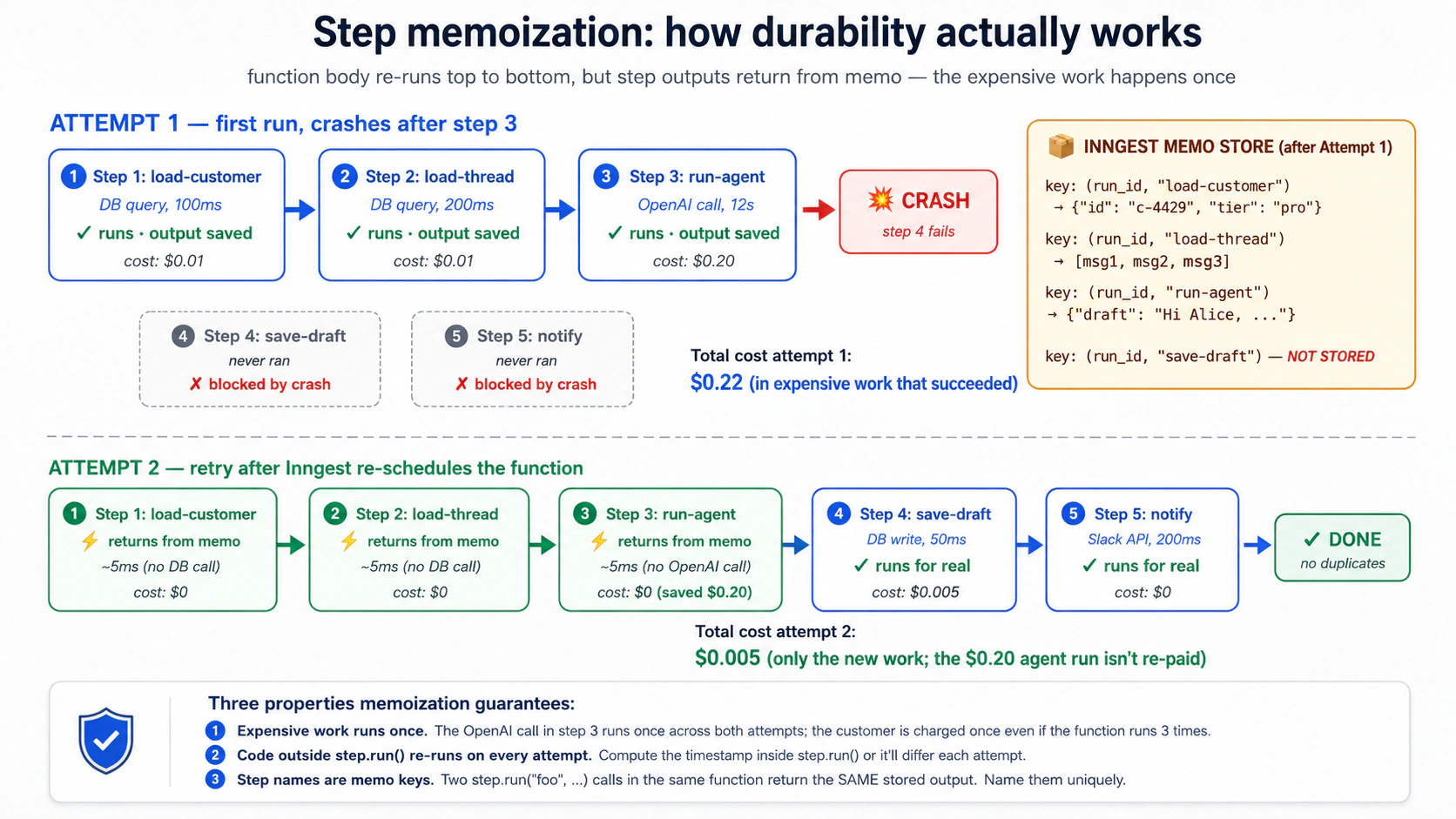
这带来一个重要限制:step.run 外面的代码每次 retry 都会重新执行。 expensive read、外部 API、metrics、写日志、生成 ID,如果不想每次 retry 都发生,就放进命名 step。
async def handle_email(ctx: inngest.Context) -> dict[str, str]:
    expensive_thing: dict = await ctx.step.run(
        "fetch-expensive-data", fetch_expensive_data, ctx.event.data["id"],
    )
    await ctx.step.run("do-something", do_something_with, expensive_thing)
    return {"status": "done"}
step name 就是 memo key。同一个 function 中不要复用同一个 step name。循环中要用唯一名称,例如 step.run(f"load-customer-{i}", ...)。
概念 8:step.sleep 和 step.wait_for_event,穿过时间的 durability
有些工作必须等待。欢迎邮件流程可能立即发送第一封邮件,等待 3 天,再发送 follow-up。退款调查需要等待人类审批。普通 Python function 不能打开进程等 3 天;Inngest 可以:
from datetime import timedelta

@inngest_client.create_function(
    fn_id="trial-welcome-series",
    trigger=inngest.TriggerEvent(event="user/trial.started"),
)
async def welcome_series(ctx: inngest.Context) -> dict[str, str]:
    user_id = ctx.event.data["user_id"]

    await ctx.step.run("send-welcome-email", send_welcome_email, user_id)

    await ctx.step.sleep("wait-three-days", timedelta(days=3))

    await ctx.step.run("send-followup", send_followup_email, user_id)

    return {"status": "completed"}
step.sleep 是 durable 的:function suspend,Inngest 存储恢复时间,等待期间不消耗 compute。免费 Hobby plan 上 sleep 上限是 7 天,付费 plan 可到 1 年。
step.wait_for_event 更强:不是等时间,而是等另一个 event。这就是 HITL 的核心:
@inngest_client.create_function(
    fn_id="refund-with-approval",
    trigger=inngest.TriggerEvent(event="customer/refund.requested"),
)
async def refund_with_approval(ctx: inngest.Context) -> dict[str, str]:
    request = ctx.event.data
    request_id = request["request_id"]

    if request["amount_cents"] >= 50_000:
        await ctx.step.run("notify-approver", notify_human_approver, request)

        approval = await ctx.step.wait_for_event(
            "wait-for-approval",
            event="refund/approval.decided",
            timeout=timedelta(hours=24),
            if_exp=f"async.data.request_id == '{request_id}'",
        )

        if approval is None or not approval.data.get("approved"):
            return {"status": "rejected_or_timeout"}

    refund = await ctx.step.run(
        "issue-stripe-refund", call_stripe_refund_api, request,
    )
    return {"status": "issued", "refund_id": refund["id"]}
timeout 时 wait_for_event 返回 None,不是抛异常。两个 wait 可以等同一 event,但如果 filter 完全一样,通常说明设计需要重构。
概念 9:Retries、error handling、dead-letter
Inngest 默认会 retry failed steps,通常是约 4 次指数退避。所有 retry 耗尽后,run 进入 failed 状态,保留 trace、输入事件、已完成 step 输出和异常,可检查也可 replay。
@inngest_client.create_function(
    fn_id="charge-customer",
    trigger=inngest.TriggerEvent(event="order/checkout.completed"),
    retries=2,  # only retry twice; this involves Stripe; don't keep hammering
)
async def charge_customer(ctx: inngest.Context) -> dict[str, str]:
    try:
        charge = await ctx.step.run(
            "call-stripe", call_stripe_charge, ctx.event.data,
        )
        return {"status": "charged", "charge_id": charge["id"]}
    except StripeCardDeclinedError as e:
        await ctx.step.run(
            "mark-failed", mark_order_failed,
            ctx.event.data["order_id"], reason=str(e),
        )
        await ctx.step.run(
            "emit-dunning-event", emit_dunning, ctx.event.data["order_id"],
        )
        return {"status": "card_declined"}
生产上要区分 transient 和 permanent。Stripe 503、OpenAI rate limit、短暂网络错误可以 retry;card declined、401 unauthorized、schema invalid 重试也不会变好。永久错误要捕获、写入状态、发后续 event,并 clean return,而不是浪费 retry budget。
概念 10:Python 里用 step.run 包 AI calls(step.ai.wrap 只在 TypeScript 中有)
Inngest 的 AI step primitives 分语言支持。step.ai.infer() 在 TypeScript 和 Python 都有;它把 inference offload 给 Inngest infrastructure,适合 serverless compute cost 优化。step.ai.wrap() 目前是 TypeScript-only。Python 项目包 OpenAI Agents SDK 的正确默认模式是 ctx.step.run(...)。
from openai import AsyncOpenAI

oai = AsyncOpenAI()


async def call_openai_summary(thread_text: str) -> str:
    """A normal async function. Inngest doesn't care that this is an LLM call."""
    response = await oai.chat.completions.create(
        model="gpt-4o",
        messages=[
            {"role": "system", "content": "Summarize this support thread in 3 sentences."},
            {"role": "user", "content": thread_text},
        ],
    )
    return response.choices[0].message.content


@inngest_client.create_function(
    fn_id="summarize-customer-thread",
    trigger=inngest.TriggerEvent(event="customer/thread.summary_requested"),
)
async def summarize_thread(ctx: inngest.Context) -> dict[str, str]:
    thread: list = await ctx.step.run(
        "load-thread", load_thread, ctx.event.data["thread_id"],
    )

    summary: str = await ctx.step.run(
        "openai-summary", call_openai_summary, format_thread(thread),
    )

    return {"summary": summary}
step.run 会把 step 的 inputs 和 outputs 记录到 Inngest observability store。若 prompt 中含有 PII、secrets、合同/金融数据或受监管内容,不要把原文直接作为 step 参数。传 customer_id 和 ticket_id,在 step body 内从你的 authoritative store 重新加载,并按你的 retention 和 access control 管理。
step.ai.infer 是特殊优化,不是默认选择:
import os

from inngest.experimental.ai.openai import Adapter as OpenAIAdapter


@inngest_client.create_function(
    fn_id="long-research-call",
    trigger=inngest.TriggerEvent(event="customer/research.requested"),
)
async def long_research(ctx: inngest.Context) -> dict[str, str]:
    response = await ctx.step.ai.infer(
        "call-openai",
        adapter=OpenAIAdapter(
            auth_key=os.environ["OPENAI_API_KEY"],
            model="gpt-4o",
        ),
        body={
            "messages": [
                {"role": "user", "content": ctx.event.data["prompt"]},
            ],
        },
    )
    return {"response": response["choices"][0]["message"]["content"]}
注意 keyword 是 adapter=,不是 model=。inngest.experimental.ai 在 inngest-py 中仍然是 experimental,依赖它时要 pin SDK version。
第 3 部分:Flow control and recovery,生产规模
flow control 是第三层:它保护 Worker 在流量下保持健康。concurrency 防止下游系统被打爆;throttling 避免撞上 rate limit;priority 和 fairness 防止一个租户饿死其他租户;batching 把“午夜 10,000 个事件”变成“100 个可管理 run”;replay 把“昨天的 bug 造成 200 个失败交互”变成“修复后从断点恢复”;HITL gate 让 agent 等人类授权。
概念 11:Concurrency and throttling
concurrency 是同一个 function 同时执行的最大 run 数;throttling 是单位时间内可启动的最大 run 数。两者都是 prototype 进入生产时最常缺的一层。
from datetime import timedelta

@inngest_client.create_function(
    fn_id="customer-support-conversation",
    trigger=inngest.TriggerEvent(event="customer/email.received"),
    concurrency=[inngest.Concurrency(limit=10)],
    throttle=inngest.Throttle(limit=100, period=timedelta(minutes=1)),
)
async def handle_email(ctx: inngest.Context) -> dict[str, str]:
    ...
concurrency=10 表示任意时刻最多 10 个 run 正在执行,第 11 个排队。throttle=100/minute 表示每分钟最多启动 100 个新 run,即使还有 concurrency 空位,第 101 个也要等。
更关键的是 per-key concurrency:
@inngest_client.create_function(
    fn_id="customer-support-conversation",
    trigger=inngest.TriggerEvent(event="customer/email.received"),
    concurrency=[
        inngest.Concurrency(limit=10),  # global cap
        inngest.Concurrency(limit=2, key="event.data.customer_id"),  # per-customer cap
    ],
)
async def handle_email(ctx: inngest.Context) -> dict[str, str]:
    ...
一个客户一分钟发 100 封邮件,也最多同时处理 2 封;其他客户不会被饿死。这是多租户公平性的最小版本。
概念 12:Priority and fairness,多租户扩展
priority 决定等待队列中谁拿到下一个空 slot。Enterprise customer 可以比 Free customer 先运行,但不能突破 concurrency 和 throttle。
@inngest_client.create_function(
    fn_id="customer-support-conversation",
    trigger=inngest.TriggerEvent(event="customer/email.received"),
    concurrency=[inngest.Concurrency(limit=10)],
    priority=inngest.Priority(
        # Enterprise tier = high priority; Pro = 0; Free = low priority
        run="100 - (event.data.customer_tier_priority * 100)",
    ),
)
async def handle_email(ctx: inngest.Context) -> dict[str, str]:
    ...
fair-share scheduling 通常用 per-key concurrency 表达:
concurrency=[
    inngest.Concurrency(limit=50),   # global pool
    inngest.Concurrency(limit=3, key="event.data.tenant_id"),  # max 3 per tenant
],
这意味着全局最多 50 个 slot,没有任何 tenant 能占用超过 3 个。自建这种 scheduler 通常是上千行代码;在 Inngest 中是几行配置。
概念 13:Batching,低成本批处理
某些工作天然适合 batch:embedding、bulk DB write、bulk email、每日摘要。Inngest 的 batch trigger 可以积累事件,然后一次 function run 处理一批:
@inngest_client.create_function(
    fn_id="batch-embed-tickets",
    trigger=inngest.TriggerEvent(event="ticket/resolved"),
    batch_events=inngest.Batch(
        max_size=50,        # invoke when 50 events accumulated, OR
        timeout=timedelta(seconds=30),  # invoke when 30 seconds pass, whichever first
    ),
)
async def batch_embed_resolved_tickets(ctx: inngest.Context) -> dict[str, int]:
    # ctx.events (plural) instead of ctx.event
    ticket_ids = [e.data["ticket_id"] for e in ctx.events]

    tickets = await ctx.step.run(
        "load-tickets", load_tickets_by_ids, ticket_ids,
    )

    embeddings = await ctx.step.run(
        "embed-batch", embed_texts_batch,
        [t["text"] for t in tickets],
    )

    await ctx.step.run(
        "store-embeddings", store_embeddings_batch,
        ticket_ids, embeddings,
    )

    return {"batched": len(ctx.events)}
ctx.events 是列表,而不是单个 ctx.event。50 个 ticket 可以变成一次 embedding batch、一次 bulk write 和一个 function run。前提是你能接受最多 timeout 那么长的延迟;交互式响应不适合 batch。
概念 14:Replay and bulk cancellation,生产恢复
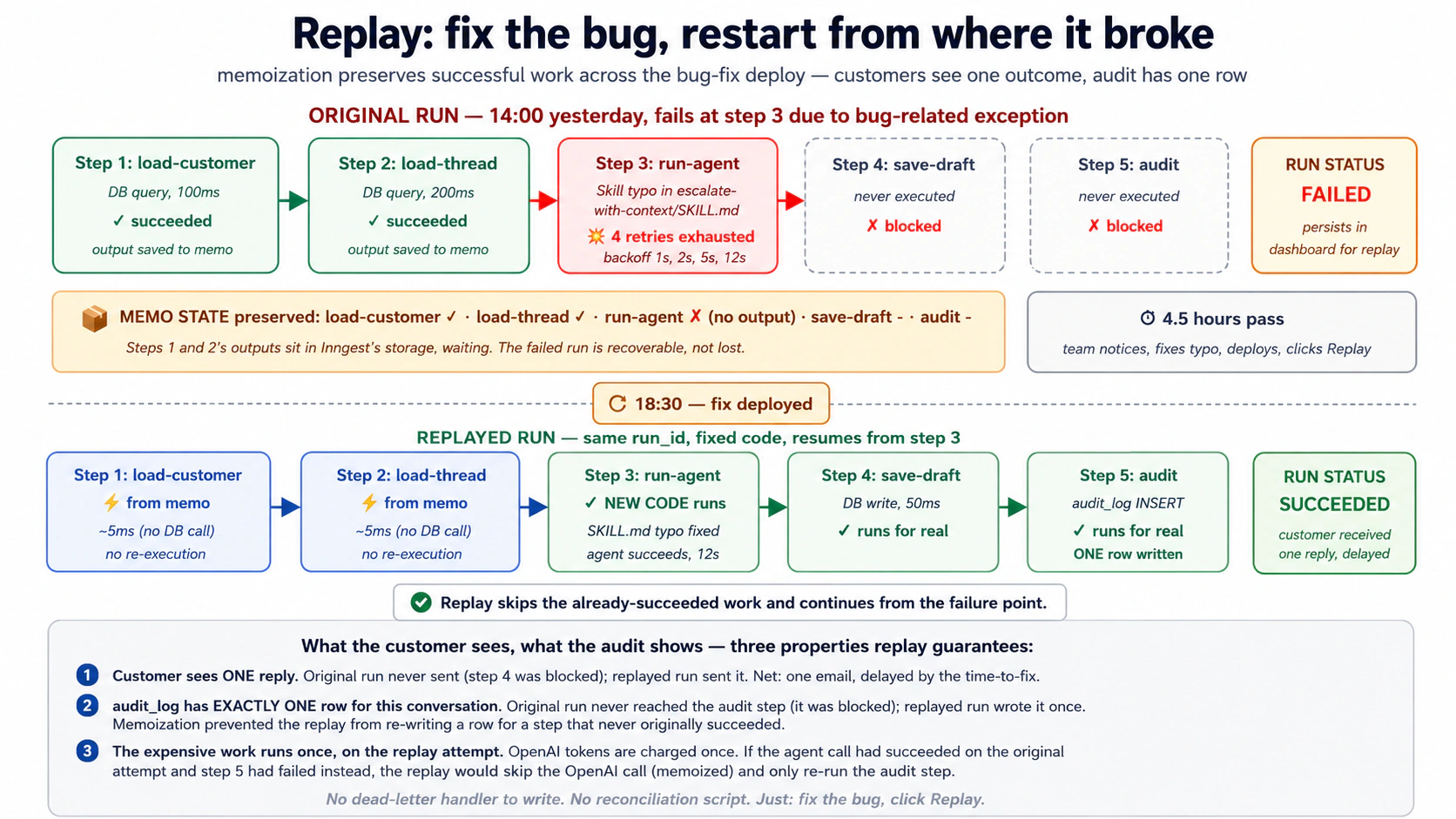
Replay 的意思是:这项工作失败了,我希望它成功。Bulk cancellation 的意思是:这项工作还在排队或 sleeping,但我不希望它继续发生。前者用于 bug-fix recovery,后者用于取消活动、客户 churn、功能 rollback。
Replay 的关键点:
- replay 使用你修复并 deploy 后的新代码;
- 已成功 step 默认从 memo 返回,不重新执行;
- failed run 会保留在 dashboard,直到你 action 或 retention 到期;
- force replay / replay all 才会从头重跑所有 step,适合 schema migration 或逻辑重算。
如果昨天 14:00–18:00 因 Skill typo 导致 47 个 run 在 escalation step 失败,18:30 修复并 deploy 后,你在 dashboard 过滤那 47 个 failed runs,点击 Replay。load customer、load thread 等成功 step memo hit;失败的 escalation step 用新代码执行。客户最终只看到一个结果,audit log 也只应该有一条有效记录。
概念 15:用 step.wait_for_event 做 HITL gates,把 Invariant 1 放进 runtime
Agent Factory 的 Invariant 1 说人类是 principal:高风险决定必须服从人类授权意图,而不是 agent 自主判断。生产上,这表现为 approval gate:agent 做分析、起草动作,但不执行动作,直到人类 approve。
@inngest_client.create_function(
    fn_id="refund-with-hitl-gate",
    trigger=inngest.TriggerEvent(event="customer/refund.investigated"),
    concurrency=[inngest.Concurrency(limit=5)],
)
async def refund_with_gate(ctx: inngest.Context) -> dict[str, str]:
    request_id = ctx.event.data["request_id"]
    amount_cents = ctx.event.data["amount_cents"]

    analysis = await ctx.step.run(
        "agent-investigates",
        run_refund_investigation_agent,
        request_id=request_id,
    )

    needs_approval = analysis.recommends_refund and amount_cents >= 10_000

    if needs_approval:
        await ctx.step.run(
            "notify-approver",
            send_slack_approval_request,
            request_id=request_id,
            analysis=analysis,
            amount_cents=amount_cents,
        )

        approval = await ctx.step.wait_for_event(
            "wait-for-human-approval",
            event="refund/approval.decided",
            timeout=timedelta(hours=24),
            if_exp=f"async.data.request_id == '{request_id}'",
        )

        if approval is None:
            await ctx.step.run(
                "escalate-timeout",
                escalate_to_senior_reviewer,
                request_id=request_id,
            )
            return {"status": "escalated_timeout"}

        if not approval.data["approved"]:
            await ctx.step.run(
                "notify-rejected", notify_customer_rejected,
                request_id=request_id,
            )
            return {"status": "rejected_by_human"}

    refund = await ctx.step.run(
        "issue-refund", call_stripe_refund,
        request_id=request_id, amount_cents=amount_cents,
    )

    await ctx.step.run(
        "audit-approved-refund", audit_refund,
        request_id=request_id, refund=refund,
        approved_by="human" if needs_approval else "auto",
    )

    return {"status": "issued", "refund_id": refund["id"]}
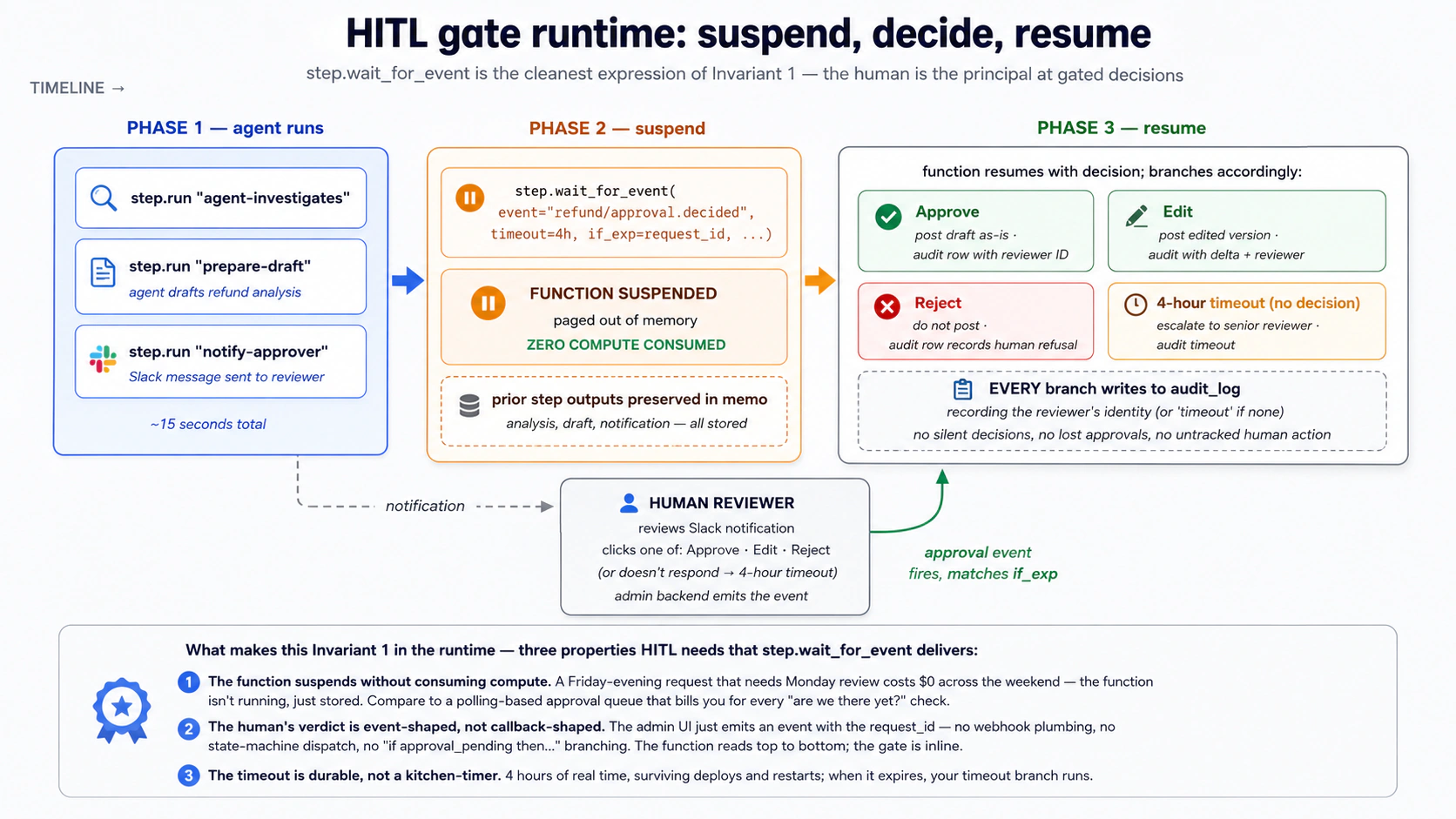
代码看起来是 top-to-bottom:分析、通知、等待、分支、执行。runtime 语义是 suspend/resume:等待人类时没有 compute,审批事件到达后用 if_exp 匹配对应 request,函数恢复并写 audit。没有 callback 地狱,也没有手写状态机。
第 4 部分:实战示例,客户支持 Production Worker
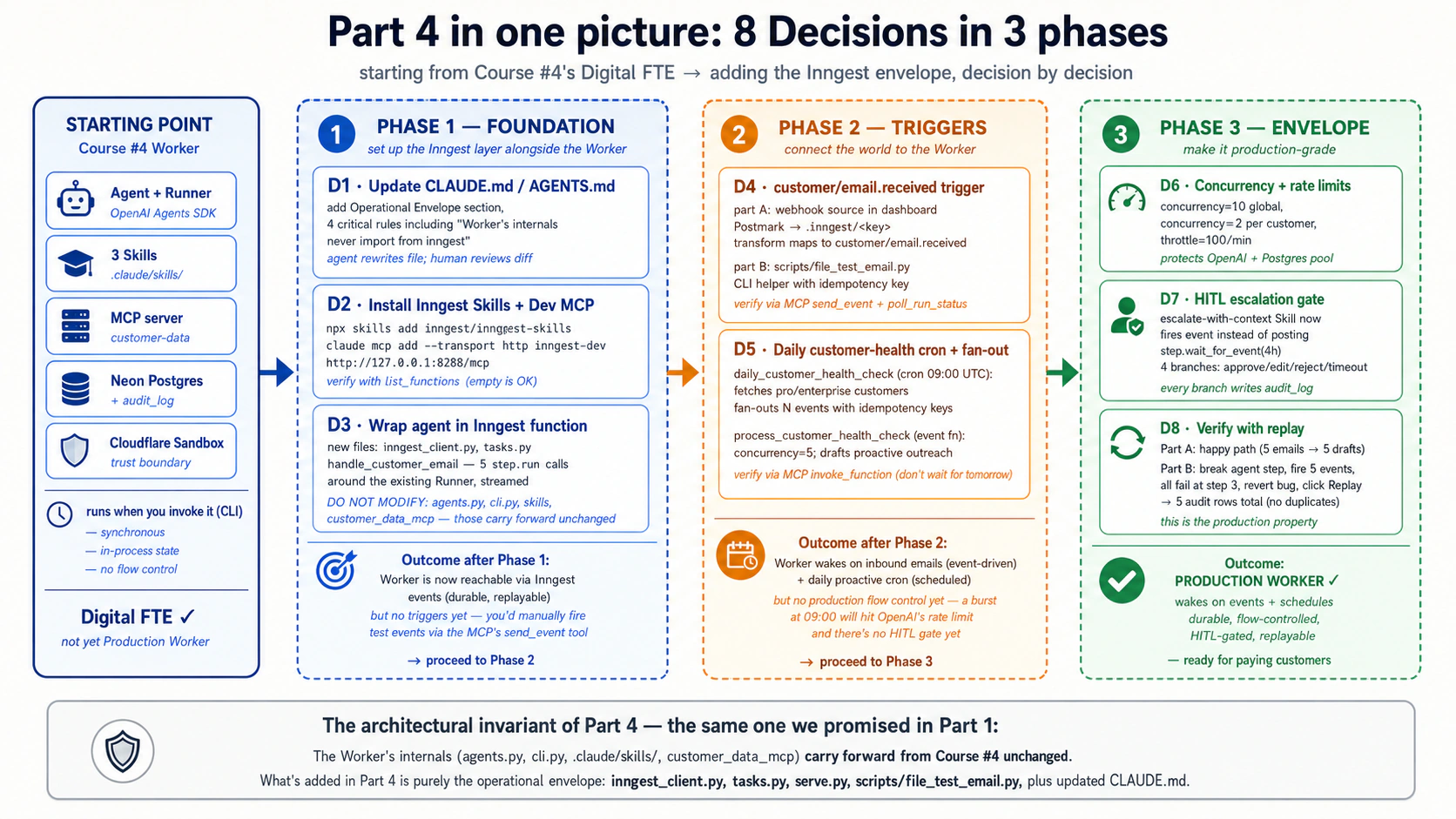
开始前需要确认四件事:
- Course 4 的 worked example 已经真正构建完成:
chat-agent/项目、cli.py、agents.py、三个.claude/skills/、Neon Postgres schema、audit_log和 customcustomer-dataMCP server 都可用。 - 已安装 Node.js 20+,可以运行
npx inngest-cli@latest dev。 - 有免费 Inngest account。Hobby tier 足够完成本课,但有 5 concurrent steps 和 7-day
step.sleepceiling。 - Claude Code 或 OpenCode 已安装并 authenticated。
Brief
把 Course 4 的 chat-agent Digital FTE 演进为客户支持 Production Worker:
- 响应
customer/email.receivedevents; - 用 durable steps 包住 agent invocation;
- 每天 09:00 UTC cron,为每个 Pro/Enterprise customer fan-out 一个
customer/health_check.requestedevent; - 全局 concurrency 10、每客户 concurrency 2、每分钟 start throttle 100;
- escalation 进入 4 小时 HITL window;
- 失败 run 保留状态,修复后可 replay。
Worker 内部(agent、Skills、MCP server、audit_log)不改变,只在外面增加 Inngest operational envelope。
Decision 1:用 Inngest layer 更新 rules file
在 chat-agent/ 中打开 Claude Code。先让 agent 读取 CLAUDE.md、src/chat_agent/ 和 Course 4 Skills,回报当前结构。然后要求它更新 rules file:
We're adding the Inngest operational envelope around the Course Four
Digital FTE. The Worker's internals don't change. What's NEW:

1. inngest-py SDK installed and configured (an inngest_client in
   src/chat_agent/inngest_client.py).
2. A new module src/chat_agent/tasks.py containing Inngest
   functions that wrap the agent: one for inbound emails, one for
   the daily health-check cron, one for the HITL escalation gate.
3. A dev-only entry point src/chat_agent/serve.py that runs an
   ASGI server hosting the Inngest functions so the local dev
   server can discover them.
4. The Inngest dev server is launched separately with
   `npx inngest-cli@latest dev`; the Inngest dev-server MCP at
   http://127.0.0.1:8288/mcp is added to Claude Code's MCP config.

Update CLAUDE.md to add:

- A new "Operational envelope" section describing where Inngest
  functions live, what triggers each one has, and the rule that
  the Worker's internal code never depends on Inngest's API:
  agents, skills, MCP server are unchanged.
- A new critical rule: every Inngest function wraps its agent
  invocation in step.run so failures don't lose state.
- A new critical rule: every inngest_client.send from inside agent
  code uses an idempotency key (event ID seed) to prevent
  double-firing on retry.
- A new critical rule: HITL gates use step.wait_for_event with
  an explicit timeout AND a timeout handler that writes to
  audit_log. No silent timeouts.
- Update the Commands section with the two new commands:
  `npx inngest-cli@latest dev` (dev server) and
  `uv run uvicorn chat_agent.serve:app --reload` (function host).

Keep the file focused (well under 3,000 tokens). Show me the diff before writing.
重点审查三条 critical rule:Worker internals never import from inngest、内部 send 必须带 idempotency key、HITL timeout 不能 silent。
Decision 2:安装 Inngest skills 并连接 dev-server MCP
Claude Code 与 OpenCode 的 MCP 配置方式不同,其余逻辑一样。
Set up the Inngest development plane for this project. Three things
to do:

1. Install the Inngest Python SDK as a dependency:
   `uv add inngest`

2. Install the Inngest Agent Skills into .claude/skills/ via the
   official installer:
   `npx skills add inngest/inngest-skills`

3. Add the Inngest dev-server MCP to Claude Code's MCP config so you
   can interact with the running dev server:
   `claude mcp add --transport http inngest-dev http://127.0.0.1:8288/mcp`

After installing, start the dev server in a separate terminal:
`npx inngest-cli@latest dev`

Verify the setup by using the MCP's list_functions tool to confirm
the dev server is reachable.
Inngest Agent Skills 的代码例子偏 TypeScript,但概念(events、durable functions、steps、flow control、middleware)跨语言有效。Python syntax 不确定时,让 coding agent 用 dev-server MCP 的 docs 工具查当前文档。
Decision 3:把现有客户支持 agent 包成 Inngest function
先读 src/chat_agent/agents.py、cli.py 和 tools.py,确认现有 agent 输入输出。然后新增两个文件,不修改原 agent:
Create the Inngest client and the first Inngest function. Two files.

File 1: src/chat_agent/inngest_client.py
- Import inngest
- Create a single inngest.Inngest() instance with app_id="chat-agent"
  and the appropriate env vars
- Export it so tasks.py can import it

File 2: src/chat_agent/tasks.py
- Import the inngest_client from file 1
- Define handle_customer_email: an async function decorated with
  inngest_client.create_function, triggered by event
  'customer/email.received'
- Inside the function:
    - step.run "load-customer"
    - step.run "load-thread"
    - step.run "run-agent"
    - step.run "save-draft-reply"
    - step.run "audit-handled"
- Return {"status": "drafted", "draft_id": draft["id"]}

DO NOT MODIFY:
- src/chat_agent/agents.py
- src/chat_agent/cli.py
- src/customer_data_mcp/server.py
- any .claude/skills/ files
这是 additive change:原来的 CLI 入口继续工作,Inngest 是新的生产入口。
Decision 4:加入 email-received event trigger
生产中 Postmark webhook 经由 Inngest dashboard transform 变成 customer/email.received。开发中用 send_event 或小 CLI helper 模拟。
Configure the inbound webhook trigger for customer emails.

PART A, webhook configuration (Inngest dashboard, manual).
Transform incoming Postmark JSON into:
name: 'customer/email.received'
data:
  customer_id: lookup from Postmark's 'From' email
  body: Postmark's 'TextBody'
  subject: Postmark's 'Subject'
  received_at: Postmark's 'Date'
  idempotency: derived from Postmark's MessageID

PART B, local development testing.
Write scripts/fire_test_email.py that sends a matching event via
inngest_client.send(...), with an idempotency key derived from
customer_id + timestamp, and prints the resulting run_id.
验证项:function 收到 event、customer-data MCP 被调用、agent run 可见、audit_log 有新行。
Decision 5:加入每日 customer-health-check cron 和 fan-out
Add a daily cron-triggered Inngest function that runs at 09:00 UTC
and fires a customer-health-check event per Pro/Enterprise customer.

1. daily_customer_health_check:
   - Schedule: "0 9 * * *"
   - step.run "fetch-eligible-customers"
   - step.run "fan-out-events"
   - Each child event:
     name='customer/health_check.requested'
     data={'customer_id': id, 'date': today.isoformat()}
     id=f'health-check-{id}-{date}'
   - Return {'customers_scheduled': N}

2. process_customer_health_check:
   - Trigger: 'customer/health_check.requested'
   - concurrency: limit=5 globally
   - step.run "load-customer"
   - step.run "load-recent-activity"
   - step.run "run-health-agent"
   - step.run "save-draft" and "audit-drafted"
手动 invoke cron,不等第二天 09:00。parent run 应在几秒内完成,dashboard 中出现 N 个 child runs。
Decision 6:加入 concurrency limits 和 rate limiting
For handle_customer_email:
- concurrency: 10 globally
- concurrency: 2 per customer (key="event.data.customer_id")
- throttle: 100 starts per minute

For process_customer_health_check:
- concurrency: 5 globally
- throttle: 30 starts per minute

For daily_customer_health_check:
- no extra concurrency change
测试方式:快速发送 20 个 customer/email.received events,分属 5 个客户。确认最多 10 个同时运行、每客户最多 2 个同时运行,其余排队并最终完成。
Decision 7:加入 HITL escalation gate
escalate-with-context Skill 不再直接发到 senior support channel;它发 customer/escalation.requested event。Inngest function 通知 reviewer,等待 approve/edit/reject/timeout,再决定是否发布并写 audit。
Add escalate_with_human_approval:
- Trigger: 'customer/escalation.requested'
- concurrency: 5

Inside:
1. step.run "notify-reviewer": Slack message with Approve/Edit/Reject buttons.
2. wait_for_event:
   approval = await ctx.step.wait_for_event(
       "wait-for-decision",
       event="escalation/decision.made",
       timeout=timedelta(hours=4),
       if_exp=f"async.data.request_id == '{request_id}'",
   )
3. Branch:
   - timeout: audit + post with "no human review" warning
   - reject: audit + do not post
   - edit: audit + post edited text
   - approve: audit + post original draft
测试四条分支。timeout 测试时临时改成 30 秒,测完再改回 4 小时。
Decision 8:用 replay 场景端到端验证
happy path:发送一条 customer/email.received,确认 5 个 step 完成、agent trace 可见、draft persisted、audit row 写入。
failure-and-replay path:在 run-agent step 中临时抛 ValueError("simulated agent failure"),发送 5 个不同客户事件,确认它们都在 step 3 失败、steps 1 和 2 成功、steps 4 和 5 没跑。修复 bug 后 replay,确认 steps 1 和 2 memo hit、step 3 用新代码成功、steps 4 和 5 真正执行。最后查 audit_log:每个客户正好 1 条 email_drafted,没有重复。
发生了什么
你没有把 agent 变聪明;你把 agent 变可靠了。同一个 Course 4 Worker 现在可以由 webhook、event、cron 唤醒;可以在失败后恢复;可以限制并发和速率;可以等待人类审批;可以在修复后 replay。Production Worker 的价值不在“更聪明”,而在它能承受延迟、失败、重复事件、人工审批和流量尖峰。
第 5 部分:本课到哪里为止
Production Worker 的成本形状
两类成本最重要:基础设施成本(Inngest、Postgres、sandbox compute)和 inference 成本(OpenAI tokens)。基础设施通常随负载缓慢增长,inference 几乎线性增长。以下数字是 2026 年 5 月语境,做预算前要查当前价格。
| Tier | Price | Executions / month | Concurrent steps | Notable |
|---|---|---|---|---|
| Hobby | $0 | 50,000 | 5 | 3 users、50 realtime connections、无信用卡 |
| Pro | from $75 / month | 1,000,000 | 100+ | 1000+ realtime connections、15+ users、7-day trace retention |
| Enterprise | custom | custom | 500-50,000 | SAML / RBAC、90-day trace retention、dedicated support |
Hobby tier 的 5-concurrent-step cap 会压住你实际观察到的 concurrency:代码里写 limit=10 仍然是生产正确配置,但免费账号上只能看到 5。step.sleep 免费上限 7 天,付费可到 1 年。
真正的大头通常是 inference。一个客户支持 Worker run 可能消耗 3,000–10,000 tokens。每天 1,000 封邮件时,token bill 比 orchestration bill 大得多。因此优化顺序是:先减少不必要 agent call、缩短上下文、batch 可 batch 的路径、使用合适模型;不要过早盯着每个 Inngest execution 的小钱。
三条 Inngest-specific 成本杠杆:
- 纯函数不要包
step.run;没有副作用就不需要 durable step。 - bulk path 用
batch_events,50 个 events 可以是 1 个 function run。 - 长时间等待用
step.sleep/step.wait_for_event,suspended time 不按 compute 计费。
Swap guide:operational envelope 是不变量,平台不是
本课处处使用 Inngest,因为教学需要具体工具。但架构可以迁移:
- Inngest events → Temporal signals、Restate handlers、AWS EventBridge + Lambda;
step.run→ Temporal activities、Restate handlers、自建 Postgres-backed state machine;step.wait_for_event→ Temporal signals、Restate awakeables、自建 approval queues;- Cron triggers → Kubernetes CronJobs + queue、GitHub Actions schedules、AWS EventBridge schedules;
- Concurrency + throttle → Temporal task queue concurrency、Redis rate limiter、SQS visibility timeout。
Dapr Agents 是生产规模上的开放 companion。Dapr Agents v1.0 GA 后,DurableAgent 成为生产类,旧 Agent 已 deprecated。选择 Dapr 的理由是 Kubernetes-native deployment、多语言 SDK、CNCF governance。选择 Inngest 的理由是学习曲线和本地 dashboard:一条命令、概念可见、feedback loop 很短。
| Course Five 概念 | Inngest primitive | Dapr production analogue | 教学说明 |
|---|---|---|---|
| Scheduled work | TriggerCron | Cron input binding / Dapr Scheduler | 时间唤醒 Worker。 |
| Webhook/event ingress | webhook endpoint → event | HTTP endpoint、input bindings、pub/sub ingress | Inngest 隐藏更多 plumbing。 |
| Internal events | inngest_client.send() | Dapr pub/sub | 同一 event-driven 心智模型。 |
| Fan-out | 一个 event 触发多个 functions | 一个 topic/event 被多个 services 消费 | 架构相同,组合方式不同。 |
| Durable steps | step.run() + memoization | Dapr Workflows + activities | 目的相似,开发模型不同。 |
| Waiting without compute | step.sleep() | Durable workflow timers | 都避免进程空等。 |
| Human approval gate | step.wait_for_event() | external events/signals、actors | Inngest 写法更紧凑。 |
| Retries | function/step retries | workflow/activity retries + resiliency policies | Dapr 更 infrastructure-native。 |
| Dead-letter / failed runs | dashboard failed runs + replay | broker DLQ + workflow restart tooling | Inngest 更 turnkey。 |
| Flow control | concurrency、throttle、priority、batching | Kubernetes scaling、broker controls、bulk pub/sub | Dapr 能做,但不是一个 decorator argument。 |
这张表是 translation guide,不是 API 等价声明。概念转移,substrate 改变。
本课还没有覆盖什么
你现在有一个满足部分 Agent Factory 不变量的 Worker:它有 engine(Course 3)、system of record(Course 4)、世界可以唤醒它(本课)、高风险点能回到 human principal(本课)。剩余工作属于后续课程:
- Invariant 2:每个人需要一个 delegate,例如 OpenClaw 风格的 owner-side personal agent。
- Invariant 3:workforce 需要 manager,例如 Paperclip 风格的分配、预算和审计层。
- Invariant 6:workforce 可在 policy 下扩展,agent 可以授权生成并注册新 Worker。
单个 Worker 的 event、durable step、HITL 和 replay 是最小生产单元。后续课程会把多个这样的单元组合成 workforce。
如何真正变熟
阅读不会让你擅长 Production Workers;反复构建会。每次出问题,把症状映射回概念:
- function 不触发:event name typo 或 namespace mismatch(概念 3)。
- 同一逻辑事件触发两次:缺 idempotency key(概念 4)。
- deploy 后“丢工作”:副作用在
step.run外面(概念 7)。 - 客户被重复收费:Stripe call 不在
step.run中,或 step name 不唯一(概念 6、7)。 - 9am OpenAI 429:缺 throttle(概念 11)。
- 一个客户挤掉其他客户:缺 per-key concurrency(概念 12)。
- HITL gate 周末 silent timeout:缺 timeout handler 和 audit row(概念 15)。
每次只加一个生产能力:先 event trigger,再 agent step.run,再 crash/replay 验证,再 concurrency,再 HITL。一次性大重写会把可学习的摩擦变成噪音。
Quick reference
下面的内容是构建时搜索用,不需要从头读到尾。
15 个概念一行版
- Events vs requests。 request 同步阻塞;event 异步、durable、可多 consumer。
- Cron triggers。
TriggerCron(cron="0 9 * * *")按 schedule 唤醒函数。 - Webhook triggers。 Inngest 提供 endpoint,入站 payload 变成 named event。
- Idempotency。 event ID 防止重复投递;step memoization 防止重复 step execution。
- Fan-out。 多个 functions 订阅同一 event,或 parent 发 N 个 child events。
step.run。 每个 step 是 checkpoint;retry 时已完成 step 从 memo 返回。- Memoization。
step.run背后的机制;step 外代码每次 retry 都会重跑。 step.sleep/step.wait_for_event。 durable suspend,等待时间或等待 event 时不消耗 compute。- Retries and dead-letter。 默认 backoff retries;失败 run 留在 dashboard,可 replay。
- Python AI calls。 Python 用
ctx.step.run(...)包 OpenAI Agents SDK;step.ai.infer是 serverless 优化;step.ai.wrap是 TypeScript-only。 - Concurrency and throttling。 限制活跃 run 和启动速率,保护下游系统。
- Priority and fairness。 priority 决定队列顺序,per-key concurrency 给每个 tenant 公平份额。
- Batching。 把多个 events 聚合成一个 batch function run。
- Replay and bulk cancellation。 failed runs 可修复后 replay;不想继续的 queued/sleeping runs 可 cancel。
- HITL gates。
step.wait_for_event让函数 suspend 到人类批准,再恢复执行。
15 个概念诊断表
| # | Concept | Layer | 回答的问题 |
|---|---|---|---|
| 1 | Events vs requests | Triggers | request 和 event 的心智模型差别是什么? |
| 2 | Cron triggers | Triggers | Worker 如何按 schedule 醒来? |
| 3 | Webhook triggers | Triggers | 外部系统如何唤醒 Worker? |
| 4 | Idempotency | Triggers | 同一 event 来两次怎么办? |
| 5 | Fan-out | Triggers | 一个 event 如何唤醒多个 Worker? |
| 6 | step.run | Durable execution | function 为什么 durable? |
| 7 | Memoization | Durable execution | Inngest 怎么知道从哪里恢复? |
| 8 | step.sleep / wait_for_event | Durable execution | Worker 如何等待而不占 compute? |
| 9 | Retries / dead-letter | Durable execution | step 一直失败后怎么办? |
| 10 | AI calls in Python | Durable execution | Python 里如何让 OpenAI Agents SDK call durable? |
| 11 | Concurrency / throttling | Flow control | 如何防止 Worker 淹没 OpenAI 或 Postgres? |
| 12 | Priority / fairness | Flow control | 如何避免一个客户饿死其他客户? |
| 13 | Batching | Flow control | 如何不用 10,000 次 invocation 处理 10,000 个 events? |
| 14 | Replay / cancellation | Flow control | 昨天的 runs 都失败了怎么办? |
| 15 | HITL gates | Flow control | Invariant 1 如何落到 runtime? |
触发面选择树
- 外部系统发 HTTP request:webhook trigger。
- schedule 到点:cron trigger。
- 另一个 Inngest function 发 event:event trigger。
- 交互式用户正在等即时响应:保留普通 request/response;重活从 request 内发 event 后异步处理。
step primitive 选择树
- API、DB、file write、agent invocation:
ctx.step.run("name", fn, ...)。 - serverless 上的长 OpenAI call:
ctx.step.ai.infer(...)。 - 等固定时间:
ctx.step.sleep("name", timedelta(...))。 - 等人类审批或 sibling event:
ctx.step.wait_for_event("name", event="...", timeout=..., if_exp=...)。 - 纯 deterministic computation:直接写代码,不用
step.run。
文件位置速查
chat-agent/
├── .claude/
│   └── skills/
│       ├── summarize-ticket/SKILL.md
│       ├── find-similar-cases/SKILL.md
│       ├── escalate-with-context/SKILL.md
│       ├── inngest-setup/SKILL.md
│       ├── inngest-events/SKILL.md
│       ├── inngest-durable-functions/SKILL.md
│       ├── inngest-steps/SKILL.md
│       ├── inngest-flow-control/SKILL.md
│       └── inngest-middleware/SKILL.md
├── src/
│   ├── chat_agent/
│   │   ├── agents.py
│   │   ├── cli.py
│   │   ├── tools.py
│   │   ├── guardrails.py
│   │   ├── inngest_client.py
│   │   ├── tasks.py
│   │   └── serve.py
│   ├── customer_data_mcp/
│   └── chat_agent/embedding/
├── scripts/
│   └── fire_test_email.py
├── migrations/
└── CLAUDE.md
症状 → 根因 → 概念
| Symptom | First suspect | Concept |
|---|---|---|
| function 不触发 | event name typo、namespace mismatch | C3、C5 |
| function 对同一逻辑 event 触发两次 | 缺 idempotency key | C4 |
| deploy 后 lost work | 工作写在 step.run 外 | C7 |
| cron 在 deploy 中没触发 | 只看了 local dev server;production cron 在 Inngest infra 上 | C2 |
| 客户被重复收费 | Stripe call 在 step.run 外,或 step name collision | C6、C7 |
| 9am OpenAI rate limit | 缺 throttle | C11 |
| 一个客户饿死其他客户 | 缺 per-key concurrency | C12 |
| function 一直 suspended | wait_for_event event name/filter 不匹配 | C8、C15 |
| HITL timeout silent | timeout branch 没写 audit | C15、D7 |
| replay 重复收费 | step name collision 或外部 provider idempotency 缺失 | C4、C7 |
Appendix:先修课快速复习(不能替代先修课)
A.1:Course 4 假设你已经会什么
完整课程是 From Agent to Digital FTE。本课依赖三件事:
- Skills 已可运行。
.claude/skills/summarize-ticket/、.claude/skills/find-similar-cases/、.claude/skills/escalate-with-context/。Decision 7 会修改第三个。 - Neon schema 有
audit_log。 至少包含id、action、customer_id、payload (JSONB)、created_at。 customer-dataMCP server 可作为 Python process 启动。 Decision 3 后会调用load-customer、load-thread等能力。
如果“Worker 通过 scoped custom MCP server 读写 Postgres system of record,并且每个重要动作在同一 transaction 写 audit_log”听起来像复习,可以继续。否则先回 Course 4。
A.2:本课使用的 Inngest 基础
- 一个 Python 项目导出一个
inngest.Inngest(app_id=...)client。 - function 用
@inngest_client.create_function(fn_id=..., trigger=...)decoration。 - 常用 step primitives 是
ctx.step.run、ctx.step.sleep、ctx.step.wait_for_event、ctx.step.ai.infer。 - 发事件用
inngest_client.send(events=[...]),逻辑去重用id=。 - dev server 命令是
npx inngest-cli@latest dev,dashboard 在http://127.0.0.1:8288,MCP 在http://127.0.0.1:8288/mcp。
A.3:这个 appendix 不替代什么
仍然需要 Course 3 的 Cloudflare Sandbox trust boundary,以及 Course 4 的完整 worked example。困难不在 Inngest syntax,而在两个心智转变:从 request 到 event(概念 1),从 in-process execution 到 durable execution(概念 6)。