AI Agent 的插件:一个 bundle,整支团队
13 个概念,覆盖 80% 的真实用法 · 约 90 分钟概念阅读 · 第一个真实 plugin 需要一个专注日 · 从空文件夹到队友一条命令即可安装的 plugin
首先:plugin 到底是什么。 默认情况下,像 Claude Code 或 OpenCode 这样的 coding agent 是一个能力很强的通才。它可以在任何项目里工作,但它不知道_你的_工作方式。Plugin 是用一次安装修正这个问题的包:它把 agent 要遵循的 playbooks(skills)、它要委派的 specialists(subagents)、它能触达的 systems(MCP servers)、你的常驻 instructions,以及它_不能_跳过的规则(hooks)打包起来。把这个 bundle 交给一个通用 agent,它就变成_你的_ agent;队友安装后,也得到完全相同的一个。
现在把它落到现实里。 Anthropic 已经发布了整套这样的 marketplace。两条命令,claude plugin marketplace add anthropics/knowledge-work-plugins,再运行 claude plugin install finance@knowledge-work-plugins,一个空白 Claude 就会变成 finance specialist:skills 会自己触发,出现 /finance:reconciliation 这样的 commands,并连接到 finance team 日常使用的 systems。把 finance 换成 sales 或 legal,就得到相应 specialist。这就是 plugin:一次安装,把通才变成你需要的精确专家。到本课结束,你会构建一个自己的 plugin,也会看到它通向哪里:这本书围绕的 sellable domain marketplaces,例如 agentfactory-business(banking、legal-ops、Islamic finance),它们在 Anthropic 之上叠加 regulated-domain depth。
Bundle 是 host-specific 的;里面大多数东西不是。 Claude Code plugin 和 OpenCode plugin 会把同样的 pieces 包成不同格式,彼此不能直接加载(Concept 2 会说明原因)。但 pieces 大多会流动:skill 到处都是同一个 SKILL.md,instructions 是同一份 markdown,MCP server 是任何 host 都能指向的 URL。只有 hook 真正是 per-host 的,因为它插进每个 host 不同的内部机制(你会在 Concept 7 看到具体差异)。所以你为自己使用的 host 构建,而里面的大多数东西仍然能到达 claude.ai、Codex、Cursor,甚至 OpenClaw 这样的 personal agent。
而这正是你真正要学的。 你的 agent 已经知道语法;你一说,它就能写 hook 或 manifest。如果课程只教这个,agent 会让课程失去意义。稀缺的是它没有的判断:一个 job 需要_哪种_杠杆,什么时候规则必须是 guarantee 而不是 hope,以及怎样 prove plugin 真的做到了你声称的事。所以你用 plain English 指挥,从空文件夹开始亲手构建每个 lever,旁边有一份完整、已验证的 build 用来比较,然后发布一个队友能一条命令安装的真实 plugin。你做决定;agent 打字。
一切都来自一个事实:你扩展的是一个你不拥有的 agent。 Host 拥有 loop、model 和 machine。你的 plugin 不掌控全局;它把要加载的 pieces 交给 host。四个不可协商的规则由此得出,整门课就是把这四个做出来:
- Bundle 是为了分享。 Plugin 是 customization 的_可分享、带版本_形式。如果它只给你自己在一个 repo 里用,你需要的是
.claude/folder,而不是 plugin。只有当别人也应该拿到它时,才使用 plugin。 - 为任务选择正确杠杆。 Skill 是 agent 自己选择使用的 knowledge;subagent 是它委派出去的 work;MCP server 是它能触达的 tools 和 data;hook 是在固定时刻自行运行的 code。让 job 匹配 lever。
- Must-always 是 hook,不是 instruction。 Skill 或
CLAUDE.md里的任何内容都是 advice,model 可以跳过。Hook 是每次都会运行的 code。如果某件事_必须_发生,比如 formatter 或 safety gate,它就是 hook。 - Plugin 运行在用户的 trust 中。 它会在安装者的 machine 上执行 code。用 least privilege 构建,清楚说明它会 touch 什么,并把 install 或 ship 都当成 trust decision。
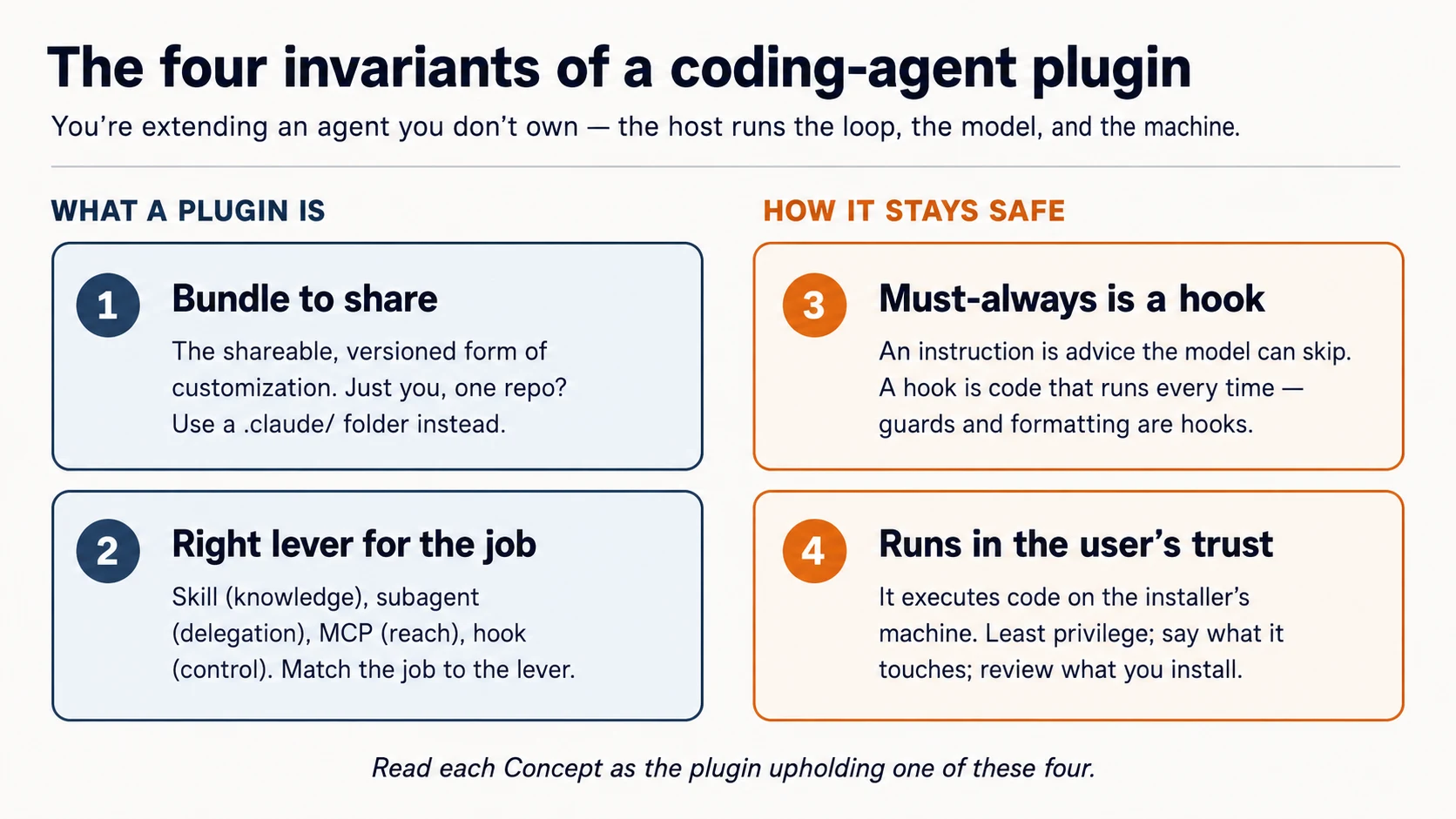
阅读每个 Concept 时都问自己:这是哪个 invariant?
Prerequisites。 本页假设三件事。
- 你已经在 drive coding agent。 你完成过 Agentic Coding Crash Course:Claude Code 或 OpenCode、plan mode、rules file。我们会通过那个 workbench 来 build。
- 你能读 typed code:shell、少量 JSON 和 TypeScript。可以直接读,也可以把 blocks 粘给你的 agent,让它用 plain English 解释。
- 推荐:Connector-Native Apps。 那门课训练的是同一种习惯:知道自己在哪一层,并构建了 MCP server。Plugin 可以指向一个 MCP server(Concept 6),所以两门课会接起来。
你不需要先学 Build AI Agents 或 AI Identity。它们都在后面的路径上,本课会指向它们。
本课的位置。 在 Mode 2,紧接 Connector-Native Apps。路径是:Connector-Native Apps → 本课 → AI Identity(sign-in & agent access) → Build AI Agents。 Connector-native apps 为 end users 扩展 chat app;plugins 为 builders 扩展 coding agent。同一个动作,换了一个 host。
设置(几分钟)
这里你不会手动运行 shell commands。你会用 plain English 指挥你的 coding agent,并检查它报告了什么,这也是你接下来构建 plugin 的同一套 loop。Setup 是第一轮练习。
-
下载 base(
plugins-crash-course-base.zip),解压,然后在 Claude Code(或 OpenCode)中打开plugins-crash-coursefolder。打开时,agent 会读取AGENTS.md:你要构建什么、proven reference 在哪里。 -
让它自己设置环境。粘贴:
Set up my base environment, then tell me what you did and what passed.
这一个句子背后,agent 会遵循 AGENTS.md 里的 brief:在 Claude Code 上,它安装 official plugin-structure skill,以便按 current spec 工作;在 OpenCode 上,它读取 plugin docs;然后运行 reference build 的 checks。
- 现在让它教你 layout。粘贴:
Walk me through, in plain English, how a plugin is laid out on my host.
完成标准: agent 报告 reference build 是 green 的(guard 阻止 .env 和 rm -rf,sample skill 与 MCP server 都 check out),并能把你 host 的 plugin layout 解释给你。
盒子里有什么。 几乎还没有_你的_东西,这正是重点。Plugin 由你构建;starter 给你 brief 和 proven build,用来检查你的 work。
plugins-crash-course/           ← you build YOUR marketplace + plugin here, from blank
  AGENTS.md                     your brief + how each host lays out a plugin
  CLAUDE.md                     points Claude Code at the same brief (@AGENTS.md)
  reference/                    a COMPLETE, PROVEN build — read it, diff against it, don't copy it
    plugins/agent-factory/      the finished plugin: proven guard, a model skill, a model reviewer
    server/                     a runnable MCP server you point your plugin at
    verify.sh                   one command that proves the reference is sound
你会自己构建每个 lever:guard hook、一个你真的会用到的 skill、reviewer subagent、MCP wiring、marketplace。你用 plain English 指挥 agent。当某个 piece 回来不对时,把它和 reference/ 这个 known-good version 做 diff。你指挥;agent 打字;你检查;你比较。
构建前,先看一个跑起来(5 分钟)
你刚读完 plugin 做什么。现在感受一下。进入概念前,先安装 starter 里自带的 finished plugin,看它如何_强制执行_一件事。先看到它,后面的内容才会落地。
把 reference plugin 加载进 session:
claude --plugin-dir reference/plugins/agent-factory
在 OpenCode 中打开 reference/plugins/agent-factory。它会从该 folder 的 .opencode/plugins/ 加载 guard,并从 skills/ 加载 skill。
然后让它工作。粘贴:
Try to read a file called
.env, then use your loop-engineering skill to explain an agent loop in four moves.
你应该看到:
- Agent 被 blocked,不能读取
.env,并告诉你原因。(hook,在 model 无法跳过的 tool call 上触发) - Skill 用自己的声音回答,而且你没有点名它。(model 选择了这条 skill)
- (Claude Code) 让它整理一个 messy file,它会在没有额外要求的情况下返回 auto-formatted 版本。(第二个 hook)
对 .env 的 hard block,是一句 “please don't read secrets” instruction 永远无法保证的东西;学会构建它,是本课的核心。你没有为每个 file 做配置;plugin 自带了这个 behavior。现在 concepts 有了真实东西可以附着。
Part 1: 形状
Concept 1: 你扩展 agent,但不拥有它
plugin 不是一个由你运行的程序。它是一组部件,由 host 替你加载并运行。host(Claude Code 或 OpenCode)拥有 agent loop(decide-act-repeat 循环),带来模型,并运行在用户机器上。你的 plugin 贡献的是 host 会拿起的能力和规则。这个画面看清楚了,其他都是细节;看错了,你就会一直想让 plugin “做”一些它从来不负责掌控的事。
这里有一个值得点明的有趣反转:你会指挥一个 coding agent 去构建用于 coding agent 的 plugin。 你会让 Claude Code 编写 Claude Code 自己会加载的那类扩展。构建它的工具和它要扩展的工具属于同一种工具。这不是噱头,而是最快的构建方式,也是每一门 Manufacturing 课程的节奏:你指挥,agent 打字,你验证。
Concept 2: 两个 host,一个想法
本课覆盖两个 host。它们打包扩展的方式不同,但想法完全一样:host 加载的一个单元。
- Claude Code 接受一个 declarative bundle:一个包含组件(skills、subagents、hooks、MCP servers)的文件夹,由一个小 manifest 描述。你主要编写配置和脚本;Claude Code 负责接线。
- OpenCode 接受一个 code module:一个 JavaScript/TypeScript 文件,接入 agent 事件并可以添加工具。你编写函数;OpenCode 调用它们。
| Claude Code plugin | OpenCode plugin | |
|---|---|---|
| Form | a folder + plugin.json manifest | a .ts/.js module that exports functions |
| You write | skills, subagents, hooks config, .mcp.json | event handlers, custom tools |
| Loaded from | a marketplace, or --plugin-dir | .opencode/plugins/ or an npm package |
它们没有谁更好或更差,只是扩展方式不同。这个差异值得在选择目标前先知道。Claude Code 是 Anthropic 的工具,绑定 Claude 模型,使用 declarative bundle 格式,并通过 marketplace 生态分发。OpenCode 是开源且模型无关的:你可以带自己的 API key,也可以运行免费模型或本地模型(Gemini、GPT、本地模型)。它的 plugin 是代码,因此控制更细,但也需要你自己写更多东西。对成本敏感的学习者来说,模型自由是重点:你写的同一个 skill 可以在 OpenCode 的免费模型上运行。(两者也能互操作:skills 可以直接跨过去,社区 plugin 会在它们之间桥接凭据和后端。但那是把工具一起用,不是编写 plugin,所以本课不展开。)
本课大部分内容是共享心智模型和 Claude Code 形式(它的 bundle 更丰富);Part 5 会展示同一工作的 OpenCode 形式。选择你实际使用的 host;四个不变量不变。
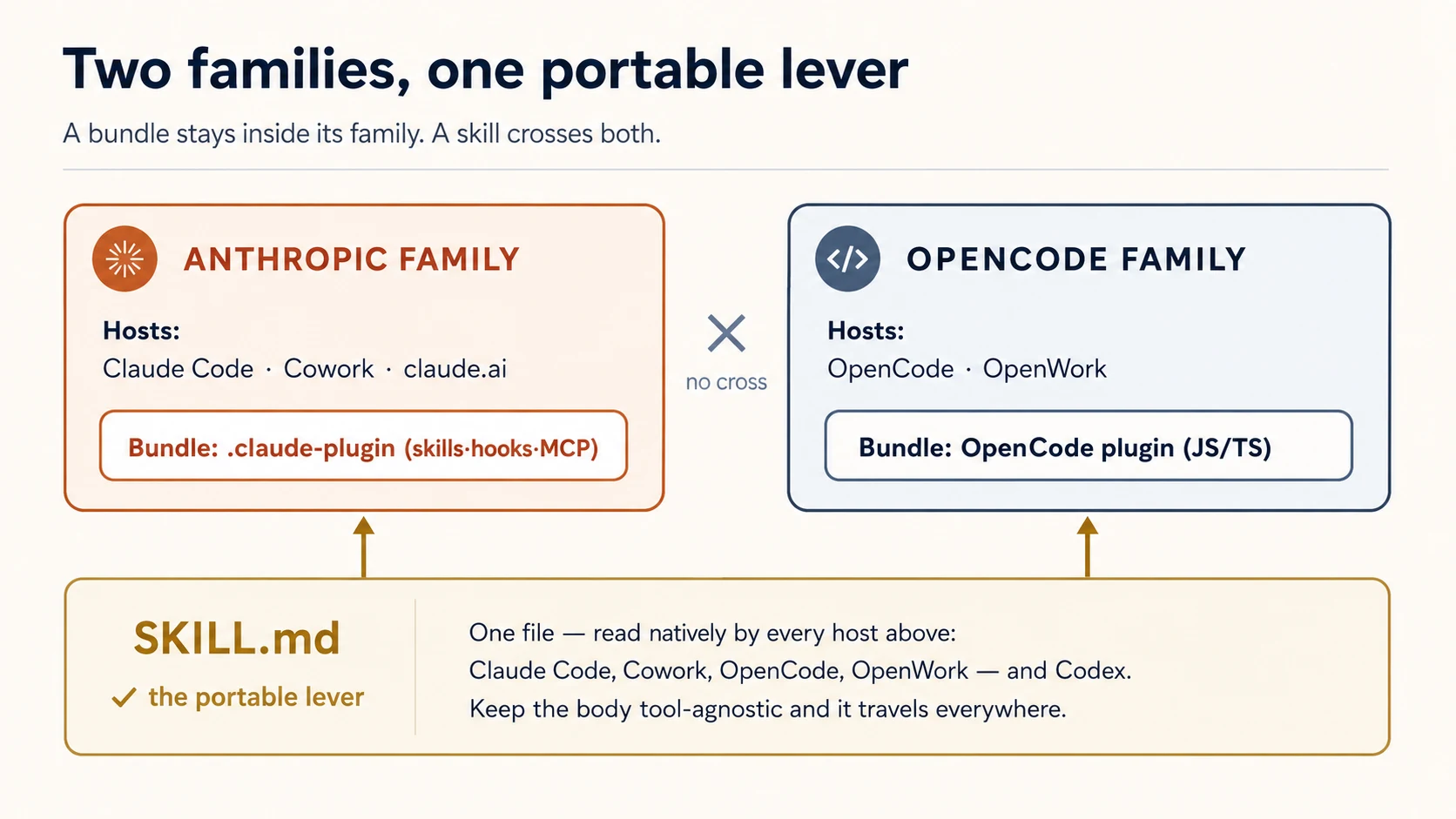
有一个杠杆可以免费移植;另一个不行。 skill 只是一个 SKILL.md 文件,本课里的三个 coding agent 都能原生读取这个格式:Claude Code、OpenCode 和 Codex。OpenCode 会自己从 .opencode/skills/、.claude/skills/ 和 .agents/skills/ 发现 skills(skills 根本不需要 plugin)。所以一个 skill 文件夹可以服务所有工具。**Hooks 正好相反:**Claude Code hooks 是 JSON 配置,OpenCode hooks 是 JavaScript module。两者没有共享格式,所以每个 host 都要写一次 hook。记住这个拆分;它会决定你如何组织跨工具 plugin(Concept 4)。
这个拆分会扩展成两个家族。 你构建的 Claude Code plugin 也会加载到 Claude Cowork 和 claude.ai,因为它们共享 Anthropic 的 plugin 格式。你构建的 OpenCode plugin 也会加载到 OpenWork,一个由 OpenCode 驱动的桌面 agent,因为它使用同一套 OpenCode 格式。Skills 可以跨越两个家族(所有工具都读取 SKILL.md);bundle 不能跨越(Claude bundle 不是 OpenCode module)。所以你选择的 host 决定 bundle 能走多远,但一个普通 skill 可以到处走。本课只聚焦这两个 coding agent;knowledge-work hosts 有自己的课程(见 ceiling)。
Concept 3: 打包是为了分享,不是为了私有配置
两个 host 都允许你在没有 plugin 的情况下定制:Claude Code 读取项目里的 .claude/ 文件夹;OpenCode 读取 .opencode/。当定制是个人使用,并且只存在于一个 repo 里时,这才是正确工具。plugin 是当定制能力应该流动时使用的形式:流向队友,跨项目,流向社区,带着版本和更新。
所以判断“这是否应该做成 plugin?”的测试不是它做什么,而是谁还需要它。一个开发者、一个项目:用 .claude/ 文件夹。一个团队、许多项目,或陌生人:用 plugin(不变量 1)。
有一个早期就要知道的后果:plugin skills 和 commands 会按 plugin 名称 命名空间化。一个名为 repo-tools 的 plugin 里的 hello skill,会被调用为 /repo-tools:hello。这样两个已安装 plugin 就不会因为同名而冲突。
✓ Checkpoint: 形状已经就位。 你知道 plugin 是 host 加载的单元,两个 host 打包方式不同,也知道“plugin”意味着“为分享而做的定制”。接下来是四个杠杆。
Part 2: 能力杠杆
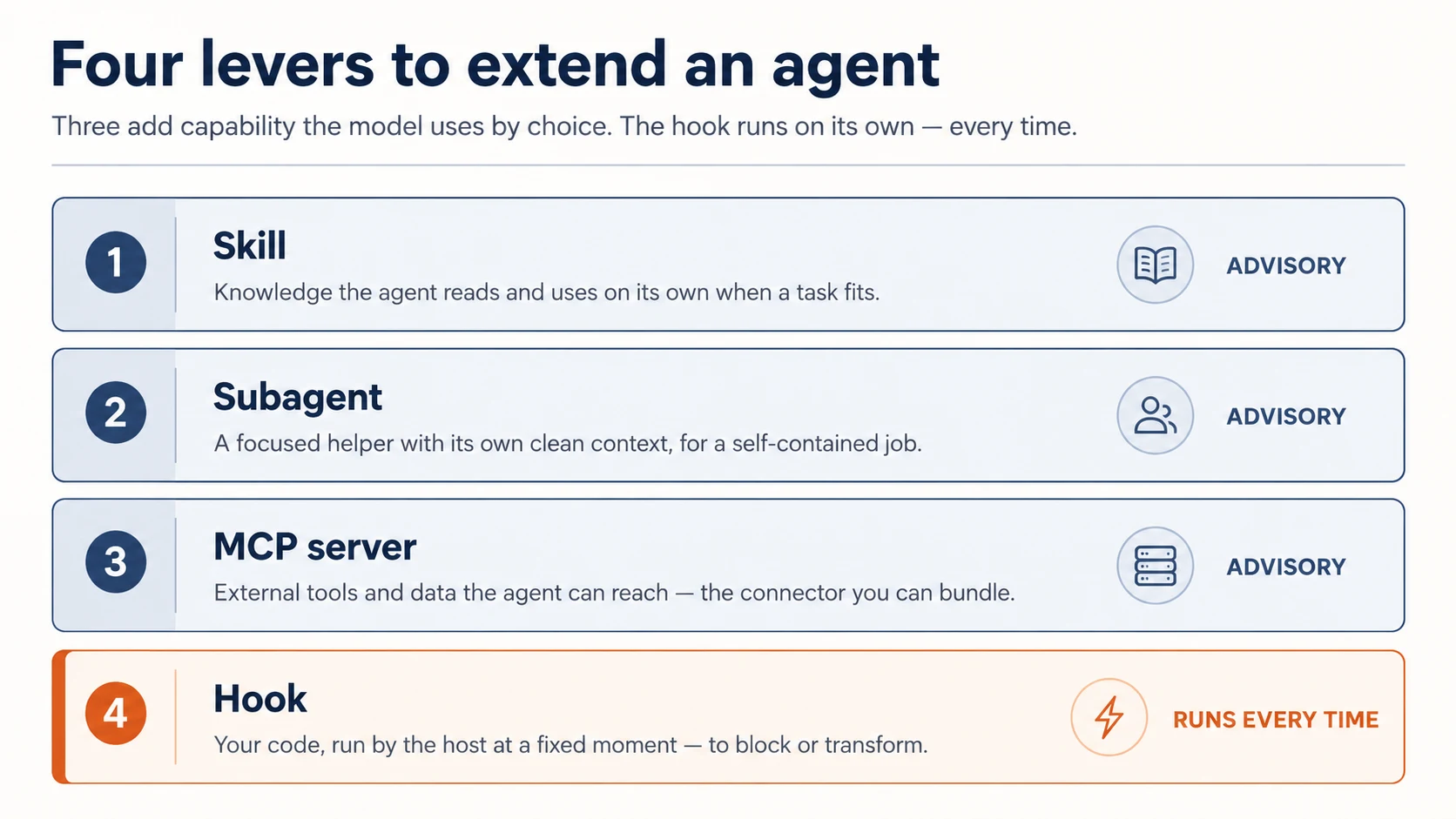
四个杠杆里有三个会增加 agent 能做什么。(第四个 hooks 足够不同,会单独放到下一 Part。)
Concept 4: Skills:agent 自己选择使用的知识
skill 是一个带 SKILL.md 文件的文件夹:里面有 description 和 instructions。Claude 会读取 description,并在任务匹配时主动把 skill 拉进来。这叫 model-invoked。skill 用来教 agent 你的团队如何做一件事:review checklist、commit-message 格式、release 流程步骤。
---
description: Review a diff for our team's standards. Use when reviewing code or a PR.
---

When reviewing, check in this order:

1. Does it match the existing patterns in the file?
2. Error handling and edge cases.
3. Tests for the new behavior.
4. Security: secrets, input validation, injection.
description 是最重要的一行。模型用它来判断 skill 是否相关,所以要写“什么时候使用它”,而不只是“它是什么”。正文只在 skill 触发时加载,因此可以按需要写得很长。
因为 skill 是模型选择遵守的建议,所以它适合承载指导,也不适合承载任何必须无条件发生的事(那是 hook,Concept 8)。
写一次 skill,每个工具都能读。 这是 skill 作为杠杆的超能力:SKILL.md 格式在 Claude Code、OpenCode 和 Codex 之间共享。为了让 skill 可移植,保持正文与工具无关:只依赖 frontmatter 的 name 和 description,不要使用 $ARGUMENTS、allowed-tools 或 disable-model-invocation 这类特定工具结构。这样同一个文件到处都能用:Claude Code 从 plugin 的 skills/ 加载;OpenCode 原生在 .opencode/skills/ 或 .claude/skills/ 里找到;Codex 在 .agents/skills/ 里找到。starter 的 skills/loop-engineering/SKILL.md 是完整、可移植的示例,请阅读它。
为什么只用 frontmatter?
每个 host 都从 description 推导 skill 名称,并决定何时调用它。除了这两个字段,host 之间就开始分化:一个支持的东西,另一个可能忽略,甚至解析失败。因此,你放进正文里的任何特定工具内容,都会悄悄破坏 skill 在其他工具中的可用性。正文里放普通说明,frontmatter 只放两个字段,skill 就是通用的。
Concept 5: Subagents:带干净上下文的委派
subagent 是主 agent 可以把任务交给它的助手,拥有自己的 干净上下文窗口 和自己的指令。你把它定义为 agents/ 文件夹里的 markdown 文件:frontmatter 放名称和 description,正文放 brief:
---
name: reviewer
description: Reviews a diff against our standards. Use after a change is written.
---

You review code in your own context. Check, in order: matches existing patterns,
error handling, tests, security. Report findings as a short ordered list.
Do not edit files — only review and report.
委派重要有两个原因:subagent 不会被主对话分心,它的工作也不会堵住主上下文。
当任务是自包含且可验证的,就使用 subagent:例如“review this diff”、“find everywhere this function is called”、“write tests for this file”。主 agent 保持主线;subagent 深入执行并回报。
要避免的错误是把所有事情都做成 subagent。委派有成本(新上下文必须被告知它需要什么)。只有当专注和干净白板值得这个成本时才使用它,不要把每个小步骤都交出去。
Concept 6: MCP servers:plugin 可以发布的外部触达
第四个 lever 给 agent 它原本没有的 reach:你的 internal API、database、service。它通过指向一个 MCP server 来做到,而你已经在 Connector-Native Apps 中构建过一个。这里不再构建另一个。Plugin 的全部工作就是把它 wire 起来。
Plugin 通过 root 下的 .mcp.json file 连接:命名 server,给出 URL,并把用户的 key 放在 header 中。Plugin enabled 后,host 连接,server 的 tools 出现在 agent 面前。
{
  "mcpServers": {
    "my-api": {
      "type": "http",
      "url": "https://api.yourdomain.com/mcp",
      "headers": { "Authorization": "Bearer ${MY_API_KEY}" }
    }
  }
}
Server 在设计上就是 remote 的:logic、data 和 secrets 留在你控制的 infrastructure 上,plugin 只发布那个 pointer。这让 reach durable,并且在 Concept 10 中变得 gateable、sellable。Plugin 是 thin client;value 在 URL 背后。Header 里的 key 是最简单的 gate:你的 server 检查它,被取消的 key 会停止工作。更强的方式是 sign-in,你已经在 connector course 中见过;下一课 AI Identity 专门讲如何给 agents bounded access。这里不需要。
那 server 从哪里来?来自你已经构建的那个。 打开上门课的 connector,让 agent 运行它,把它打印出的 URL 复制到上面的 .mcp.json。同一个 server,第二个 front door:connector 服务 chat app;这个 plugin 服务 coding agent。手头没有 connector?Starter 在 reference/server/ 里带了一个 tiny runnable server,可以先接它。不论哪种情况,你都是_指向_一个 server;绝不在 plugin 里面写 server。
为什么不用 local server?
Claude Code 也支持 local MCP servers,也就是 host 在用户机器上作为 process 运行的 command。我们刻意跳过它们。Local server 会把代码随 plugin 一起发布,并在别人的电脑上运行;它像 skill 一样可复制,而且 runtime 不归你所有。对 plugin 来说,remote server 几乎总是正确选择:构建并托管一次,然后让任意数量的 plugins 通过 URL 指向它。
无论哪种方式,有一件事会延续:那个 server 运行你的 code,保存你的 secrets。发布一个会 wire 它的 plugin,会让它成为你发布的 trust 的一部分(invariant 4),现在也延伸到你的 users。
✓ Checkpoint: 能力杠杆已覆盖。 Skills 增加 knowledge,subagents 增加 focused help,MCP servers 增加 reach;三者都是 advisory:model 决定何时使用。接下来,是那个不能 optional 的 lever。
Part 3: 确定性杠杆
Concept 7: Hooks:每次都会运行的代码
hook 是 host 在 agent 生命周期固定点自动运行的命令。它不是给模型的建议;它是你的代码,由 host 按模型无法改变的时间表执行。这一个属性,就是 hooks 比它们第一眼看上去更重要的原因。
生命周期点(events)分成三种节奏:
- 每个 session 一次:
SessionStart、SessionEnd。 - 每个 turn 一次:
UserPromptSubmit(agent 看到新 prompt 之前)、Stop(agent 完成时)。 - 每次 tool call:
PreToolUse(tool 运行之前,也是唯一可以阻止它的点)和PostToolUse(之后)。
command hook 每次运行方式都一样:host 把事件的 JSON 描述通过 standard input 发给它;你的脚本读取它,完成自己的工作,并用 exit code 回答:
- Exit 0:允许 / 完成。
PreToolUse上的 Exit 2:阻止 tool call。 你打印到 standard error 的内容会作为原因交给模型,让它调整。- 任何其他非零:非阻塞错误。会被记录,但动作继续。
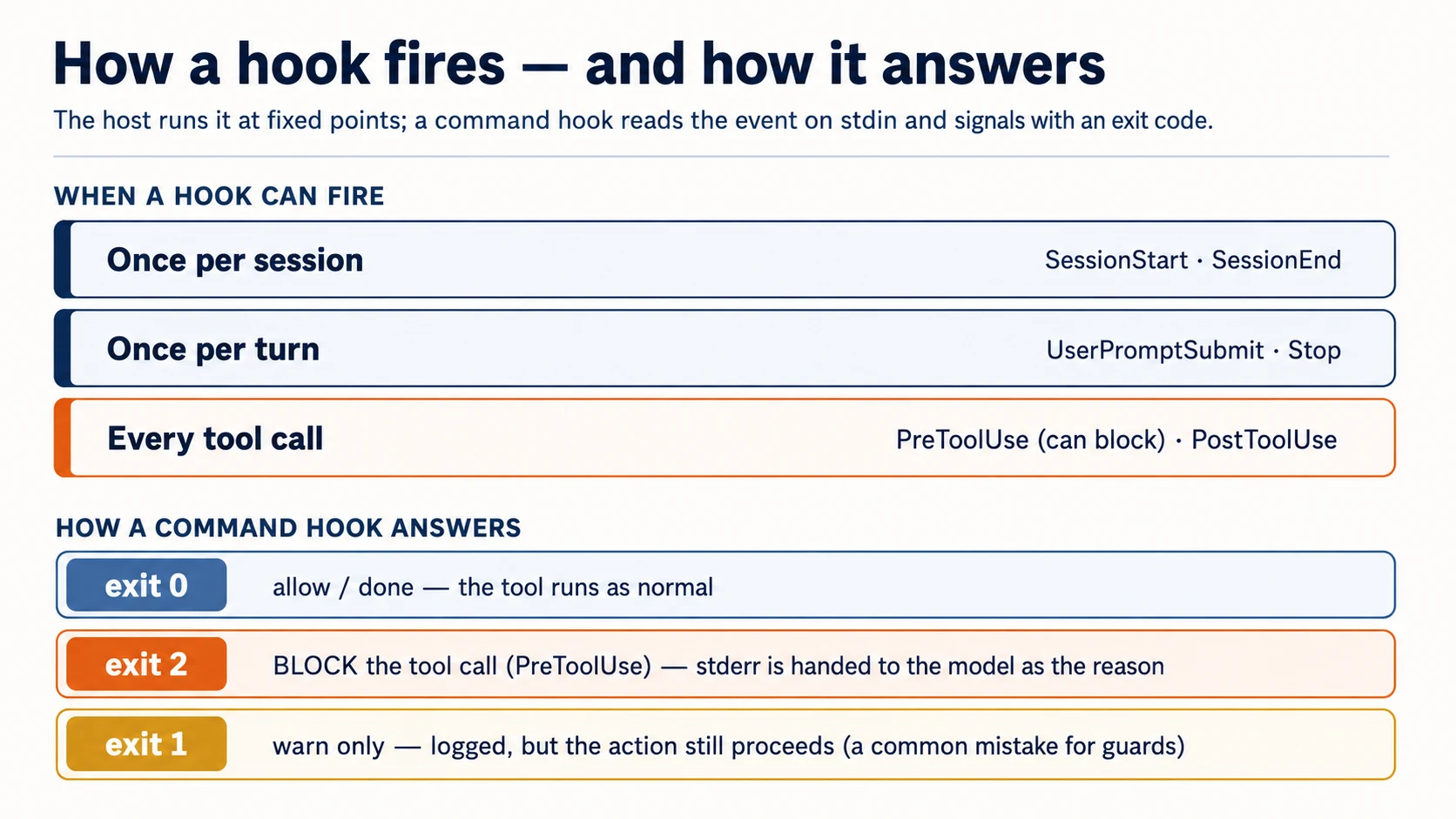
这个 exit-2 规则就是 guardrails 的核心,也是人们最常弄错的地方(exit 1 不会阻止)。在 plugin 里,hooks 位于 hooks/hooks.json:
{
  "hooks": {
    "PostToolUse": [
      {
        "matcher": "Write|Edit",
        "hooks": [
          {
            "type": "command",
            "command": "${CLAUDE_PLUGIN_ROOT}/hooks/format.sh"
          }
        ]
      }
    ],
    "PreToolUse": [
      {
        "matcher": "Read|Edit|Write|Bash",
        "hooks": [
          {
            "type": "command",
            "command": "${CLAUDE_PLUGIN_ROOT}/hooks/block-secrets.sh"
          }
        ]
      }
    ]
  }
}
matcher 是 hook 会在哪些 tools 上触发的 pattern(Write|Edit = 文件写入;Bash = shell commands)。plugin-root 路径变量指向你的 plugin 文件夹,让 host 能找到脚本;请按你的 Claude Code 版本确认它的确切名称(SDK 和 plugin paths 会移动)。
Concept 8: 必须每次发生的是 hook,不是指令
这是本课最重要的想法。你写成指令的任何东西(skill、CLAUDE.md 里的一行)都是建议性的。 模型通常会遵守,但它可能忘记、耗尽上下文,或判断对话已经转向。对大多数指导来说,这没问题。对任何必须每一次都成立的事来说,建议不够。hook 才够。
两个 pattern 承载了大部分真实价值:
写入后格式化:PostToolUse。 每次文件编辑后,运行 formatter。模型输出不再需要完美符合样式,因为 formatter 每次都会归一化它:
#!/usr/bin/env bash
# hooks/format.sh — runs after every Write/Edit
path=$(jq -r '.tool_input.file_path // empty')   # read the edited file's path from the event
[[ -n "$path" ]] && npx --yes prettier --write "$path" 2>/dev/null
exit 0
阻止绝不能发生的事:PreToolUse,exit 2。 检查 tool call;如果越线,就阻止它并告诉模型原因。这个 guard 同时覆盖 secret files 和 destructive commands,所以会从事件里读取两个字段:
#!/usr/bin/env bash
# hooks/block-secrets.sh — runs before Read/Edit/Write/Bash
input=$(cat)                                                   # read the event ONCE (see note)
path=$(printf '%s' "$input" | jq -r '.tool_input.file_path // empty')
cmd=$(printf '%s' "$input" | jq -r '.tool_input.command // empty')

if [[ "$path" == *.env* || "$path" == */secrets/* ]]; then
  echo "Blocked: $path is a secret file. Do not read or edit it." >&2   # stderr → the model
  exit 2                                                                  # exit 2 → blocked
fi
if [[ "$cmd" == *"rm -rf"* || "$cmd" == *"git push --force"* ]]; then
  echo "Blocked: refusing to run a destructive command ($cmd)." >&2
  exit 2
fi
exit 0
一行 gotcha:只读取一次事件
host 通过 standard input 发送事件,而 standard input 是一个 stream:第一个读取它的东西会把它耗尽。如果你直接调用两次 jq(path=$(jq …) 然后 cmd=$(jq …)),第一次调用会消费整个事件,第二次什么也拿不到,所以 cmd 会悄悄变空,command guard 永远不会触发。像上面那样用 input=$(cat) 捕获一次,再解析那个变量。starter 的测试抓的正是这个 bug;否则你会发布一个看起来正确、却在 rm -rf 上悄悄失效的 guard。
一个写着“never read .env”的 skill 只是希望。这个 hook 是保证。
运行它。 把这段贴给你的 coding agent:
add a
PostToolUsehook that formats files after Write/Edit, and aPreToolUsehook (matched onRead|Edit|Write|Bash) that blocks reads/edits of.env/secrets/and blocksrm -rfin Bash, all with exit 2. Read the event once withinput=$(cat). Then try to read my.envand runrm -rfand show me both are blocked, and edit a file and show me it got formatted.
(你在这里构建一次,是为了看见 mechanics。在 worked example 里,你会使用 starter 已经证明过的版本,而不是重写它。亲手构建一次,才能信任它。)
在 terminal 里自己运行(raw commands)。 用 host 调用 hook 的方式测试 hook:pipe 一个 fake event 进去,并检查 exit code:
echo '{"tool_input":{"file_path":"/app/.env"}}' | ./hooks/block-secrets.sh; echo "exit: $?"   # expect: exit 2
echo '{"tool_input":{"command":"rm -rf /"}}'    | ./hooks/block-secrets.sh; echo "exit: $?"   # expect: exit 2
echo '{"tool_input":{"file_path":"/app/main.ts"}}' | ./hooks/block-secrets.sh; echo "exit: $?" # expect: exit 0
验证。 三个 exit code 都匹配:.env 被阻止(2),rm -rf 被阻止(2),普通文件被允许(0)。如果 secret read 通过了,你的 hook 用的是 exit 1 而不是 2,这是最常见的错误。如果 rm -rf 通过但 .env 被抓住了,说明你读取了 stdin 两次(见上面的 gotcha)。exit 2,只读一次,否则就不算阻止。
✓ Checkpoint: 确定性杠杆有效。 你可以让某件事在每次编辑后发生,也可以在每次 tool call 前阻止某件事。这就是只会建议的 plugin 和能够强制执行的 plugin 之间的区别。
当 hook 出问题时(大多数指南跳过的部分)
Hooks 会在每个匹配的 tool call 上运行,所以坏 hook 会立刻让人感到痛。四条规则能让它们不挡路:
- 保持快速。
PreToolUsehook 会 gate 每个匹配调用,所以慢逻辑(一次网络往返、每次编辑都跑完整测试套件)会卡住 agent。目标是明显低于一秒;重活放到Stop,不要放到每次调用。 - 有意地 fail safe。 先决定 hook 自己出错时发生什么。formatter 跑不起来时应该 exit 0(让编辑保留),所以
format.sh以exit 0结束,并吞掉 prettier 错误。guard 正好相反:如果不能判断,宁可阻止。永远不要让崩溃的 guard 悄悄落到 exit 0。 - 每次阻止都说明原因。 只有 bare exit 2 而没有 message,模型拿不到可行动信息,会重试同一件事。
stderr那行就是修复说明,请写具体(“edit the source, not the generated file”)。 - 按 host 调用方式 debug。 pipe 一个 fake event 进去并读 exit code(上面的 raw-command test)。如果 hook 看起来触发太频繁,检查
matcher:Write|Edit是窄的;空 matcher 或过宽 matcher 会在所有事情上触发。
Part 4: 发布它
Concept 9: Manifest 和结构
Claude Code plugin 是一个由 manifest 描述的文件夹:.claude-plugin/plugin.json。(Claude Code 即使没有它也能自动发现标准组件文件夹,但发布时要带 manifest,因为它承载 name、version 和 description。)
{
  "name": "agent-factory",
  "description": "A portable skill, guard hooks, and a reviewer subagent.",
  "version": "1.0.0",
  "author": { "name": "Your Name" }
}
其他所有内容都放在 plugin root(不要放进 .claude-plugin/,这是人们最常犯的结构错误):
agent-factory/
├── .claude-plugin/
│   └── plugin.json          # the manifest (this, and only this, goes here)
├── skills/                  # skills as <name>/SKILL.md
├── agents/                  # subagent definitions
├── hooks/
│   └── hooks.json           # event → command wiring
└── .mcp.json                # optional: MCP servers to load
version 对更新很重要:当你 bump 它时,安装者会拿到新版本;如果你省略它并通过 git 分发,每个 commit 都会被当成新版本。分享前运行 claude plugin validate,这与 marketplace review 使用的是同一个检查。
上面的 tree 是 plugin 本身,不管它放在哪里。在 starter 里,它位于 marketplace repo 内的 plugins/agent-factory/,这就是下一个 Concept。
Concept 10: Marketplaces:队友如何拿到它
marketplace 只是一个 git repository,里面有一个 catalog file(marketplace.json),列出一个或多个 plugins。整个分发故事就这么简单:你不把 package 发布到 registry,而是把人指向一个 repo。
{
  "name": "agent-factory",
  "owner": { "name": "Your Name" },
  "plugins": [
    {
      "name": "agent-factory",
      "source": "./plugins/agent-factory",
      "description": "A portable skill, guard hooks, and a reviewer."
    }
  ]
}
队友随后在 Claude Code 里运行两条命令:
/plugin marketplace add your-org/agent-factory   # the git repo with marketplace.json
/plugin install agent-factory@agent-factory       # plugin@marketplace
开发时先跳过 marketplace。 在你自己的机器上有两个更快的循环:用 claude --plugin-dir ./plugins/agent-factory 直接从磁盘加载 plugin(也接受 .zip),或者用 claude plugin init <name> 脚手架一个,它会放到 ~/.claude/skills/<name>/,并在下一次 session 里自动以 <name>@skills-dir 加载,不需要 marketplace,也不需要 install。marketplace 是用来分享的;构建和测试时不需要它。
不要混淆两个 manifest。 plugin 有 .claude-plugin/plugin.json;marketplace 有 .claude-plugin/marketplace.json。文档化布局会把它们分开:marketplace.json 位于 repo root,每个 plugin 位于自己的子文件夹(./plugins/<name>/),并带自己的 plugin.json。starter 正是这样:plugins/agent-factory/。(一个 repo 可以既是 marketplace 又托管一个 plugin,但把 plugin 放进 ./plugins/<name> 子文件夹,是每个官方示例都采用的 pattern,请优先使用它。)
Pinning 和 sources:更新到底如何工作。 plugin 的 source 可以是相对路径(上面)或指向另一个 repository 的 object;一个 marketplace 可以列出来自多个 repos 的 plugins,而且每个都独立 pin:
{
  "name": "code-formatter",
  "source": { "source": "github", "repo": "acme/formatter", "ref": "v2.1.0" }
}
ref pin 到 branch 或 tag,sha pin 到 exact commit;两者同时存在时,sha 优先。队友拿到特定版本和你发布更新,靠的是这个,而不是 catalog file 本身。(url source 覆盖 GitLab 和其他 git hosts;本地路径便于测试。)
发布前有两个 footguns 值得知道:
- 相对路径只在 marketplace 通过 Git 添加时解析(GitHub/GitLab/git URL)。如果有人用指向
marketplace.json文件的直接 URL 添加,./plugins/...不会解析。那种情况请使用github或urlsource。 - 已安装 plugins 会复制到 cache,所以 plugin 不能通过
../访问自己文件夹外的文件。把 plugin 需要的一切都放进它里面;复制时 symlinks 会被跟随,前提是它们指向 plugin 自己的文件。这也是 starter 里两个 symlinks 都指向 plugin 自有文件的原因。
Anthropic 运行自己的官方 catalogs:claude-plugins-official(curated)和社区 claude-community(你添加它的 repo anthropics/claude-plugins-community,并以 @claude-community 从中安装)。所以请为自己的 marketplace 选择一个不同名称,不要遮蔽这些名称。(命名和提交规则还很年轻;发布前请对照 plugins reference 确认当前 reserved-name policy。)
分发给团队,或分发给非程序员。 在 Team 和 Enterprise plans 中,owners 可以从 Organization settings → Plugins 发布 marketplace;Knowledge Work marketplace 会默认添加,你分发的 plugins 会出现在 chat 和 Claude Cowork 里,也就是同一个 bundle 到达 knowledge workers,而不只是 builders(见 ceiling,以及 Cowork and OpenWork 课程)。
分享前运行 claude plugin validate。上面的 schema 截至 2026 年中是当前形态;发布前请重新对照 Claude Code plugins reference 确认字段名,因为这个 surface 还很年轻,也在变化。
可以收费吗?可以,但不是为文件收费。 Marketplace 是 catalog,不是商店:格式里没有 payment layer、license check,也没有 subscription primitive。Billing 和 access enforcement 要在 plugin system 外部自己构建。还有一个锋利边缘:skill 是 plaintext SKILL.md,没有 DRM。客户一安装就拿到你的 source,所以把 static files 放在 subscription 后面,会邀请每个客户 churn 一次:pay once、clone、cancel。对一个 value 就在 readable text 里的 curriculum 来说,第一次下载就交出了 IP。
所以真正能支撑 subscription 的唯一模型是 hosted access:把 valuable logic 留在你控制的 server 上,卖的是进入 server 的权限,不是 files。Installed plugin 是 thin、free client,它的 .mcp.json 把用户 key 放进 header,指向你的 hosted MCP server(Concept 6 的 wiring);key 是 subscription gate,revoke 后 access 立刻切断。Free SKILL.md 是 funnel;paid moat 是 clone 复制不了的东西:hosted server、retrieval quality、URL 背后的 live data。
这是你已经构建过的 pattern 的 plugins-only 版本。Connector-native app 没有 copyable-files problem,因为它本来就是 pure hosted server,不会在用户 disk 上放文件。干净 shape 是二者一起:free plugin 是 client 和 funnel,subscription rides on 背后的 connector-native server。Same server, second front door。不过它也双向切割 trust:users 现在把自己的 requests 托付给_你的_ server,所以 trust contract 双向运行(Concept 11)。
收费前的两点提醒
- 不要违反 Anthropic 的使用政策。 如果学生通过你的 hosted service 消耗 Claude,用法如何授权和计费必须合法。这与把个人 Pro/Max subscription 转接到第三方工具会有问题,是同一类推理。如果它变成真实收入,请直接阅读 Anthropic 的商业条款(不是博客),并确认你的 server 触发的 Claude 用量该走哪条 billing path。
- 托管意味着你拥有安全面。 付费、带 gate 的 MCP server 是攻击目标,付费客户也期待稳定性。所以任何写入、删除、网络动作的 tool permissions 和 confirmations 都不再可选。这就是不变量 4,只是现在有钱压在上面。
只属于人的步骤。 创建 git repo 和提交 marketplace 是你的工作;coding agent 会写文件,但不能替你开账户或以你的名义 push。队友运行 /plugin install 也是他们的信任决策(下一个 Concept)。
Concept 11: plugin 运行在用户的信任边界内
退一步看 plugin 能在安装它的机器上做什么:它的 hooks 运行 shell commands,它的 bin/ 被加入 path,它的 MCP servers 运行并向外访问。安装 plugin 就是在运行别人的代码。 这件事双向成立,两边都是你的工作:
-
作为作者: 最小权限。只使用你需要的 hooks,并尽可能窄地匹配。不要为了任务之外的事触碰网络或文件系统。把信任写清楚:发布一个 README,用普通文字说明 plugin 在安装者机器上会做什么:
README.md — the trust contract
  What this plugin installs   (skills, subagents, hooks, MCP servers)
  What hooks run, and when    (e.g. PostToolUse formatter on Write/Edit)
  What files they inspect     (e.g. reads tool_input.file_path; never opens .env)
  What commands they execute  (e.g. prettier; no network calls)
  What network access they use (ideally: none)
安装者如果能在 10 秒内读懂它,就能在 10 秒内信任你。
-
作为安装者: 像 review dependency 一样,在安装前 review。优先选择你信任的 marketplaces;阅读 hooks 做什么;记住
PreToolUsehook 会看到每一次 tool call。在信任某个 plugin 前,运行claude plugin details <plugin>:它会在不启用任何内容的情况下打印 component inventory(这个 plugin 发布了哪些 skills、subagents、hooks 和 MCP servers)以及预计 token cost。hooks 是第一条要读的线。
这就是不变量 4,而且不是文书工作。一个悄悄上传你文件的 formatter hook,在你阅读它之前是不可见的。发布你自己也愿意安装的 plugins。
✓ Checkpoint: 你可以发布。 Manifest、结构、队友可安装的 marketplace,以及你对自己正在发布的信任有清醒认识。还剩一个 host,然后进入完整构建。
Part 5: OpenCode plugins
Concept 12: OpenCode plugins:把 hooks 写成代码
OpenCode 用另一种形式承载同一个想法:plugin 是一个 JavaScript/TypeScript module,导出一个函数。host 用 context object 调用你的函数,你返回 hooks,也就是 agent events 的 handlers。没有单独 manifest;你把文件放进 .opencode/plugins/(或安装 npm package)。
请根据你的版本验证本节。 OpenCode 的 plugin API 比 Claude Code 的 declarative 形式更年轻,也更接近代码层,所以下面的 exact event names 和 signatures(tool.execute.before、session.idle、tool helper)变化会更快。它们截至 2026 年中是当前状态,但在教学或发布前,请根据你安装的 @opencode-ai/plugin 检查。
与 Claude Code 的一个关键差异是:在 OpenCode 里,plugin 用于 hooks 和 tools,不用于 skills。 OpenCode 会从目录(.opencode/skills/、.claude/skills/、.agents/skills/)原生发现 skills,所以你的可移植 SKILL.md 文件在这里根本不需要 plugin,也不需要 shim。plugin 存在的目的,是承载不能移植的那部分:hooks。
// .opencode/plugins/block-secrets.ts
import type { Plugin } from "@opencode-ai/plugin";

export const BlockSecrets: Plugin = async ({
  project,
  client,
  $,
  directory,
}) => {
  return {
    // runs before any tool — throw to block it (the OpenCode equivalent of exit 2)
    "tool.execute.before": async (input, output) => {
      if (input.tool === "read" && output.args.filePath?.includes(".env")) {
        throw new Error("Blocked: .env files are off-limits.");
      }
    },
  };
};
心智模型会直接映射过来:tool.execute.before 就是你的 PreToolUse,tool.execute.after 就是你的 PostToolUse,而 throwing an error 会阻止调用,就像 exit 2 一样。OpenCode 还会触发 session 和 file events(session.idle、file.edited 等),plugin 也可以用 tool helper 添加 custom tool:这与 MCP server 的“增加触达”是同一个想法,只是写在 inline 代码里。
context object 会把你需要的东西交给你:project 和 directory(你在哪里)、$(运行 shell commands)、client(与 agent 通信、记录日志)。形式不同,四个不变量不变。必须每次发生的规则在这里仍然是 hook,只是它是一个会 throw 的函数,而不是 exit 2 的脚本。
Part 6: 完整 worked example:构建 agent-factory plugin
你已经在 Quick Win 中运行过_完成版_ agent-factory。现在你从 blank 开始自己构建它:lever by lever,用 plain English 指挥 agent。当某个 piece 返回错误时,把它和刚安装的 proven build,也就是 reference/,做 diff。你不是在填 stubs;你在做判断(哪个 lever、hope 还是 guarantee、什么会 travel)并证明每一项。节奏仍然是你熟悉的:plan → review → execute → verify。
完成后,你的 agent-factory 会展示所有四个 levers:一个为真实 job 写的 portable skill、一个 reviewer subagent、一个 guard hook 加 format-on-write hook、一个通过 URL wired 的 MCP server,以及一个 teammate 可安装的 marketplace entry。Must-always guard 要先做,因为它是必须正确的部分。
1. Scaffold empty plugin。 Prompt 会把你的 agent 指向该 host 的 authoritative layout。粘贴适合你的 host 的版本:
Using the Plugin Structure skill you installed in setup, scaffold an empty plugin called agent-factory, set up the right way for Claude Code. Show me the layout.
Read the OpenCode plugin docs at https://opencode.ai/docs/plugins, then scaffold an empty OpenCode plugin called agent-factory the way they describe. Show me the layout.
完成标准: shell 匹配你的 host layout(不确定时,agent 可以和 reference build 做 diff)。在 Claude Code 上,claude plugin validate 对 empty plugin 通过。
2. 先构建 guard hook,也就是 must-always lever,并证明它会 block。 这是必须正确的部分,所以先 build,prove,然后和 proven one 比较。粘贴:
Add two house rules my agent can't skip: auto-format any file right after it's changed, and hard-block anything that reads my secrets or runs a destructive command. Prove both live: have it try a secret read and a destructive command and show me they're stopped, then edit a file and show me it came back formatted.
然后不要只相信自己的 work,把它和 proven build 比较:
Compare my guard against the proven one and tell me if I missed anything that would keep it from actually blocking.
完成标准: guard 现场 block .env 和 destructive command,reference comparison 没有发现重要缺口。(Guard 在每个 host 里的形式不同:Claude Code 里是 shell script,OpenCode 里是会 throw 的 function;reference build 两者都有。你的 agent 构建你的 host 使用的那个。)
3. 为你真实拥有的 job 构建 skill。 不要做 toy:选择一个真正重复的工作,比如你的 review checklist、commit-message format、release steps。粘贴:
Look at the model skill in the reference build first. Then write me a skill for [a real, repetitive job you do]: a clear description of when to use it and the steps to follow. Keep it portable so it works in any agent, not just this one. Show it firing on a real example.
完成标准: task 匹配时,skill 会自己 fire,而且正文是 portable 的(agent 保持为 plain instructions,没有 tool-specific constructs)。
4. 添加 reviewer subagent。 粘贴:
Add a subagent that reviews a change in its own context and only reports, never edits. Run it on a real diff, show me what it finds, then compare it to the model reviewer.
完成标准: subagent 在 clean context 中 review,并报告 ordered list;和 reference 的比较没有显示重要缺失。
5. Wire MCP server,把 plugin 指向一个 running server。 你不写 server。你指向一个已经有的:上门课构建的 connector,或者 starter 中可运行的 sample。粘贴:
Start the sample MCP server in the starter and wire my plugin to it, then show me the agent can call one of its tools.
(更想用自己的?让 agent 运行上门课的 connector,并使用那个 URL。)Agent 写的 wiring 是两个 hosts 真正不同的地方;各自形状如下:
在 plugin root 发布 .mcp.json(它随 plugin travel):
{
  "mcpServers": {
    "agent-factory": {
      "type": "http",
      "url": "http://localhost:3000/mcp",
      "headers": { "Authorization": "Bearer ${AGENT_FACTORY_KEY}" }
    }
  }
}
用 /mcp 确认:server 显示 connected,tool 可调用。
向 opencode.json 添加 remote block:
{
  "$schema": "https://opencode.ai/config.json",
  "mcp": {
    "agent-factory": {
      "type": "remote",
      "url": "http://localhost:3000/mcp",
      "enabled": true
    }
  }
}
完成标准: 你的 host 显示 server connected,并且 tool 可调用。
6. 让它可安装,并证明它会 travel。 粘贴:
Make this installable from a marketplace. Then prove it travels: install it into a different project and show the guard blocks a secret read there too, with no extra setup.
完成标准: 第二个 project 通过一次 install 得到同一个 hook 的保护。这就是 plugin 的全部意义:规则会 travel。
注意节奏:plan → review → execute → verify。Must-always guard 先 build 并 prove,因为它是必须正确的部分;每个 piece 都和 proven reference 比较。判断始终是你的;agent 负责打字。
Part 7: 天花板,以及它向哪里生长
Concept 13: 天花板,以及通向外部的桥
感受 plugin 的边界。Plugin 会让 builder's agent 更好:更 sharp、更 safe、更像你自己的。但有三件事仍然不归你所有,而且每一件都指向下一门课。
Loop 不是你的。 Hooks 围绕 host 的 loop 触发;它们不运行自己的 loop。Plugin 不能自己 wake up,跨很多 steps 追一个 goal,或者在你睡觉时完成 job。当你想要一个 own its loop 的 worker 时,你要写 agent:这就是路径后面的 Build AI Agents。
Identity 不是你的。 Plugin 以运行 host 的 person 身份行动。它没有自己的 credential,也无法代表某人以 bounded、revocable authority 行动。当 agent 需要_自己的_ identity,而 person 需要安全地 delegate authority 给它时,那就是 AI Identity(built on Better Auth):own the sign-in,然后给 agent scoped、time-boxed、human-approved access。
Reach 是 borrowed。 Plugin 可以 wire remote MCP server,但 server 本身,那个陌生人粘进 chat app、带有自己 state 和 sign-in 的 durable user-facing thing,是你上门课构建的 connector-native app。Plugins 和 connectors 从两个 hosts 指向同一个 server;合在一起覆盖两边。
但注意 limits 往哪边走,以及它在哪里 grows。你构建的东西会越过 coding agent。 在 Anthropic family 内,同一个 .claude-plugin bundle 也会加载到 Claude Cowork 和 claude.ai chat;OpenCode plugin 也会加载到 OpenWork。而 portable piece,也就是 skill,走得更远,能到 OpenClaw 这样的 personal agent 以及更多地方。所以你为 builder's agent 写的 skill,可以原样移动到 knowledge-worker's agent:lawyer、analyst、ops lead。(Shell hook 是例外。它需要 real shell,所以 guard 留在 coding side,而 skill 才跨到 chat hosts。)当这些 knowledge-work hosts 不是 bonus,而是 whole story 时,那就是自己的课程:Cowork and OpenWork。
你没有浪费一步。你学会了 deterministically extend agent,并把它 ship 给 team;当 agent 和它的 identity 变成你的时候,你会复用这些 skills。
同一副骨架,其他插件
agent-factory 是一种 shape。Levers 不变;变的是 job:
- House-style plugin:一条承载 writing 或 code conventions 的 skill,一个
PostToolUseformatter,一个 reviewer subagent。(给需要统一 voice 的 team。) - Safety plugin:面向 production targets、secrets、destructive commands 的
PreToolUseguards;nothing else。(Least privilege,invariant 4。) - Service plugin:面向你 hosted API 的 remote MCP server(
.mcp.json),再加一条教 agent 如何使用它的 skill。 - Workflow plugin:agent 结束时运行 test suite 的
Stophook,以及 release steps 的 skill。
选择最接近你 team 真实 pain 的那个;build 与 worked example 相同。
Capstone
Ship 一个你自己的 plugin。 选择你 team 使用 coding agent 时的一处 real friction。用正确 levers 构建一个 plugin 来修复它:至少一个 hook 强制执行 must-always rule(exit 2 或 thrown error),以及至少一个 capability lever(skill、subagent 或 MCP server)。发布到 marketplace,并让别人安装。确认 hook 在对方的 project 中触发,而且不需要 extra setup。
Discuss with an AI. Question your scores.
Come back when you have your BEST evaluation.