将你的 Agent Harness 部署到云端:多路径速成课
*17 个概念 • 四条学习路径。Reader track:3–4 小时纯概念阅读(无需设置、无需部署,适合正在判断是否投入团队时间的工程负责人和架构师)。Beginner / Intermediate / Advanced tracks:分别约 1–2 天、3–5 天、7–10 天(概念阅读,再逐步深入部署五组件技术栈,并接入可观测性和 eval suite)。进入 lab 前先选择你的 track,见下方「四条学习路径」小节。*
前面的课程里,你已经构建过 agent,但它们全都只在你的笔记本电脑上运行过。本课会把你设计的 agent 作为真正的云服务发布出去,让用户可以通过互联网访问。你会把 agent 的「大脑」托管在受管云运行时中,把记忆保存在数据库里,把文件放进对象存储,并把高风险代码放到单独锁定的 sandbox 中运行。整套系统由你的 coding agent 根据下载的配套 brief 构建并启动。到最后,harness 会在线运行,你也会理解每个部件。
🔤 继续阅读前先掌握三个术语(如果你学过前面的课程,可能已经熟悉它们,可以跳到下面的白话版)。
本课比前几门更偏基础设施。这三个词会反复出现,所以先用直白方式定义会更好:
- Harness。 agent 的「大脑」和控制部分:运行 agent loop、选择调用哪个工具、持有密钥,并在多次运行之间保存状态的代码。它本身不运行 agent 生成的代码。本课中,harness 是一个运行在云端的 FastAPI Web 应用。
- Sandbox。 一个独立、锁定的工作区,真正运行 agent 生成的代码。它可以读文件、运行 shell 命令,但不能访问 harness 的密钥或数据库。Sandbox 创建成本低,一次使用后就销毁。
- Manifest。 对 sandbox 需求的简短描述:要挂载哪些文件、接入哪些存储、开启哪些能力(shell、文件系统)。你只描述一次工作区,OpenAI Agents SDK 就能在任何受支持的 sandbox provider 上运行它。
完整术语表还会定义两个常用术语:Azure Container Apps(一种受管云服务,可运行你的容器、自动扩缩容,并提供公网地址)和 Neon Postgres(一种 serverless Postgres 数据库,支持低成本分支)。完整术语表在下面的小节中。
白话版:如果你想先读人的版本,从这里开始。(技术读者可以跳到下面「本课讲的是生产环境部署……」那一段。)
前面的课程在概念上构建了一家 AI-native 公司。你学过如何设计 agent、给它知识、让它持久运行、管理许多 agent、雇用和解雇它们、给 owner 配一个 delegate,并衡量这些东西是否真的有效。所有这些课程里,你还没有做过的一件事,是把它们真正部署到一个真实用户能访问的云环境里。本课就是为此准备的。你会把前面构建的 agent、架构和 eval suite 一起发布成一个在线云服务。你会知道 agent 的大脑在哪里运行、记忆在哪里保存、文件存在哪里,以及高风险代码如何安全运行。这是一条完整、端到端、可工作的路径。也有其他路径;与其先调查所有路径,不如先完整走通一条,学习会更快。
本课讲的是 OpenAI Agents SDK harness 在云端的生产环境部署。前面的课程构建了 AI-native 公司的架构,又给它套上了使行为可衡量、可信赖的纪律。本课把整套东西发布出去。
整门课可以归结为一个核心想法。Harness 是你拥有并持续运行的 control plane。Sandbox 是你创建、使用一次、然后丢弃的 execution plane。 Harness 持有密钥、状态和审计日志;sandbox 不持有这些,只负责高风险工作。本课的每个概念和每个决策,都是对这一次分离的展开。如果只记住一句话,就记住这句。
🆕 2026 年 4 月发生了什么,为什么现在才有这门课。 OpenAI 在 2026 年 4 月 15 日发布了 Agents SDK 的一次重大更新,把 agent harness 与 sandbox compute 的分离做成 SDK 的一等部分。在此之前,团队要部署生产 agent,必须手工拼接 model client、container runtime、credential isolation、state 和 tool routing。4 月这次发布把 harness/sandbox 分离变成内置 primitive,而不是团队反复重新发明的 pattern。这就是本课现在可以教学的原因:早一年,这大多还会是推测;现在它是一份 recipe。
来源:OpenAI, "The next evolution of the Agents SDK," 2026 年 4 月 15 日。
快速胜利:约 15 分钟在笔记本电脑上启动 harness
在接触云之前,先证明 harness 能在你自己的机器上运行。Harness 会先在你的笔记本电脑上运行,然后才进入云端。 你会下载配套代码,用 coding agent 打开它,然后看着它启动并响应 health check。胜利点就这么简单:control plane 活着,并报告哪些部件已经接好。
首先,下载 companion zip 并解压。用你的 coding agent(Claude Code、OpenCode 或类似工具)打开该文件夹。agent 会读取根目录中的 AGENTS.md 文件,那里说明了项目如何构建、如何启动。然后粘贴下面的 prompt。
把这段粘贴给你的 coding agent。 先规划;获批后再执行。
阅读 AGENTS.md,然后在本地启动 Maya 的 harness,让我看到它运行起来。
- 运行 AGENTS.md 末尾的 SDK probe,确认已安装的
openai-agents版本,并确认核心 import 能正常工作。- 安装依赖(
make install),并把.env.example复制为.env。先不要添加任何 key;harness 必须在没有 key 的情况下也能启动。- 启动 harness(
make run,服务地址是http://localhost:8000)。- 在第二个 shell 中请求
GET /health,并展示给我精确响应。
完成标准:
- 你的 coding agent 报告已安装的
openai-agents版本(0.17.x)。 - harness 启动并持续运行,且没有设置任何 key。
GET /health精确返回:
{
  "status": "ok",
  "model": "gpt-5.4-mini",
  "backends": { "postgres": false, "sandbox": false, "r2": false }
}
这条响应是 harness 在说真话:它还活着("status": "ok"),知道自己的模型,而且所有可选 backend 都还没有接入(全是 false)。后面的每个 decision 都会把其中一个 flag 翻成 true。Harness 只靠自己的代码就能启动,然后你再一次加一个部件。
四条学习路径,先选你的
本课适合四种不同深度。进入 lab 前请明确选择你的 track;概念内容为四条 track 都设计好了,lab 则面向 track 2–4。
| Track | 时间投入 | 你会完成什么 | 适合谁 |
|---|---|---|---|
| Reader(纯概念) | 约 3–4 小时,无 lab | Quick Win、全部 17 个概念和结语。无需云账号、无需 Docker、无需 Python 设置。架构会落地到理解层面;部署暂缓。 | 正在判断是否把团队时间投入这种部署 pattern 的工程负责人、平台架构师和 ML 平台 owner。 |
| Beginner | 约 1–2 天(概念 + 本地 lab) | Reader track 加 SDK probe、scaffold 和 containerizing。Harness 在本地 Docker 中运行,连接 OpenAI 和本地数据库。还不做云部署。 | 第一次把 AI 服务部署到云端的工程师。目标是内化 harness/sandbox 分离,并交付一个能在笔记本上端到端运行的容器化 agent。 |
| Intermediate | 约 3–5 天 | Beginner track 加云部署、接入 durable state、接入 file storage、接入 observability。Harness 服务真实用户;sandbox 仍是 stub;eval suite 延后到 Advanced。 | 想先部署并观测 harness、但还不接代码执行或完整 eval 纪律的团队。 |
| Advanced | 约 7–10 天 | Intermediate track 加接入 sandbox、接入 eval suite 和生产 checklist。完整纪律:harness 已部署、sandbox 已接入、observability 在线、eval suite gate CI 并夜间运行。 | 交付完整纪律、完整端到端部署、observability 和质量保障路径的生产团队。 |
Track 分叉建议。 正在判断是否投入这种 pattern 的工程负责人和架构师,应从 Reader track 开始:3–4 小时,无账号、无花费,结束时你会知道团队是否应该投入更高 track。初学者第一次不必有压力冲到 Advanced。这个纪律是迭代式的;团队通常会在一个周末从 Reader 进到 Beginner,在一个 sprint 内从 Beginner 进到 Intermediate,再随着部署成熟用几周进入 Advanced。没有学过前面课程的独立读者,默认先走 Reader track,然后再决定 lab 的 Simulated mode 是否适合作为下一步。
如果你把 Advanced track 当成一个集中的两周 sprint 来做,节奏如下。这里假设一名工程师每天有 4–6 小时高质量工作时间;团队可以压缩。第 5 天是自然的「可发布」检查点: harness 已部署并服务用户。第 6–10 天加入让部署长期可运营的加固内容。
| Day | Focus | Cumulative artifact |
|---|---|---|
| 1 | Concepts 1–4 + scaffold | 带 stubbed /runs endpoint 的本地 FastAPI app。 |
| 2 | Containerize + deploy | 用手机也能通过公网访问的 harness。 |
| 3 | Wire Neon Postgres | 容器重启后仍然存在的 durable state。 |
| 4 | Wire Cloudflare R2 | 文件存储;agent 可以读取输入并写入输出。 |
| 5 | ⭐ 可发布检查点 | 一个已部署、真实用户可以使用的 harness。如果 MVP 是唯一目标,可以停在这里。 |
| 6 | Wire the sandbox | 代码执行可用;agent 能安全运行代码。 |
| 7 | Wire observability | 能快速从基础设施告警跳到 agent 行为。 |
| 8-9 | Wire the eval suite | CI 会发现 agent regression;夜间行为报告会运行。 |
| 10 | Production checklist + handoff | 一个 production-ready harness,以及一个能运营它的团队。 |
两半内容。 Decisions 1–6 是核心部署课程:它们会产出一个可以工作的、已部署的、带代码执行能力的 harness。Decisions 7–9 是生产加固:observability、eval suite、安全和 runbook 纪律。压力下的团队可以先交付 1–6,再在后续几周补上加固;加固对生产确实必要,但也确实可以在 harness 上线后再加。
本课会遇到的术语
术语表,点击展开
- Harness。 agent 的 control plane:运行 agent loop、持有 secrets、保存 state 的代码。本课中它是云端的 FastAPI app。它不运行 agent 生成的代码。
- Sandbox。 agent 的 execution plane:一个隔离工作区,运行 agent 生成的代码,但不能访问 harness 的 secrets 或数据库。
- Control plane / execution plane。 agent 的编排(secrets、database access、model keys)与 agent 生成代码运行的位置处在不同安全边界中的原则。本课的基础。
- Manifest。 对 sandbox workspace 的简短描述:file mounts、要接入的 storage、要启用的能力。可在受支持的 sandbox provider 之间移植。
- Container。 你的 app 以及运行所需的一切组成的密封包,使它在笔记本和云端以相同方式运行。
- FastAPI。 用于构建 Web API 的 Python 库。本课选择它作为 harness 的 HTTP 层,因为它与 SDK 的 async Python client 天然匹配。
- Azure Container Apps (ACA)。 受管云服务,可运行你的 container,提供 autoscale、公网地址、secrets 和 revisions。本课的 harness runtime。
- Neon Postgres。 一种 serverless Postgres 数据库,支持低成本分支。本课的 durable state store。
- Cloudflare R2。 S3-compatible object storage,读出你自己的文件不收 egress 费。本课的 file 和 artifact store。
- Presigned URL。 一个短期 Web 链接,让 sandbox 可以读写存储中的某个具体文件,而不持有存储密码。
- Durable state。 重启后仍然存在的记忆:sessions、run history 和 audit log。它们保存在数据库里,而不是保存在一停止就忘光的 container 中。
- Observability。 告诉你运行中的 harness 正在做什么、什么时候出错、如何找到原因的工具。
- OpenTelemetry (OTel)。 一个开放标准,用于追踪请求跨服务流动的过程。
- Phoenix。 一个观察 agent trace、并把坏 trace 变成未来测试的工具。
- Eval。 衡量 agent 行为的测试(答案是否正确、工具是否正确、推理是否可靠),而不只是代码是否运行。
- Blue/green。 一种零停机发布新版本的方法:让新版本与旧版本并行运行,然后把流量切过去。
- Scale-to-zero。 没有流量时,云端运行 0 个 app 副本,你不付费;安静一段时间后的第一个请求,会等几秒让副本醒来。
- Connection pooling。 一组共享的已打开数据库连接,在请求之间复用,避免数据库在一次打开几千连接时崩掉。
你准备好了吗?
📦 先做这件事:下载 companion。 companion zip 是所有人的上手入口,尤其适合没有学过前面课程的独立读者。
下载
deploying-agents-crash-course.zip并解压。它包含一个已能启动的 harness scaffold(FastAPI 加 SDK 加 stubbed clients)、你的 coding agent 要读的AGENTS.mdbrief、五张数据库表的schema.sql、一个Dockerfile、Azure deploy script,以及常用命令的Makefile。里面的 stub agent(Maya 的 Tier-1 Support agent)让 lab 即使在你还没有亲自构建 Maya 时也能运行,所以 Simulated track 有真实对象可指。如果你打算走 Reader 以外的任何 track,请在继续阅读前用 coding agent 打开该文件夹。Reader track 只读浏览也可以。
- 你已经下载 companion zip(见上面的 callout)。如果你走 Reader track 且不打算运行任何东西,可以跳过。
- 你熟悉命令行。 你能安装包、运行几个命令,并在文件系统中移动。如果你从没用过 terminal,Reader track 是合适入口。
- 你能读 Python 代码。 Harness 使用 Python;你会看到
async def、await、decorators 和 type hints。不需要成为专家,能读懂即可。- 你有带 Agents SDK 访问权限的 OpenAI API key(Beginner track 及以上)。这是 model account,不只是 chat account。去 platform.openai.com 检查。
- 你有 Azure account(Intermediate track 及以上)。lab 会部署到 Azure Container Apps;free credits 足够覆盖 lab。去 portal.azure.com 检查。
- 你有 Neon account(Intermediate track 及以上)。free tier 足够。去 console.neon.com 检查。
- 你有已启用 R2 的 Cloudflare account(Intermediate track 及以上)。R2 free tier 足够用于 lab。Cloudflare sandbox 需要付费 Workers plan,所以 lab 使用 E2B free tier 作为现实可用的免费代码执行路径。
如果你缺少云账号,Reader track 真的是正确起点:先读,之后再注册。如果你缺少前面的课程,companion zip 中的 stub agent 就是桥梁,所以你不必自己构建过 Maya,也能跟着 lab 走。
先知道这些粗糙边界
- 这里的代码可追踪到已启动的 companion。 本课中的 SDK 代码与下载包里的 harness 匹配;该 harness 在课程发布前已经针对真实的
openai-agentspackage 安装并启动过。这不是「示意性、未测试」代码。- SDK 变化很快。 2026 年 4 月发布是第一次让这个 pattern 具备可教学性,harness/sandbox API 还会继续演化。所以 lab 第一步是 probe Decision:你的 coding agent 安装 SDK、打印已安装版本、抓取 live docs,并把 companion brief 与之对齐。当 brief 与 live docs 不一致时,以 live docs 为准。
- 仅 Python。 2026 年 4 月发布时,harness 和 sandbox 功能仅在 Python 中提供。TypeScript 支持已有规划但没有日期。如果你的 app 是 TypeScript,把 Python harness 作为独立服务运行,让 TypeScript app 通过 HTTP 调用它。
- 一个云、一个 sandbox、一个数据库、一个存储 provider。 本课承诺使用一个具体 stack,这样才能教完整路径。原则可以明显迁移到其他云;本课不展开替代方案的调查,不过 Concept 9 和 Concept 15 会点名主要替代项。
- 成本是真实存在的。 一个完整部署的 harness,对低流量个人使用来说每月大约几十美元;中等生产流量则会上到数百美元。Reader 和 Beginner tracks 不花钱;cloud tracks 会产生真实账单。Concept 13 有拆解。
- 不做 multi-region。 本课部署到单一区域。Multi-region active-active 会增加操作复杂度,值得单独讲;Concept 14 会诚实说明。
你要构建的形状
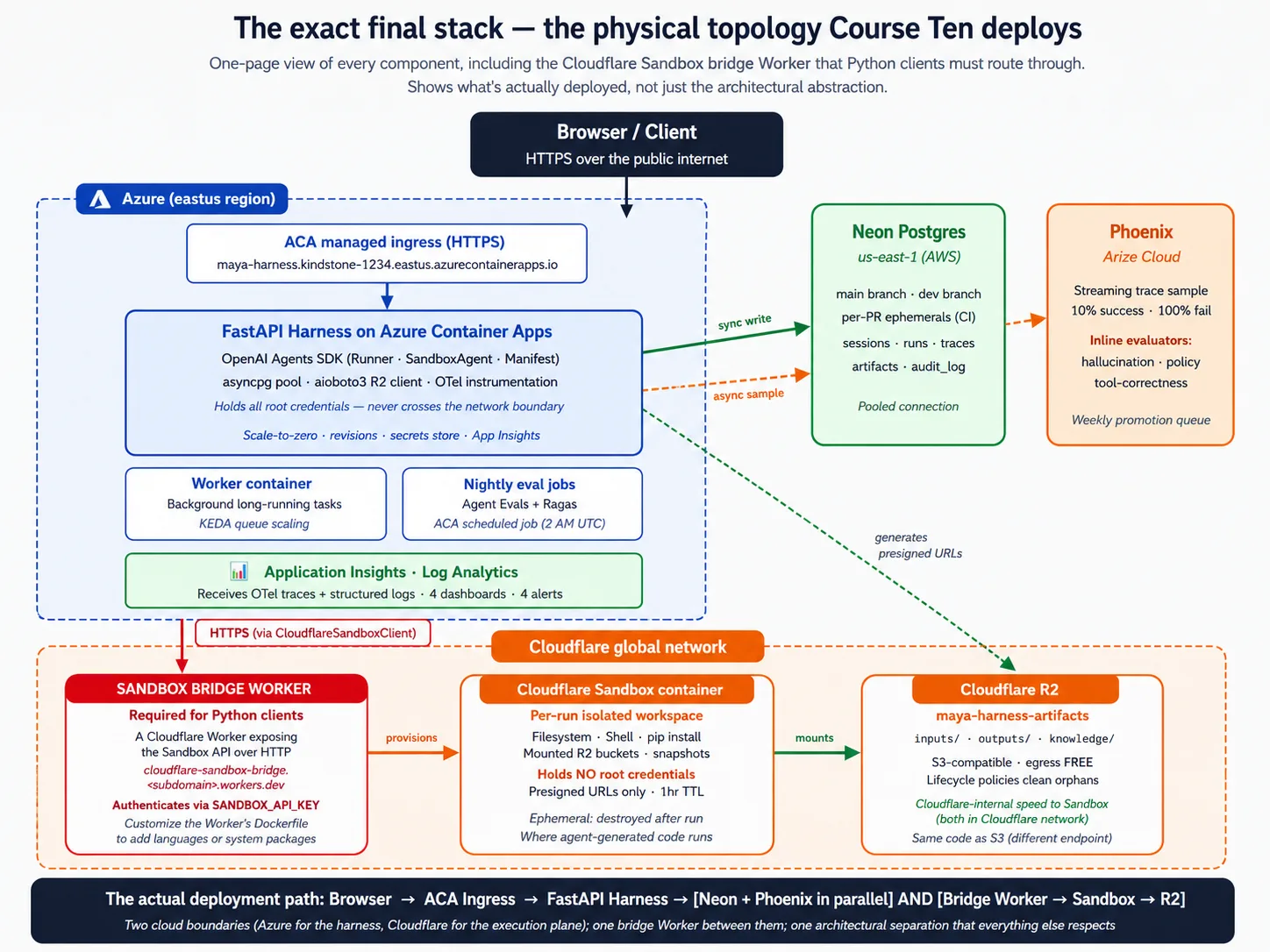
本课引入 17 个概念,并走过 9 个部署决策。在进入任何概念或决策前,先看整套架构的一张图。后面只要某个概念或决策显得抽象,就回来看这张图。
Stack primer:每个组件到底是什么
如果你已经发布过生产 Web 服务,可以跳过本节。如果前面的课程已经是你做过最多的基础设施,请读它。 本课依赖许多初学者还没有建立的背景;没有这些背景,lab 会像一串咒语。这里有四个短小部分:Docker、FastAPI、Neon 和 Cloudflare R2。目标是建立能跟上 lab 的最小心智模型,不是深度精通。
Stack primer 1:Docker 与 containers
Container 是一个密封包,里面包含你的 app 和它运行所需的一切:你的代码、Python packages、system libraries,甚至它依赖的操作系统部件。你只构建一次这个包,然后可以在任何地方运行。能在笔记本电脑上运行的同一个包,到了云端也不变。
它解决的是软件中最古老的抱怨:「在我机器上能跑」。一个 Python script 能在你的笔记本上用你精确的一组 package 跑起来,到了同事电脑或云服务器上,往往要折腾很多。Container 把这种折腾压缩掉:build image 一次,在任何 container engine 能运行的地方运行。
Lab 中会遇到这些词:
- Dockerfile 是构建这个包的 recipe:一个纯文本文件,说明「从这个 base 开始,复制这些文件,运行这些命令」。
- Base image 是起点,通常是带预装语言的小型 Linux 系统。Harness 从
python:3.12-slim开始。 - Multi-stage build 使用一个 image 构建 app(带 compilers 和 tools),再用另一个更小的 image 运行它(只带结果)。运行时 image 保持小,因为 build tools 不随它一起发布。
- Registry 是存储和共享 built images 的地方。Deploy flow 是:build image,把它 push 到 registry,云端 pull 并运行它。
最小心智模型:把 container 想成一台已安装好你的 app、准备运行的工作机器快照。Building image 是拍快照;running it 是启动一个隔离副本。副本关闭时,里面的一切都会消失。这正是为什么 durable state 需要外部数据库、durable files 需要外部存储。Container 是可丢弃的;数据不是。
Stack primer 2:FastAPI
FastAPI 是一个用于构建 Web API 的 Python 库:这些程序通过网络监听请求,并用数据响应,通常是 JSON。它叫「Fast」,是因为使用 Python 的 async 功能做并发;它叫「API」,是因为面向 request-and-response pattern,而不是渲染网页。
它解决的问题是:你的 agent 运行在服务器上,但真实用户(或其他服务)需要从别处通过网络访问它。FastAPI 把你的 Python 代码变成网络可以对话的东西。
Lab 中会遇到这些词:
- Endpoint 是 API 处理的具体 path,例如用于启动任务的
POST /runs,或用于检查 harness 是否活着的GET /health。 - Route handler 是 endpoint 被调用时运行的 Python 函数。你用 decorator 标记它,例如
@app.post("/runs")。 async def和await是 Python 中表示等待的关键字。Harness 使用它们,因为大部分工作都在等待:等 model、等 database、等 sandbox。Async code 让一个进程能同时处理数百个等待中的请求。- Pydantic models 是描述 request 和 response 数据形状的 Python class。FastAPI 用它们自动检查传入请求,并在你的代码运行前拒绝 malformed 请求。
- Uvicorn 是实际运行 FastAPI app、把网络接到 handler 前面的程序。启动命令类似
uvicorn maya_harness.main:app。
最小心智模型:FastAPI app 是一个 Python 文件,创建一个 app object,并用 decorators 把函数标记为 endpoints。每个函数接收已校验的数据,执行工作(通常会 await 其他 async operations),并返回数据,FastAPI 会把它变成 JSON。Uvicorn 是它前面的 server。
Stack primer 3:Neon Postgres
Database 把数据存到磁盘上,使它在重启后仍然存在,支持多个读者和写者同时访问,并让你用一种叫 SQL 的语言查询它。Postgres 是一个具体的开源数据库,也是世界上使用最广的数据库之一。Neon 为你把 Postgres 作为服务运行,并带来两个变化:它是 serverless(会自行扩缩容),并支持 branching(你可以创建数据库副本,副本在发生变更前与 parent 共享存储)。
它解决的问题是:harness 需要在请求和 container 重启之间记住东西。Conversation state、run history、traces、audit log。Container 的 local disk 每次重启都会消失,所以 harness 需要把这些数据放到能存活的位置。之所以特别选择 Neon,是因为它的 scale-up 和 scale-down 行为与 harness 匹配:harness 空闲时,Neon 也能 scale down,你就停止付费。
Lab 中会遇到这些词:
- Table 是一组有名称的结构化 records,像一个每列都有严格类型的 spreadsheet。Harness 有五张表:sessions、runs、traces、artifacts 和 audit log。
- Schema 是所有表及其列的定义。
- Primary key 是唯一标识每一行的列;foreign key 是指向另一张表 primary key 的列,这就是让数据具备关系性的机制。
- Migration 是一个带版本的 SQL script,用来修改 schema,并提交到 repo 中,使每次变更都可追踪。
- Connection pooling 是一组共享的已打开连接,在请求之间复用。没有它,每个请求都会打开新连接,而 Postgres 有连接上限。Neon 提供 pooled endpoint 来为你做这种 multiplexing。
最小心智模型:Postgres 把数据存到形状严格的 table 中,你用 SQL 查询它。Harness 通过 asyncpg Python library 与它通信。Neon 托管数据库,并在其上加入 serverless scaling 和 branching。
Stack primer 4:Cloudflare R2
Object storage 是一种在互联网上存储文件的服务。你给它一个名称(一个「key」)和一些 bytes,它就存起来;之后你按名称请求这些 bytes,就能拿回来。第一个此类服务是 AWS S3,它的 API 成了许多 provider 实现的事实标准。Cloudflare R2 是 Cloudflare 的 object storage。它实现了 S3 API,并带有一个变化:读出你自己的文件是免费的。从 S3 读出数据大约每 GB 九美分;从 R2 读出不收费。
它解决的问题是:agent 会读取文件(上传的文档、knowledge content),也会写入文件(生成的报告、artifacts)。这些文件需要放在 harness 和 sandbox 都能访问的位置,而且对数据库来说太大或太多。数据库不是为大文件设计的;container 的 disk 不能跨重启存活;object storage 才是文件的合适形状。
Lab 中会遇到这些词:
- Bucket 是文件的命名容器,类似顶层文件夹。Harness 的 bucket 保存 agent 的 artifacts。
- Object 是一个已存储的文件,带有一个 key(它在 bucket 中的 path)和一个 value(bytes)。
- Prefix 是 key 的一部分,用来分组相关文件,例如
inputs/或outputs/。 - S3-compatible 意味着 R2 说的是 S3 发明的同一套 API,所以任何能与 S3 通信的 Python library,只要改一个设置(endpoint URL)就能与 R2 通信。
- Presigned URL 是一个短期链接,授权访问一个具体 object。Harness 持有 root credentials;当 sandbox 需要一个文件时,harness 给它一个短期 presigned URL,sandbox 只能访问那个文件。
- Lifecycle policy 是一条规则,用来删除超过某个年龄的 objects,避免 storage 变成只写不删的坟场。
最小心智模型:R2 是 harness 放文件和读文件的地方,通过 S3 API 访问。Harness 持有 root credentials(能读写所有东西);sandbox 只拿 presigned URLs(一个文件,一小段时间)。
你不需要什么。 完成本课不需要 Kubernetes、infrastructure-as-code、service mesh 或 message broker。上面的 managed services 会处理运维机器。也不需要深厚 SQL 能力;能看出 lab 代码在做什么就够了。
Part 1:部署问题
三个概念会说明为什么有这门课,以及「部署问题」到底是什么。初学者应该在这里打底;高级读者可以略读到 Part 2。
Concept 1:「Works on my machine」不是部署
你已经在 Python 中定义了一个 agent,比如 Maya 的 Tier-1 Support agent:它会调用 tools、handoff 给 specialists、遵守限制,并通过 eval suite。你在笔记本上运行它,它能工作。
「在你的笔记本上能工作」实际意味着什么?agent 是一个你手动启动的 Python process。它从项目文件夹中的文件读取 API keys。它把 state 写入同一文件夹里的本地文件。它通过把 libraries import 进同一 process 来运行代码。Model 通过互联网调用,但除此之外的一切都在你的机器上。
生产环境意味着什么?每个部件又如何不同?
- 真实用户通过公网访问 agent。不只是你从笔记本访问。
- 许多用户会同时访问 agent。单个 Python script 一次只处理一个。
- agent 的 state 在 host 重启后仍然存在。temp folder 中的本地文件做不到。
- agent 生成的代码会运行在无法伤害你数据的地方。把它运行在自己的 process 中、旁边还放着数据库 credentials,是严重安全错误。
- agent 生成的代码够不到 agent 的 secrets。工作目录中的 key 文件做不到。
- 每次运行都可观测、可审计、可恢复。一个崩掉的 process 三者都不是。
这六个属性里,有多少可以用小改动、一两天工作加到 laptop script 上?诚实答案是一个或零个。任何一个要以能经受生产环境的方式加入,至少都需要一周专注的基础设施工作;把六个全加上,就是本课要教的全部工作。生产部署不是给「works on my laptop」套一层薄 wrapper。它是另一种架构。
尤其是第一次部署 AI 服务的团队,很容易跳过这个认识。「我们就把 script 放到服务器上跑。」两个月后,团队会拥有一台偶尔崩溃的服务器、一个偶尔用完整生产数据库访问权限运行受用户影响代码的 agent、每次重启都消失的 state,以及没有任何 agent 操作记录的系统。这就是把生产环境当成放 script 的地方,而不是另一种架构时的可预测结果。
部署问题不是「我们在哪里运行 script?」而是「如何重新架构 agent,让它的 harness 拥有这六个生产属性,同时让 execution 保持安全?」本课会教一条完整答案。
Concept 2:Harness/sandbox 分离,control plane vs execution plane
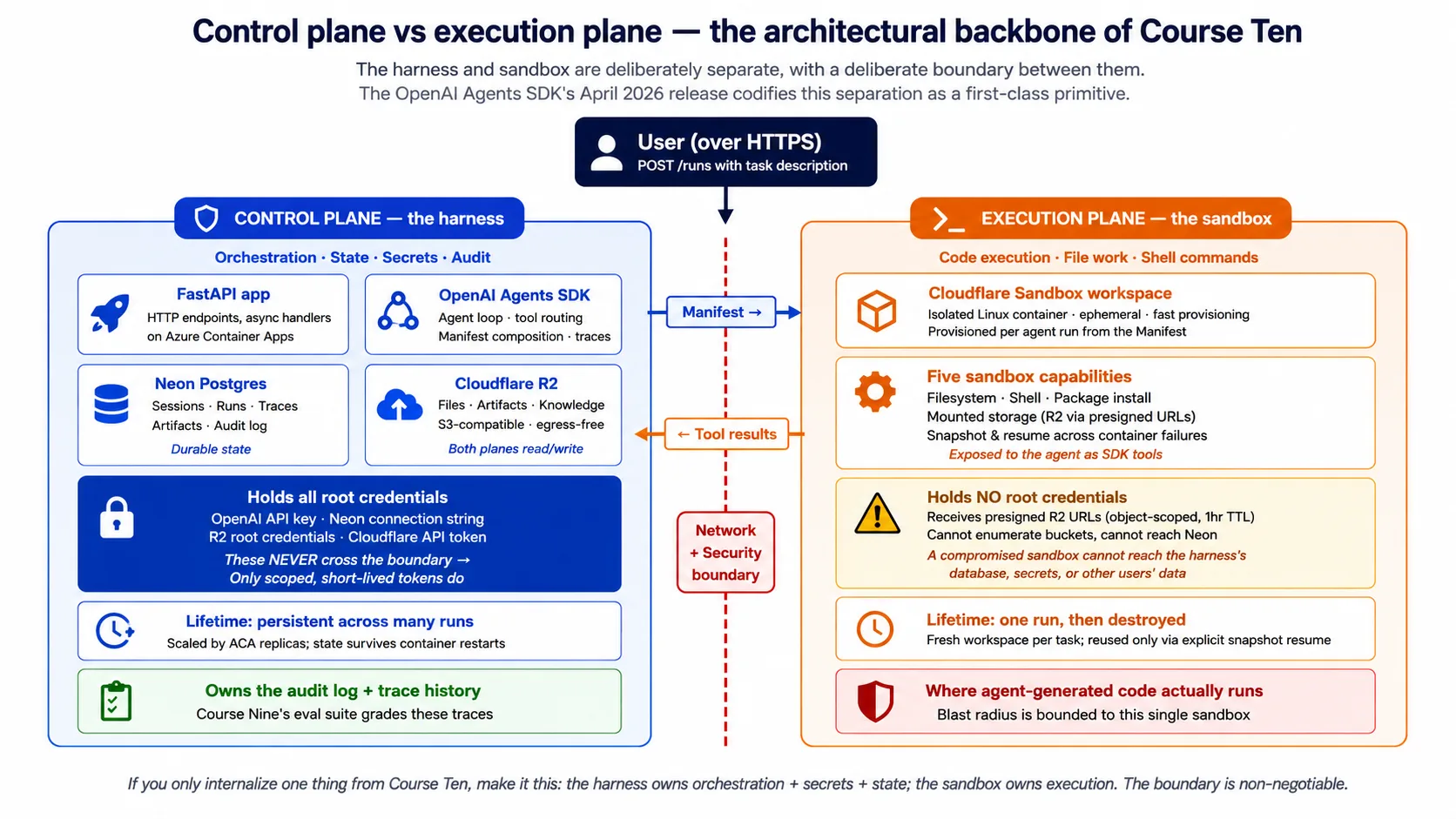
本课最重要的单一想法,是 harness(control plane)与 sandbox(execution plane)之间的分离。后面每个概念和决策都建立在它之上。
Harness 是 agent 的大脑。它通过网络接收用户请求。它运行 agent loop:调用 model、决定接下来调用哪个 tool、处理 handoff 到 specialist agents、应用 guardrails。它跨多次运行保存 durable state:conversation history、run history、audit log。它持有 secrets:model key、database credentials、storage credentials。它把结果返回给用户。
Sandbox 是 agent 的双手。它从 harness 接收 workspace description(Manifest)。它 provision 一个与描述匹配的隔离 workspace。它根据 agent 请求运行 shell commands、读写文件和执行代码。它把结果返回给 harness。除了 Manifest 明确 mount 的内容外,它不能访问 harness 的 secrets、database 或 production systems。
它们之间的边界是 network boundary 和 security boundary。 Harness 用 sandbox credentials 通过网络与 sandbox 通信;它不把自己的 secrets 分享给 sandbox。Sandbox 不能读取 harness 的 environment、database 或 filesystem。这就是 2026 年 4 月 SDK 发布放进 SDK 自身的生产纪律。
为什么这种分离重要?有四个原因。
安全原因:agent 会生成代码。代码可能是错的,可能以微妙方式产生副作用;在对抗环境中,还可能是恶意的。你不希望这样的代码运行在持有数据库 credentials 的同一个 process 中。这种分离在生成代码与 harness secrets 之间放入 network 和 OS 边界。如果 agent 生成了会删除文件的请求,受伤的只有 sandbox,而 sandbox 是可丢弃的。
持久性原因:sandbox 本来就应该经常创建和销毁。Harness 必须能承受 sandbox 死亡。单个任务可能 provision 一个 sandbox、运行十分钟、因为短暂故障失去 sandbox、从 checkpoint 恢复到新的 sandbox 中并完成。Harness 负责 orchestrate 这些。如果 harness 住在 sandbox 里,sandbox 一死就全丢。
可扩展性原因:一个 harness 协调多个 sandbox,比一个 harness-plus-sandbox 块更容易扩展。Harness 的需求较温和(处理请求、调用 model、访问 database);sandbox 的需求更尖峰(compile code、run tests、process files)。分离后两者可以各自扩展。
可观测性原因:harness 拥有记录。agent 做了什么决定、调用了什么 tools、产生了什么 trace,全都跟 harness 在一起。Sandbox 是 execution;harness 是 audit log。出问题时,你读的是 harness 的记录。
本课会避开两个 anti-pattern:
- 把 harness 放进 sandbox 里运行。 对 prototype 方便,对 production 错误。Sandbox 是可丢弃的;harness 需要持久存在。Sandbox 不能被托付 secrets;harness 必须持有它们。
- 把 agent-generated code 放进 harness 里运行。 这是 AI 部署的原罪。Harness 持有 database credentials、model key 和用户数据访问权限。你不能让 agent-generated code 拥有这样的 access surface。迟早会出问题,而出问题时伤害没有边界。
Concept 3:SDK 需要云基础设施提供什么:五个 surface
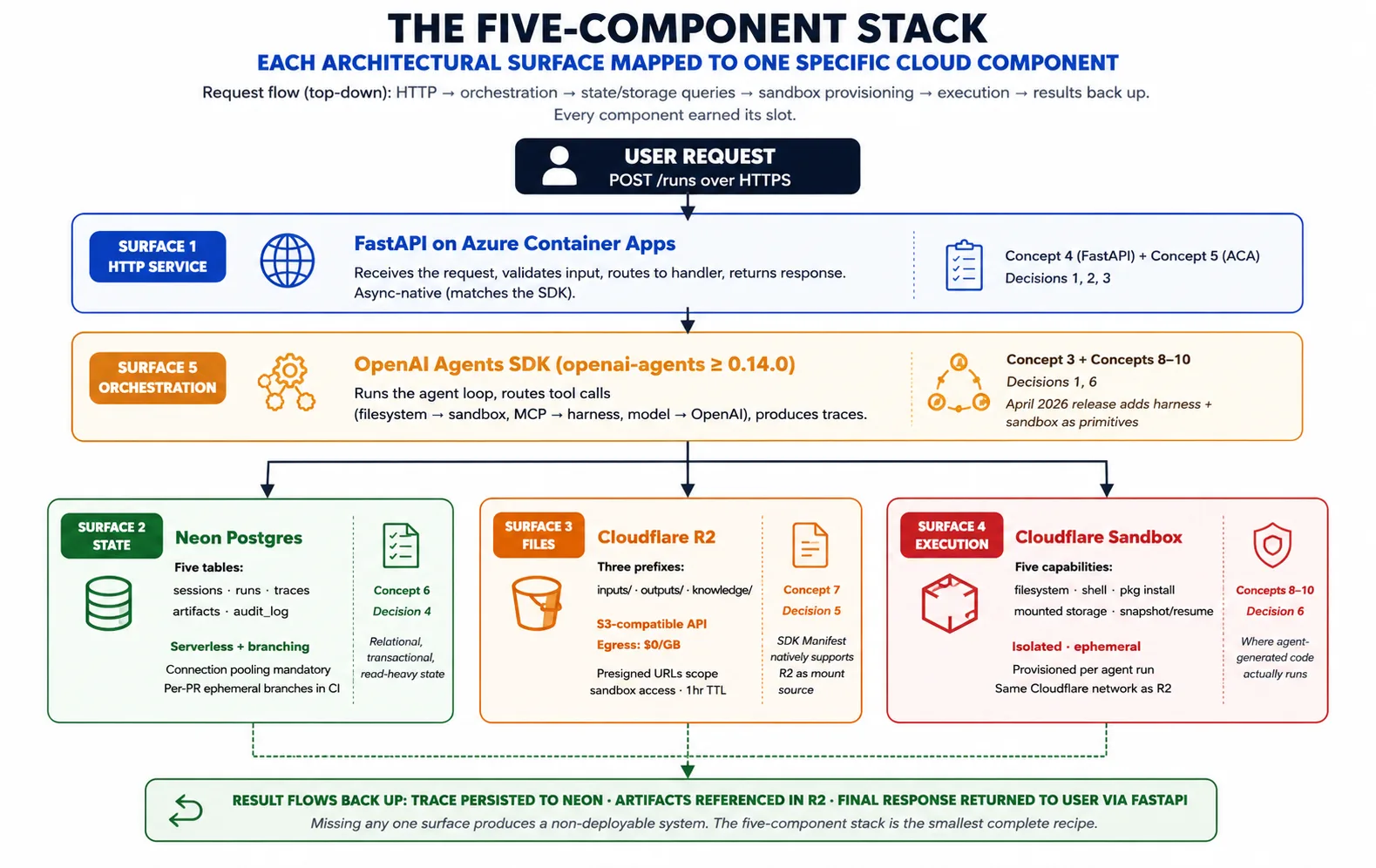
Concept 2 点名了 pattern。Concept 3 问的是:给定这个 pattern,OpenAI Agents SDK 到底需要云基础设施提供什么,才能实现它?答案是五个 surface,而五组件技术栈正好把每个组件映射到一个 surface。
Surface 1:一个长期运行的 HTTP service,用来托管 harness。 Harness 是一个 Python process,必须接收用户请求,长期保持运行(任务可能持续几秒到几小时),在流量上升时 scale out、下降时 scale back,并能承受 host 故障。Azure Container Apps 上的 FastAPI 提供这个 surface。Concept 4 讲 FastAPI;Concept 5 讲 Azure Container Apps。
Surface 2:跨 runs 的 durable state。 Harness 保存 sessions、runs、traces、approvals 和 audit log。Neon Postgres 提供这个 surface:选择 Postgres 是因为它是最被理解的 transactional database;选择 Neon 是因为它的 serverless scaling 和 branching 匹配 harness 的部署模式。Concept 6 讲 Neon。
Surface 3:两个 plane 都能访问的 file 和 artifact storage。 Agents 会产生文件(reports、code、exports),也会消费文件(uploads、datasets、knowledge content)。这些文件需要放在 harness 和 sandbox 都能到达的位置。Cloudflare R2 提供这个 surface:S3-compatible API、读出自有文件免费,并且在 2026 年 4 月 SDK 中作为 Manifest mount source 原生支持。Concept 7 讲 R2。
Surface 4:agent-generated code 的隔离执行环境。 当 agent 运行 shell command、安装 package 或执行代码时,这项工作需要一个与 harness secrets 隔离、按需创建,并能从 storage 读取输入和写回输出的 home。代码执行 sandbox 提供这个 surface。Concepts 8–10 会深入讲 sandbox layer。
Surface 5:把 surface 1–4 串起来的 orchestration。 这就是 SDK 自身。它运行 agent loop、route tool calls(filesystem 和 shell 到 sandbox,model calls 到 OpenAI)、管理 Manifest,并产生 traces。Harness import SDK 并使用它的 primitives;不会重新发明它们。
组合方式是:请求到达 Azure Container Apps 上的 FastAPI。Harness 从 Neon 加载 agent 和 prior state。它组成描述任务所需 workspace 的 Manifest。它要求 sandbox provider provision 该 workspace。SDK 运行 agent loop,把 tool calls 发送到 sandbox,并记录 trace。Artifacts 进 R2;trace 进 Neon。结果返回用户。这种组合就是整门课;每个概念和决策都会展开其中一块。
🚫 不用 Python? 截至 2026 年 4 月发布,harness 和 sandbox 功能只支持 Python;TypeScript 支持已有计划但没有日期。如果你的 app 是 TypeScript,把 Python harness 作为独立服务运行,让 TypeScript app 通过 HTTP 调用它的 endpoints。本课构建的 harness 正是这种服务。
Part 2:五组件技术栈
Part 1 建立了 pattern;Part 2 讲 harness 侧的 stack(FastAPI、Azure Container Apps、Neon、R2),以及为什么每个组件都值得占据自己的位置。第五个组件 sandbox 会在 Part 3 单独讲。
Concept 4:FastAPI 作为 harness 的 Web 层
Harness 需要成为一个长期运行的 HTTP service,而几个 Python framework 都能托管它:Flask、Django、FastAPI、Starlette。本课选择 FastAPI,原因足够具体,值得点名。
Async 方面:OpenAI Agents SDK 建立在 Python 的 asyncio 之上。对 model、tools 和 sandbox 的调用都是 await 调用。FastAPI 是 async-native,所以你可以写 async def handler,直接 await SDK,不需要 thread-pool workaround。一个 sync-native framework 意味着每个请求都要启动 event loop,或把 SDK 放进 thread pool:两者都能工作,但都会增加摩擦并丢失并发。选与你依赖项 concurrency model 匹配的 framework。
Schema 方面:FastAPI 会从 handler 的 type hints 生成 OpenAPI schema。这里有三点收益。eval suite 可以用 checked requests 调用 harness endpoints,因为 schema 是 machine-readable 的。任何语言都可以生成 typed client libraries,包括上一条 sidebar 中的 TypeScript app。schema 也会为团队和未来的你记录 API,而不需要单独写文档。
Pydantic 方面:FastAPI 用 Pydantic 检查 request 和 response data,SDK 内部也使用 Pydantic。Validation 在边界只发生一次,并使用 SDK 已经采用的同一库和模式。其他 framework 需要单独 validation layer;FastAPI 去掉了这种不匹配。
Community 方面:截至 2026 年 5 月,FastAPI 是 AI services 中占主导地位的 Python framework。这个 workload 的 tutorials、examples 和 answers 都默认它。选择支持良好的工具能减少摩擦。
FastAPI 不是什么。它不是包办一切的通用 framework;如果你需要 template-rendered HTML pages 或 Django-style admin,FastAPI 是错误选择。Harness 是 API server,不是 Web app。它也不是 queue 的替代品:如果任务运行时间长到请求不该一直打开,就不要一直 hold 连接。Harness 会排队工作,让 client 回来查询;lab 会设置这个 pattern。
在 lab 中,你会看到 harness 的 POST /runs endpoint:一个 async def handler,加载 session、运行 agent、持久化 run 并返回 reply。它是一个短函数,因为 FastAPI 和 Pydantic 免费提供 HTTP handling、validation 和 serialization,而 async def 让你能直接 await SDK。真实、已启动版本的代码在 companion download 和 lab Decision 中,可以追溯到一个确实能跑的 harness。
Concept 5:Azure Container Apps 作为 harness runtime
Harness 是一个 containerized FastAPI service,需要持续运行、随流量扩展、安全持有 secrets,并承受 host 故障。本课选择 Azure Container Apps(ACA),Microsoft 将它定位给的正是这类 workload。
它是什么:一种受管云服务。你给它一个 container image 和一份 configuration;它运行 container,给它公网地址,处理 autoscale,存储 secrets,并跟踪 revisions。你不用管理 servers,不用手动运行 Kubernetes,也不用为底层 compute 写 infrastructure code。你声明想要什么;ACA 让它变成现实。
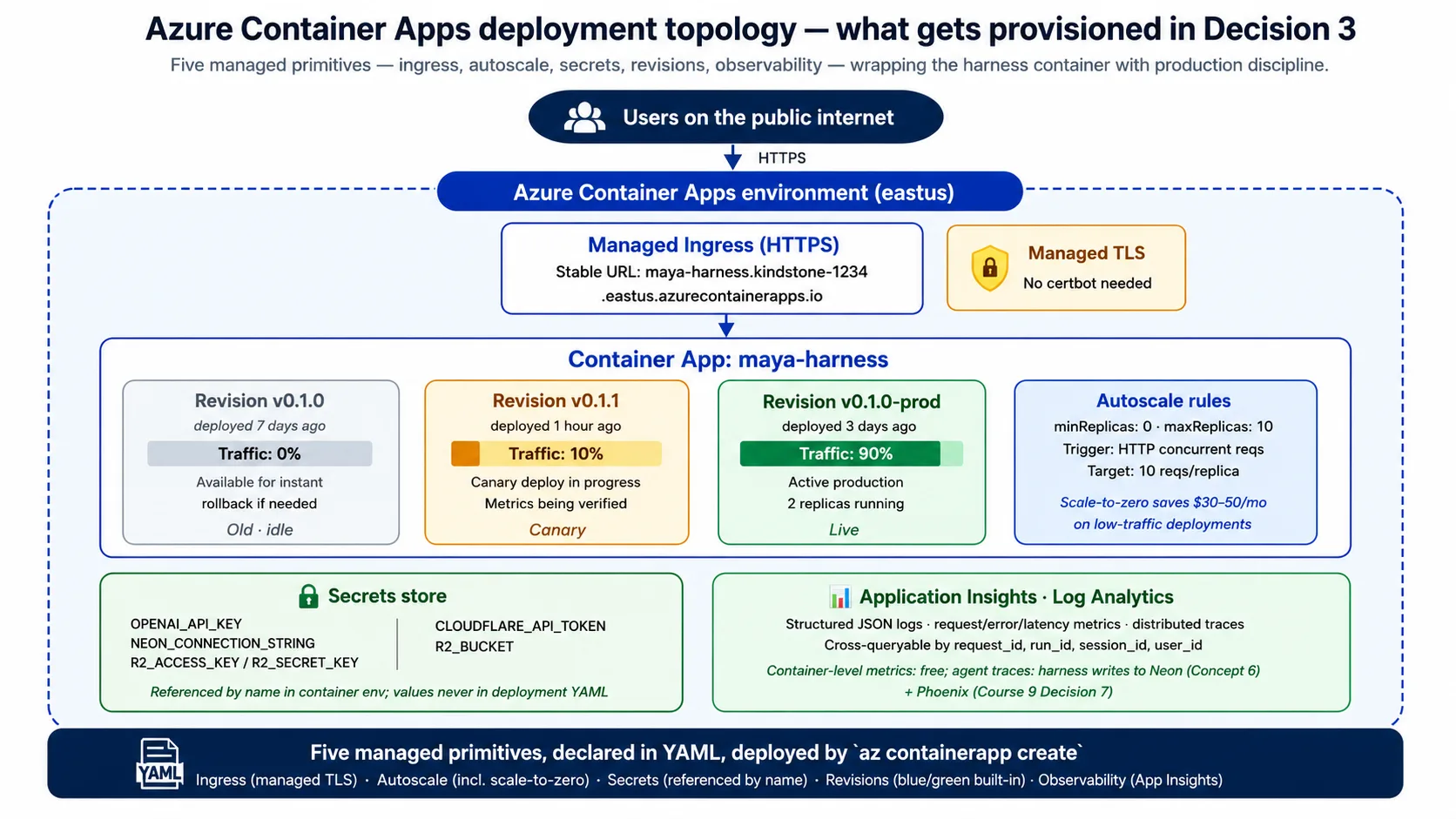
Harness 需要它提供五项能力:
- 公网地址。 ACA 给每个 app 一个稳定的 HTTPS 地址和 managed certificates。无需 Web-server config、certificate setup 或 DNS gymnastics。
- Autoscale。 ACA 根据你设置的规则扩缩运行副本数,通常基于 in-flight requests 数量。**Scale-to-zero 是成本杠杆:**没有流量时,ACA 运行 0 个副本,你不付费;安静一段时间后的第一个请求,会等几秒让副本醒来。
- Secrets。 ACA 存储 secrets,并允许你在 environment variables 中按名称引用;真实值不会出现在 configuration 或 image 中。这比磁盘上的 key file 好得多。
- Revisions。 每次 deploy 都会创建一个 immutable revision,ACA 可以按任意百分比在 revisions 之间切流量。这让 blue/green deploy 和 rollback 成为内置能力:rollback 是一次流量变更,不是重新部署。
- Observability。 ACA 把 logs、metrics 和 traces 输入 Azure monitoring tools,所以你免费获得 request rate、error rate 和 latency;harness 会在其上加入 agent 自己的 traces。
为什么是 ACA,而不是 Cloud Run、Fly.io 或 raw Kubernetes?有三个诚实原因。Microsoft 把 ACA 定位给的正是这种 profile:containerized APIs、background jobs 和 microservices。它的 revisions 和 traffic splitting 是一等能力,而许多服务把 blue/green 当成 bolt-on。它的 scale-to-zero 也很诚实:确实运行 0 个副本并不收费,而有些「managed」服务会保留一个 warm copy 并收费。其他云有干净的等价物(Google Cloud Run、AWS App Runner);架构形状相同,Concept 9 和 Concept 15 会讲替代。
什么时候 ACA 是错误选择:如果 peak 时需要超过约 25 个副本,它的 per-app limits 会变得别扭,完整 Kubernetes 更合适;如果需要 active-active multi-region,它的 multi-region story 不够成熟(Concept 14 会点名)。Harness 部署的 container 很小,基于 python:3.12-slim,用 multi-stage build 构建,由 uvicorn 启动,并用你在 Quick Win 中请求过的同一个 GET /health endpoint 检查。
Lab 的 Decision 3 会产出一份短的 ACA configuration,声明公网地址、按名称引用的 secrets、资源大小和 scale rule(根据 request volume 从 0 扩到少量副本)。你会读到它,并从这个概念中认出每一行。
Concept 6:Neon Postgres 用于 durable state
Harness 需要跨 runs 记住东西:conversation history、run records、traces、audit log。所有这些都必须在 container 重启、扩缩容或替换后仍然存在。本课选择 Neon Postgres。
为什么要 Postgres,而不是 Redis 或 document store?Harness 的 state 有三个属性,指向 relational、transactional database。它的形状是 relational:sessions 有多个 runs,runs 有 traces 和 artifacts,因此 foreign keys 和 joins 能自然映射。它需要 transactional integrity:「把这个 run 标记为 complete、插入 trace、更新 session timestamp」应该全成功或全失败,而 Postgres transactions 免费提供这一点。它的 reads 也是 relational:「给我这个 session 最近十次 runs 及其 traces」是教科书级 SQL query。Redis 这类 cache 做 key lookup 更快,但不是 system of record 的正确形状。
为什么特别是 Neon,而不是 RDS 或 VM 上的 database?Serverless story:Neon 的 compute 会自行扩缩,并且在 harness 空闲时可接近 scale to zero,匹配整个 stack 的成本模型。传统 managed instance 不管你查不查询都会计费。Branching story:Neon 让你创建数据库 branch,也就是与 parent 共享存储直到发生变更的副本;这能在几秒内为每个 developer 和每个 PR 提供可丢弃测试数据库。并且它就是 Postgres,不是近似品:同样的 SQL、同样的 client libraries,所以迁入迁出 Neon 基本是 connection-string change。
Harness 的 schema 有五张表:sessions(用户的 ongoing context)、runs(每个 agent task)、traces(一次 run 的完整 SDK trace)、artifacts(指向 R2 中文件的 pointers)和 audit log(对发生过什么的 immutable record,用于 eval suite 和 compliance)。Lab 的 Decision 4 会从 companion download 中的 schema.sql 文件创建这个 schema。
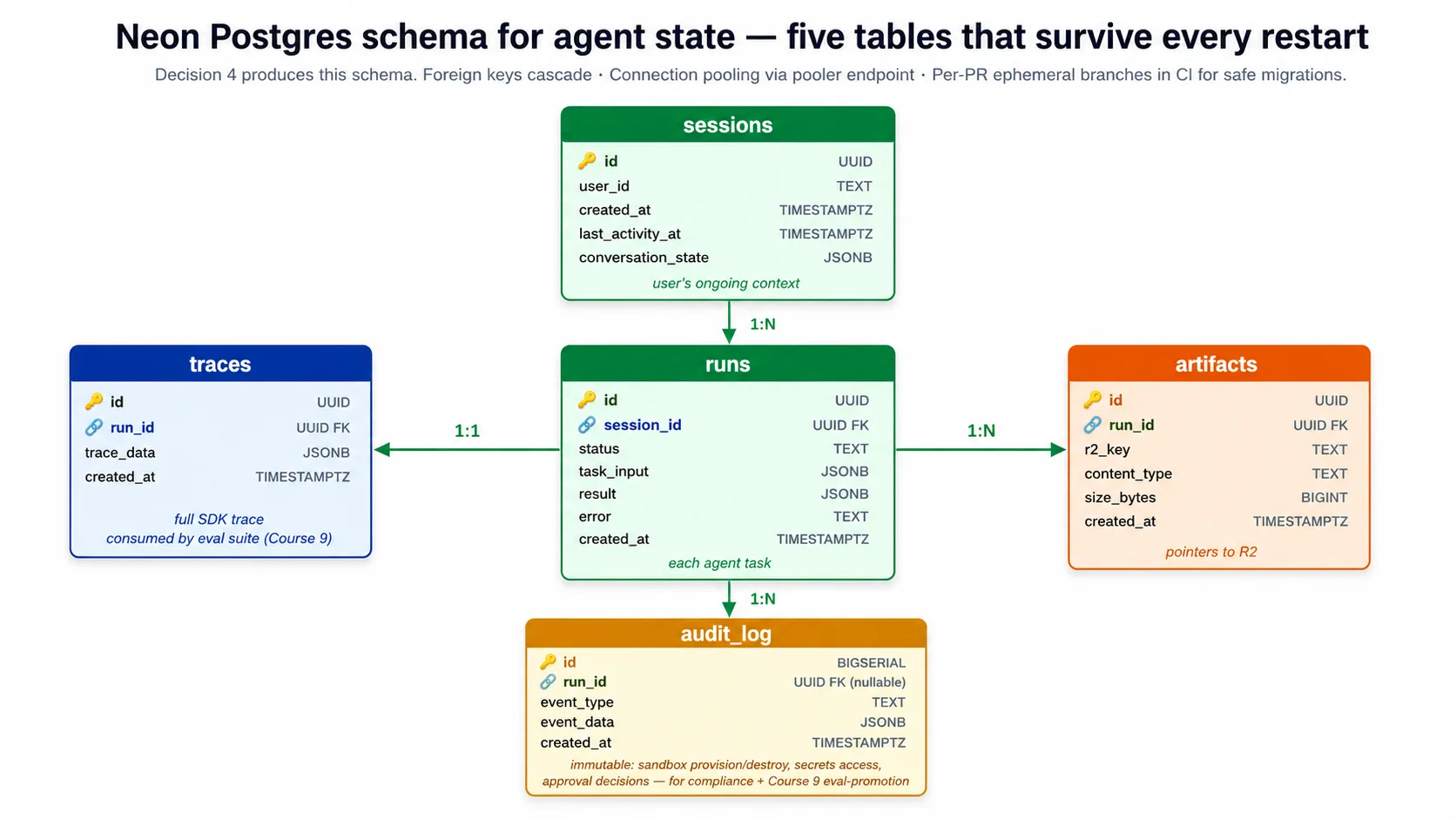
⚠️ lab 会为你修掉两个 Neon footgun。 Neon 复制粘贴出来的 connection string 包含
channel_binding=require。asyncpgdriver 不认识它,并会在 pooled endpoint 上失败,所以 harness 在连接前会移除channel_binding(保留sslmode=require)。另外,pooled endpoint 会静默丢弃search_pathserver settings,所以 harness 对每条 statement 都做 schema-qualified(public.runs、public.sessions),并且你会在 direct、non-pooled endpoint 上运行 schema。这两个都是真实 footgun,companion code 已处理;lab 会把它们列为 explicit acceptance criteria。
Connection pooling 不是可选项。Harness 会扩展到多个副本,每个副本都打开连接,而 Postgres 同时连接数超过几百就会倒下。Neon 提供 pooled endpoint,把成千上万个 harness connections multiplex 成少量真实 Postgres connections。Harness 对普通工作连接 pooled endpoint,只在 schema changes 时连接 direct endpoint。
Concept 7:Cloudflare R2 用于 files 和 artifacts
Harness 和 sandbox 都需要文件:agent 读取的 input documents、它产生的 output artifacts、它检索的 knowledge content。本课选择 Cloudflare R2,原因有三个。
为什么要 object storage,而不是 database 或 container disk?文件不是 relational database 的合适形状:Postgres 可以把大文件放在一个 column 中,但 backups 会膨胀,connection 会成为瓶颈,你会后悔。Database 应该保存 relational state 和文件的 pointers;文件 bytes 住在 object storage。文件也不适合 container local disk,因为它会在重启后消失,也无法在多个副本之间轻松共享。当文件需要比任一 container 活得更久、并能被许多地方同时访问时,object storage 是正确形状。
为什么是 R2,而不是 S3 或 GCS?Egress story 是主要原因。从 R2 读出你自己的文件是免费的。 S3、Google Cloud Storage 和 Azure Blob 都会对传出数据收费,通常每 GB 五到十二美分。对于在 harness 和 sandbox 之间反复移动文件的 agent,这会迅速累积。每月移动几 TB 数据的 harness,在 S3 上会为 egress 支付数百美元,在 R2 上为 0;storage 和 request costs 大致相当,所以 egress 这一行直接消失。低流量 harness 差异不大,但真实规模下,free egress 是可行与不可行之间的差别。
R2 也说 S3 API,所以任何 Python S3 library 只需改一个设置,也就是 endpoint URL,就能与它通信;未来迁移时无需重写 client。2026 年 4 月 SDK 发布也把 R2 列为受支持的 Manifest mount source,与 S3、GCS 和 Azure Blob 并列,所以 harness 可以在 Manifest 中声明 R2 buckets,sandbox 无需自定义 bridge code 就能 mount 它们。
Harness 在 bucket 中使用三个 prefix:inputs/ 存用户上传的文件,outputs/ 存 agent 产生的文件,knowledge/ 存长期 knowledge content。Lab 的 Decision 5 会设置这些。
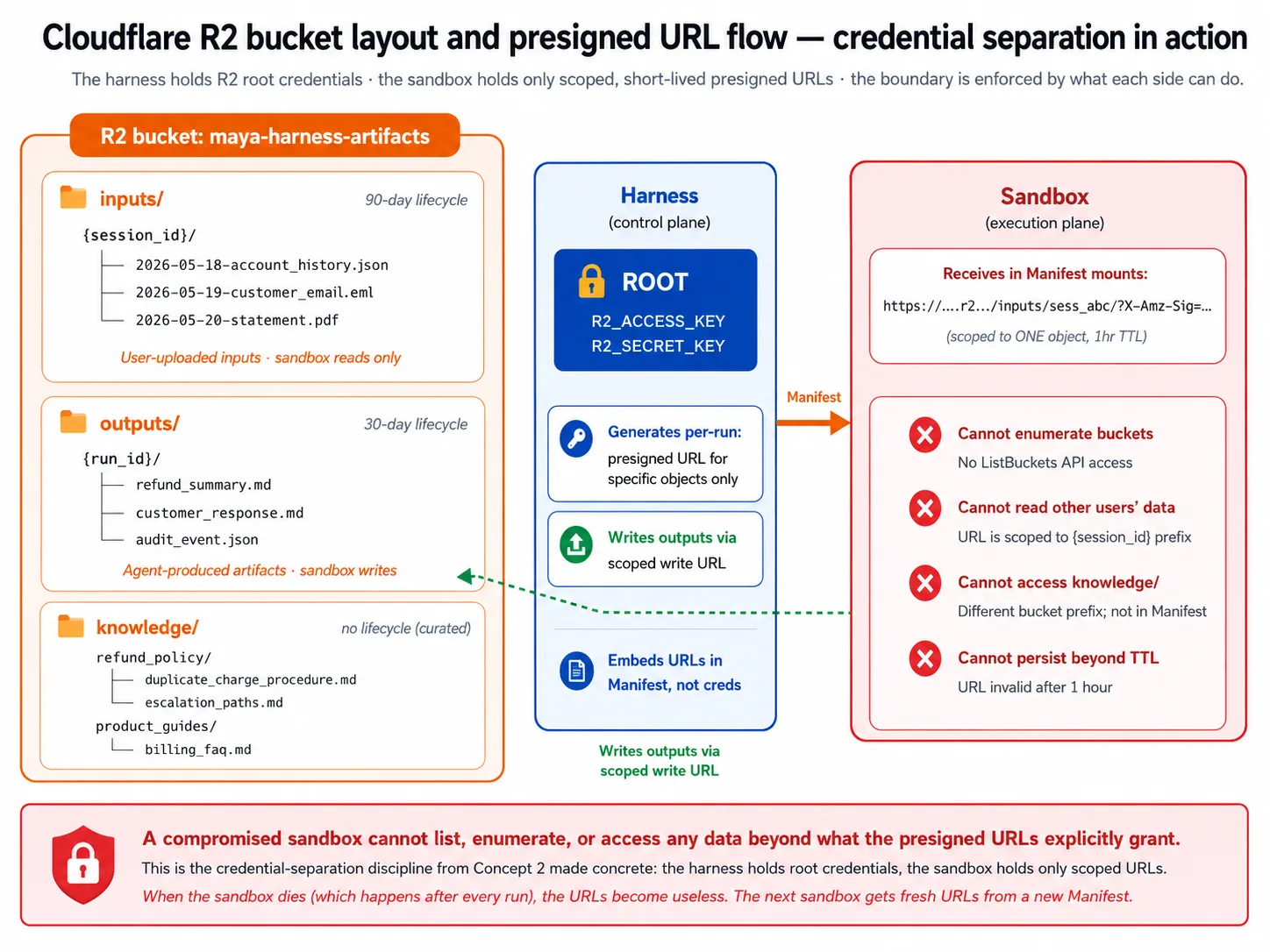
Presigned URLs 是 sandbox 在不拿 root credentials 的情况下获得访问权限的方式。Harness 持有能读写任何内容的 root credentials。它不会把这些 credentials 分享给 sandbox。相反,它为一个具体 object mint 一个短期 presigned URL,并交给 sandbox。Sandbox 只能访问 URL 允许的内容;当 sandbox 死亡,URL 也失去价值,下一个 sandbox 会拿到新的 URL。这就是 Concept 2 的 credential separation 的具体化:compromised sandbox 无法 list buckets,也无法访问另一个用户的数据。
Lifecycle policies 避免 storage 变成只写不删的坟场:lab 会为 outputs/ 设置 30-day cleanup,而 curated knowledge/ 不设置 cleanup。
Part 3:Execution plane
Part 2 覆盖了 harness 侧:orchestration、state 和 storage。Part 3 覆盖 execution 侧,也就是真正运行 agent 生成代码的 sandbox。三个概念:sandbox 提供什么、选哪个 provider,以及 harness 与 sandbox 之间如何 handoff。
Concept 8:Sandbox execution capabilities
Concept 2 把 sandbox 命名为 execution plane:代码运行在那里,却不能访问 harness secrets。Concept 8 让它具体化。agent 到底需要 sandbox 提供什么?
五项能力:
- Filesystem。 agent 会读写文件:inputs、intermediate artifacts、outputs。Sandbox 提供一个 Unix-like filesystem,并把 read、write、edit 和 list operations 暴露为 tools。没有它,agent 无法做文件工作。
- Shell。 agent 会运行 commands:test runner、package install、clone、自定义 tool。Sandbox 提供一个 shell 来运行这些。没有它,agent 只能使用 harness 显式 wrap 的东西。
- Package install。 agent 会按需安装 packages:「安装这个 library,然后读取用户上传的文件,再总结它。」没有它,agent capability 被锁死在 base image 自带内容上。
- Mounted storage。 agent 需要本地 disk 放不下的文件:uploads、knowledge content、datasets。Sandbox 把外部 storage(R2、S3、GCS)mount 成普通 paths,Manifest 声明哪里要 mount 什么。没有它,agent 只能触碰足够小、能随 image 一起发出的文件。
- Snapshot and resume。 Sandbox 是可丢弃的,也可能在 run 中途失败。Sandbox 可以 checkpoint 自己的 state,并在 fresh workspace 中从 checkpoint 恢复,这就是 SDK 让长任务在 workspace 死亡后仍能存活的方式。没有它,任何超过 sandbox lifetime 的任务都会变成等待发生的 failure。
三个属性把 production-grade sandbox 与 prototype 区分开来。Isolation: sandbox 不能访问 harness network、filesystem 或其他 sandboxes,而且由 provider 的基础设施强制执行,而不是靠信任,所以 compromised sandbox 只会伤害自己。Ephemerality: 每个任务得到 fresh sandbox,任务结束后销毁,所以即使 sandbox 被 compromised,也不会带到下一个任务。Fast provisioning: sandbox 几秒内启动,因为 30 秒启动时间会让每个任务都多出 30 秒以上,使 chat-style agents 显得很慢。
Sandbox 不是什么。它不是跨 tasks 长期运行的 VM;那会重新发明问题,积累 state,并与 harness secrets 纠缠。它也不是 serverless function,serverless function 是运行一个 function 并返回;sandbox 是一个 workspace,会在一次 run 中跨多次 tool calls 持续存在,在 run 期间把 state 保存在 filesystem,并提供 shell access。它也不是 Kubernetes;sandbox provider 会完全抽象 container orchestration,所以你不需要运行 cluster 也能得到 isolation 和 ephemerality。
Concept 9:选择 sandbox provider
Concept 8 点名了 capabilities;Concept 9 选择 provider。本课会诚实说明选择,也会说明现实可用的免费路径。
先看决定大多数读者选择的 tradeoff。Cloudflare 的 sandbox 需要 paid Workers plan,而且在 Python harness 与 sandbox 之间还需要一个小的 bridge Worker。E2B 有免费 Hobby tier、SDK 中的 native client,并且不需要部署 bridge。 所以,如果你想不花钱完成 lab,E2B 是现实的免费路径;如果你已经在使用 paid Cloudflare plan 和 R2,Cloudflare sandbox 的 proximity benefit 值得考虑。Lab 写成两者都能工作,companion code 默认 E2B,因为这是你能真正免费测试的路径。
为什么在你选择 Cloudflare sandbox 时,本课把它命名为 primary:它运行在 Cloudflare 网络中,R2 也在同一网络里,所以 mount R2 buckets 会走 Cloudflare-internal speeds,而不是公网。没有其他 provider 与 R2 有这样的 proximity。它也有一等 SDK support,并且成本结构不为 idle time 计费(agent 等待 model 的时间远多于执行时间)。问题是 paid plan 和 bridge Worker:Python harness 这类非 Worker client 无法直接创建 Cloudflare sandbox,所以需要单独部署一个小 Worker,把 harness calls 翻译成 sandbox operations。其他 providers(包括 E2B)直接暴露 Python API,不需要 bridge。
诚实的替代项,以及各自胜出的 use case:
- E2B。 现实可用的 free-tier 路径,也是 polished general-purpose provider。它与 S3、GCS 或 Azure Blob 都能很好配合,SDK 对它有 native client。你 storage-agnostic、不在 R2 上,或想免费完成 lab 时,用 E2B。
- Modal。 擅长 Python ML workloads;能很轻松地把 agent tasks 与 GPU-backed inference 放在一起运行。如果 agent 包含 custom model serving,用 Modal。
- Daytona。 运行在你自己的 cloud account 中。适合受监管行业,data residency 要求 sandbox 必须住在特定 cloud 中;代价是更高 operational complexity。
- Vercel。 如果团队已经深度使用 Vercel ecosystem,可以考虑;但它对 non-JavaScript workloads 的成熟度较低。
- Bring-your-own。 SDK 支持把 sandbox client 实现到你自己的 container infrastructure 上。只有当 security team 明确要求 sandboxes 必须在你的 cloud 中时才值得;operational complexity 会大幅上升。
Provider 之间的替换大多是机械性的。Manifest 是 provider-agnostic 的,所以无论 provider 是谁,你声明同样的 workspace shape。变化的是 provider client class(一个用 Cloudflare client,一个用 E2B client)。Storage mounting 的差异来自 network proximity(R2 配 Cloudflare sandbox 很快;R2 配 E2B 走公网,也能工作)。Credential pattern 完全相同:harness 持有 provider credentials,只把短期 access 交给 sandbox。
一句话建议:如果你已有 paid Workers plan 并使用 R2,用 Cloudflare sandbox;否则用 E2B,尤其是你想走免费路径时;选一个并交付,不要先调查所有 provider。
Concept 10:Harness-to-sandbox handoff
Harness 负责 orchestrate;sandbox 负责 execute。Concept 10 走一遍 handoff:harness 如何告诉 sandbox 要 provision 什么,credentials 如何安全跨越边界,以及 sandbox lifecycle 如何跨一次 run 被管理。
Manifest 是 handoff contract。 Harness 组成 Manifest,描述 workspace 需要什么;provider 接收它,并 provision 匹配的 workspace。在 2026 年 4 月 SDK 中,Manifest 由一组 entries 构成:每个 entry 是 workspace 中的一个 path,映射到该处应该放什么,可以是 file、directory、git repo 或 storage mount。Mounts(R2Mount、S3Mount 等)位于 agents.sandbox.entries,并放进这些 entries 中。Manifest 自身没有单独的 mounts list,也没有 base-image 或 resource-limit fields;entries 描述 workspace。
from agents.sandbox import Manifest
from agents.sandbox.entries import R2Mount
from agents.sandbox.entries.mounts.base import DockerVolumeMountStrategy

# Mounts go inside entries, keyed by their path in the workspace. An R2Mount
# attaches a bucket; it has no per-prefix field, so object-level scoping is
# the harness's job (the presigned URLs it mints, from Concept 7), not a mount.
manifest = Manifest(
    entries={
        "/workspace/inputs": R2Mount(
            mount_path="/workspace/inputs",
            bucket="maya-harness-artifacts",
            account_id=R2_ACCOUNT_ID,
            mount_strategy=DockerVolumeMountStrategy(driver="rclone"),
        ),
        "/workspace/outputs": R2Mount(
            mount_path="/workspace/outputs",
            bucket="maya-harness-artifacts",
            account_id=R2_ACCOUNT_ID,
            mount_strategy=DockerVolumeMountStrategy(driver="rclone"),
        ),
    }
)
Capabilities 从 SDK defaults 中选择,而传入 list 会替换它们。 Capabilities.default() 返回标准集合(filesystem、shell 和 compaction)。如果你传入自己的 list,它会替换 default,而不是追加;所以要保留 defaults 并加一个能力,需要 concatenate:
from agents.sandbox.capabilities import Capabilities, Memory

# Keep the defaults and add one: a passed list REPLACES the default,
# so concatenate rather than passing [Memory()] alone.
capabilities = Capabilities.default() + [Memory()]
这是一个真实 footgun:写 capabilities=[Shell()] 会静默丢掉 default 里包含的 filesystem 和 compaction abilities。保留 default,再在其上添加。
Sandbox 通过 RunConfig attached,而不是作为 Runner.run 参数。 没有 Runner.run(..., sandbox=...) 这个参数。你用 provider client 及其 options object 构建 SandboxRunConfig,把它放到 RunConfig 上,再把 RunConfig 传给 run。每个 provider client 都配自己的 options object,而 options 位于 SandboxRunConfig 中,不在 client constructor 中:
from agents import Runner
from agents.run import RunConfig
from agents.sandbox import SandboxRunConfig
from agents.extensions.sandbox.e2b import E2BSandboxClient, E2BSandboxClientOptions

# The client reads E2B_API_KEY from the environment; the options carry the
# required sandbox_type. The sandbox rides on RunConfig, not a Runner kwarg.
sandbox = SandboxRunConfig(
    client=E2BSandboxClient(),
    options=E2BSandboxClientOptions(sandbox_type="e2b"),
)
result = await Runner.run(agent, message, run_config=RunConfig(sandbox=sandbox))
Cloudflare sandbox 的形状相同;只改变 client 和 options(一个 CloudflareSandboxClient,配 CloudflareSandboxClientOptions(worker_url=...))。这正是 companion download 中 sandbox.py 和 runner.py 的代码形状,并已针对已安装 SDK 启动过。
Credential discipline 是最重要的安全点。Harness 持有 storage root credentials 和 provider credentials。它为具体 objects mint 短期 presigned URLs,这些 URL 进入 workspace,而不是 root credentials。Sandbox 只收到这些 scoped URLs:不能 enumerate buckets,不能访问 harness database(没有 connection string 跨过边界),也不能访问 harness 的其他 services(network policy 把它限制在所需内容上,比如 model API 和 package registries)。除此之外的做法,比如把 root credentials 或 database string 嵌入 workspace,都是 2026 年 4 月发布要防止的安全错误。
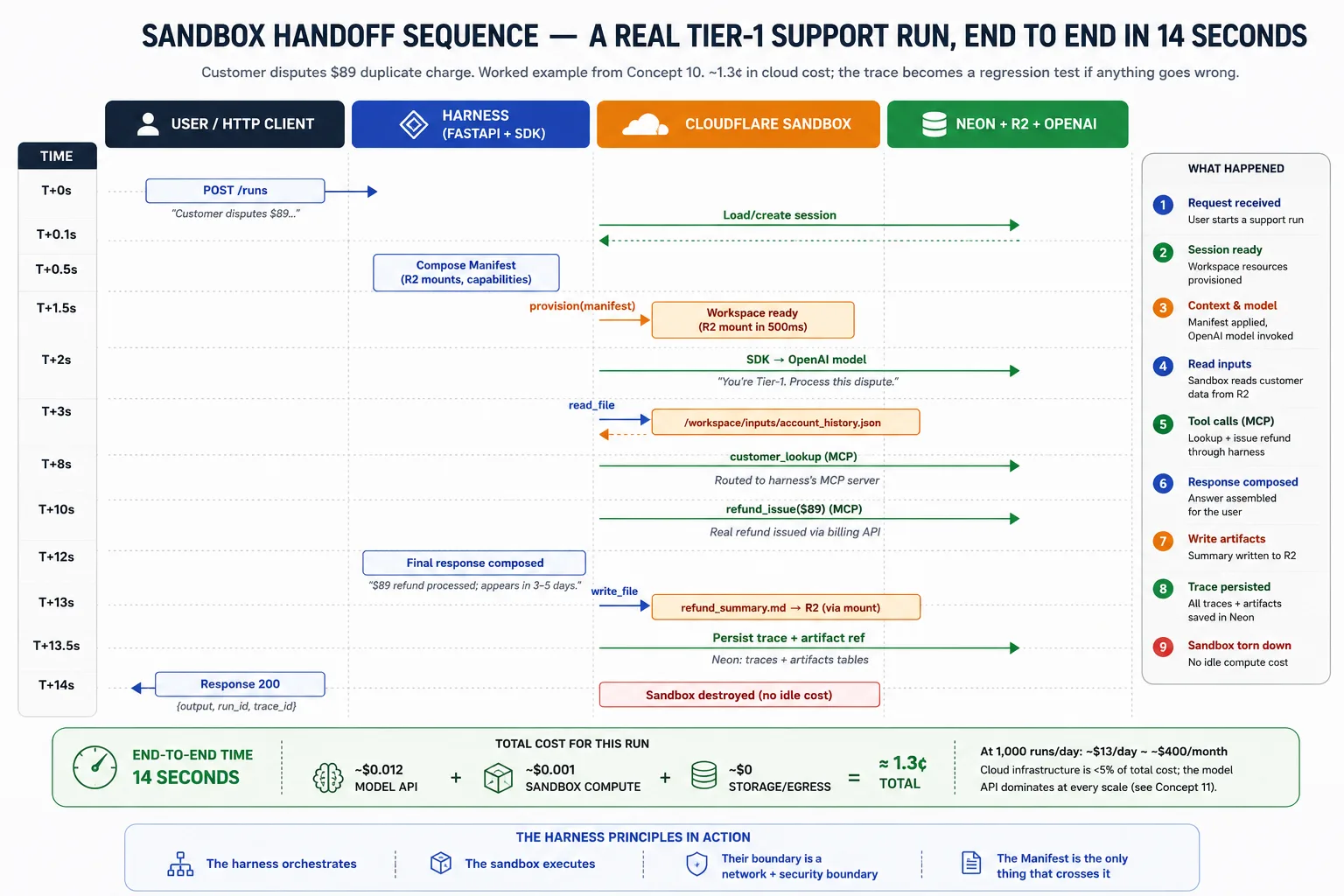
单次 run 的 lifecycle 是:harness 接收请求并加载 session state;它为任务组成 Manifest;它要求 provider provision workspace;SDK 运行 agent loop,把 filesystem 和 shell calls route 到 sandbox,并记录 trace;如果 workspace 失败且 snapshots 已启用,SDK 从最新 snapshot provision 新 workspace 并继续;完成时,harness 从 R2 读取 outputs,把 trace 和 artifact pointers 持久化到 Neon,销毁 sandbox 以免 idle,并把结果返回用户。
Part 4:Observability 和 Evals 作为 Architectural Surfaces
Parts 1–3 部署了 harness。Part 5 的 lab 会构建它。Part 4 位于两者之间,点名 Part 1 的 harness/sandbox 分离仍然需要的两个 surface:告诉你运行中的 harness 正在做什么的系统,以及衡量它是否仍在做正确事情的系统。跳过这些的团队,会发布一个第一天能工作、之后悄悄退化的 harness。两个概念,然后进入 lab。
Concept 11:Observability 作为 architectural surface
Observability:告诉你运行中的 harness 正在做什么、什么时候出错、如何找到原因的工具。大多数 production AI failure 本质上是 observability failure。agent 做错了事,没人连续几天注意到,延迟成本不断增长。因此 observability 不是最后加上的 feature。它是另一个 architectural surface,从一开始就要规划。Decision 7 会接入它。
Harness 运行时,有四个 surface 同时观察它。它们看起来相似,但每个 surface 拥有不同问题。
| Surface | Owns the question |
|---|---|
| Application Insights | harness 的基础设施是否健康? |
| OpenTelemetry traces | 一个请求如何流经各个服务? |
| OpenAI Agents SDK traces | agent 在这次 run 中做了什么? |
| Phoenix | agent 行为如何随时间变化? |
Application Insights 是 Azure 的内置 monitor。它拥有 container view:request rate、error rate、latency、CPU and memory、restart counts、log streams。当 replica 崩溃时,它最先注意到。它看不到 agent 的行为。对它来说,每个请求都是「POST /runs 在 12 秒内返回 200」;答案是否正确是不可见的。
OpenTelemetry(OTel)是一个开放标准,用于追踪一个请求跨服务流动的过程。Trace 是一次 run 的完整记录。当单个请求 fan out 到一次 model call、三次 tool calls 和四次 database queries 时,OTel 会展示它们之间 parent-child timing。它看不到 agent 在 tool calls 之间的 reasoning;它记录 model 被调用了,而不是为什么调用。
OpenAI Agents SDK 会发出自己的 trace:做了哪些 model decisions、用哪些 arguments 调用了哪些 tools、handoffs 去了哪里。它拥有 agent-behavior view。它看不到 agent execution 之外的东西。
Phoenix 会长期观察 agent traces,并把坏 trace 变成未来测试。它采样 SDK traces、评分,并标记最差的 trace,以便提升到 eval suite。它拥有 trend view:不只是 agent 做了什么,还包括哪些 runs 应该成为明天的 regression tests。它看不到 transient infrastructure outages。
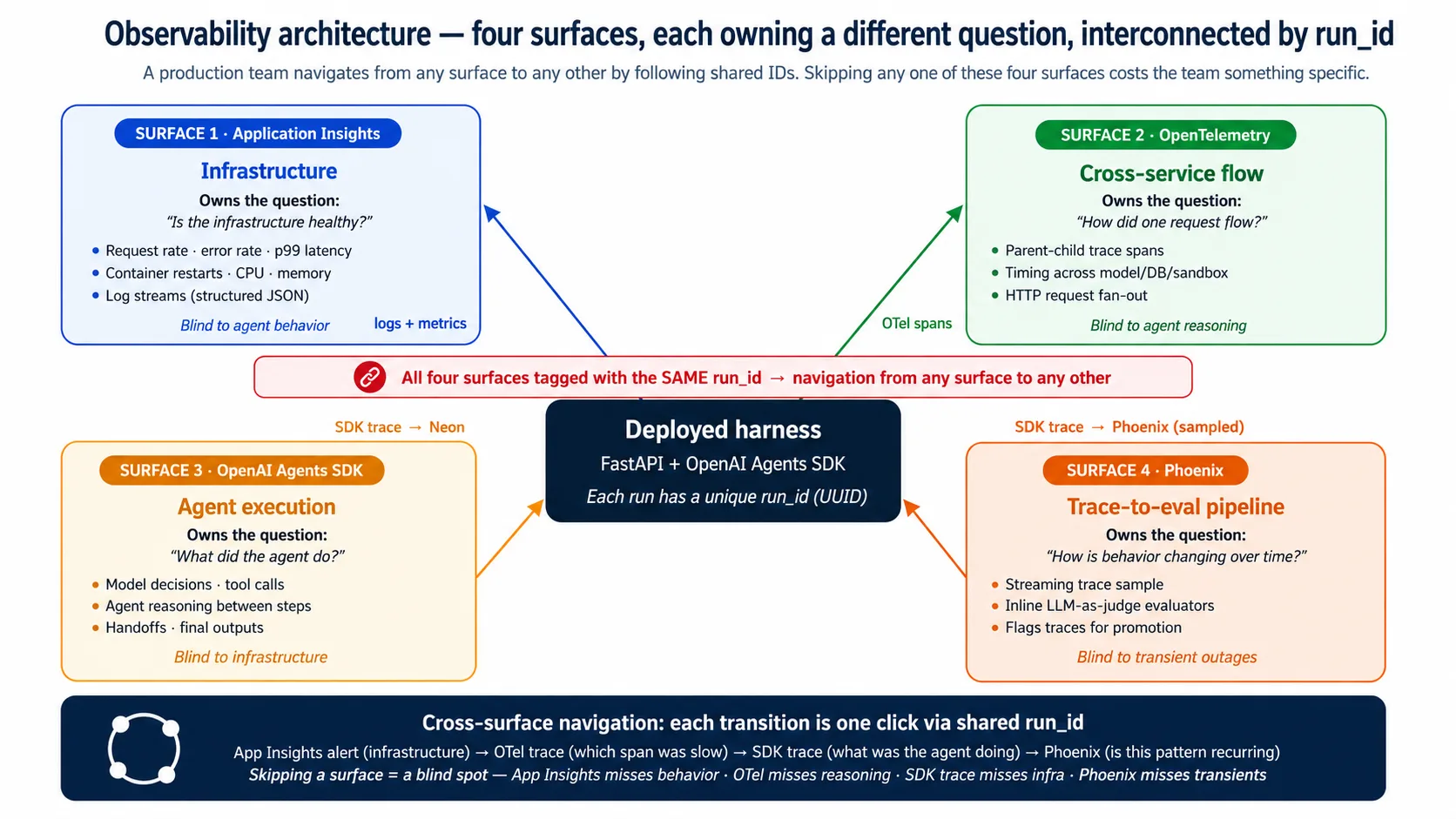
这些 surface 彼此重叠,但不能互相替代。它们通过共享的 run_id 相连,所以团队可以从任一 surface 开始,一键跳到另一个。Application Insights alert 标记基础设施 spike;OTel trace 显示哪个 span 慢;SDK trace 显示 agent 当时在做什么;Phoenix 显示同样模式是否反复出现。跳过一个 surface,就丢掉其中一步:跳过 Application Insights 会错过 outages,跳过 OTel 会错过 slow span,跳过 SDK trace 会错过 agent decision,跳过 Phoenix 会让 eval suite 变 stale。
只有在你把 runs 包进 durable-execution layer 时,才会出现第五个 surface。该 layer 自己的 dashboard 会加入 run-level operational lineage(哪个 step failed、retried、then succeeded)。这是 Production Worker course 的范围,不是本课范围。如果你构建它,见 Production Worker with a Nervous System。
Concept 12:Evals 作为 architectural surface
Eval:衡量 agent 行为的测试(答案是否正确、工具是否正确、推理是否可靠),而不只是代码是否运行。Eval-Driven Development course 构建了四个 eval frameworks。这个概念点名它们接到 deployed harness 的位置。这个连接就是全部意义:没有它,eval suite 只是理论。
边界只有一个地方:traces。eval suite 评分的一切都从 trace 读取,而 traces 住在两个 stores 中。Neon 保存 durable record,供 scheduled jobs 和 audit 查询。Phoenix 保存 real-time sample,显示在 live dashboard 中。如果这个概念只记一件事,就记住 integration 由 traces 中介,而 traces 住在 Neon 和 Phoenix 中。
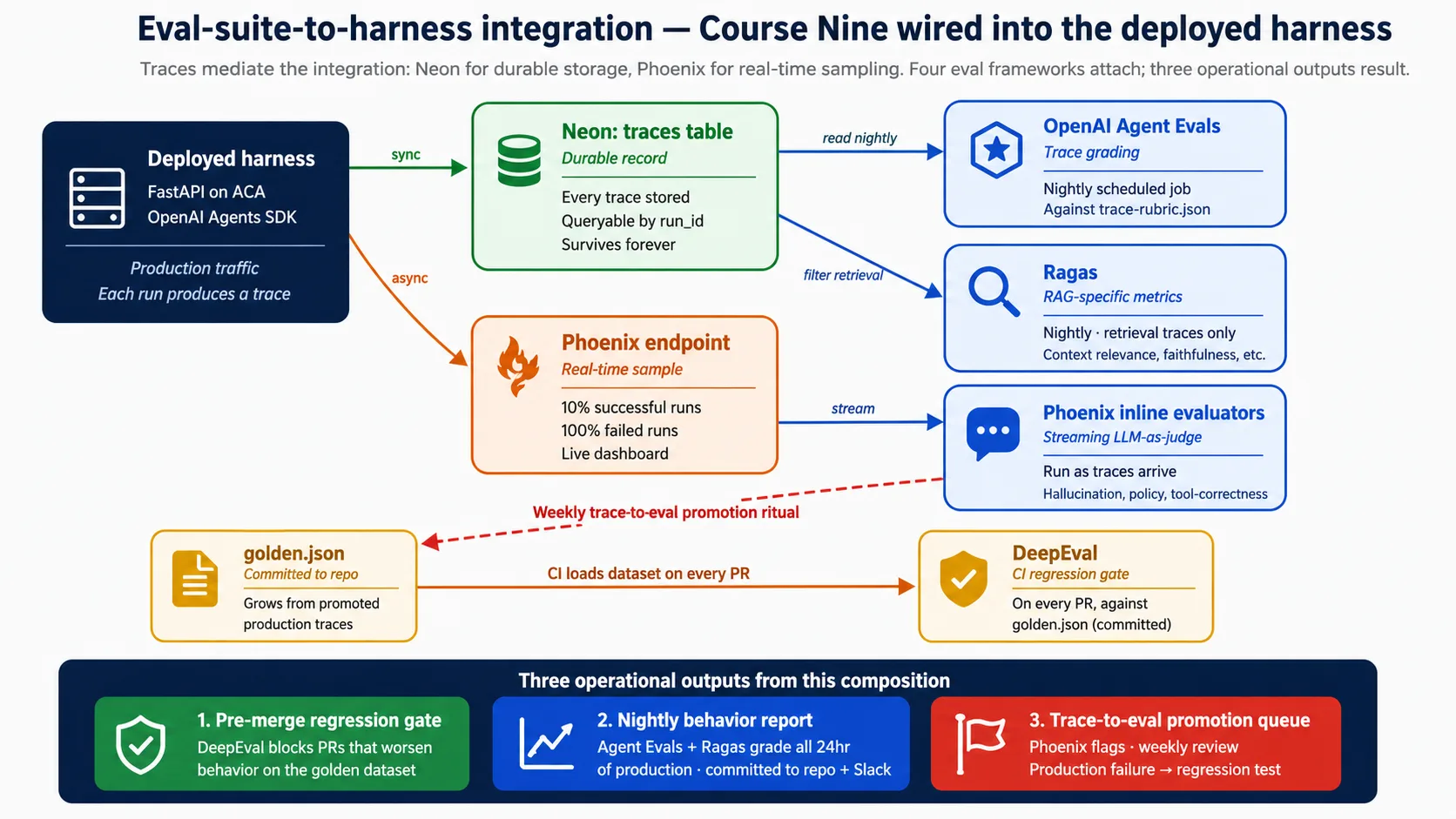
一次 run 结束时,harness 会同步把 trace 写入 Neon(durable record),并异步把一个 sample stream 到 Phoenix(live view)。然后,eval frameworks 接到具体位置:CI gate 在每个 pull request 上运行,scheduled jobs 每晚给前一天的 traces 打分,Phoenix inline checks 在 traces 到达时运行。Decision 8 会完整接入这些。现在就规划,而不是以后再规划,原因很简单:observability 接好之前产生的 traces 已经没了,而 eval suite 只能从它实际看到的 traces 中成长。
Part 5:Deployment Lab
Parts 1–4 覆盖了架构和 surfaces。Part 5 构建整套东西:十个 Decisions,把你从空文件夹带到一个已部署、可观测、带 eval gate 的 harness。这是前面课程使用的形状。你指挥 coding agent;agent 编写并运行代码。每个 Decision 都是一段短 brief 供你粘贴,一个可观察的「Done when:」行,以及一条给只读不部署的读者的说明。
Companion download 承载共享上下文。里面的 AGENTS.md 保存 project rules、architecture 和已验证的 API shapes,所以每段 brief 都保持很短:agent 会读 AGENTS.md 获取细节,你只粘贴目标。现在下载:deploying-agents-crash-course.zip。
工作时反复回看这张图。每个 Decision 都会添加一个标注部件。
完成 lab 的两种方式。
Full build(Intermediate 和 Advanced tracks):你会部署到云端。每次 session 后以及端到端结束时 tear resources down,账单会保持很小;一直运行则会增长。Concept 13 有成本拆解。
Simulated(Reader 和 Beginner tracks):你阅读 companion code,而不是 provision 任何东西。Harness 仍然只设置
OPENAI_API_KEY就能在本地启动,所以所有不需要云账号的步骤都可以运行。每个 Decision 的 Simulated note 会说明要读什么。
Decision 0:probe SDK 并对齐 brief
一句话:安装 SDK、打印已安装版本、抓取 live sandbox docs,并把 companion AGENTS.md 与它们对齐。以 live docs 为准。
OpenAI Agents SDK 发布很快。Names、signatures 和 defaults 会在 releases 之间移动。Companion AGENTS.md 是今天的 known-good,不是永远不变。所以第一个 Decision 是 probe:对照你机器上实际安装的 SDK,确认 lab 依赖的每个 symbol,并写下任何 drift。这里花五分钟,可以省下一小时「为什么这个 attribute 不存在」。
把这段粘贴给你的 coding agent。 先规划;获批后再执行。
打开 companion download。运行
AGENTS.md底部的 SDK probe:uv sync,然后检查agents、agents.sandbox、agents.sandbox.entries和 E2B client 的 imports。打印已安装的openai-agents版本。从官方文档抓取 live sandbox API reference。把AGENTS.md中点名的每个 SDK symbol 与你实际能 import 的内容对比。如果有任何差异,以 live docs 为准:在AGENTS.md顶部写一个短的 "What changed since the brief" note,列出每个差异,并在之后全部使用 live name。现在不要改任何代码。
完成标准:
- agent 报告已安装的
openai-agents版本(预期 0.17.x)。 - agent 报告与
AGENTS.md不同的 SDK names,并在每个差异上以 live docs 为准。 AGENTS.md顶部有一个短的 "What changed since the brief" note,或者 agent 明确说 brief 与已安装 SDK 匹配。
Simulated track。 阅读
AGENTS.md末尾的 SDK probe 小节。你不需要运行它;重点是看到抗 drift 的习惯:先对照 live SDK 确认 brief,再信任任何 symbol,并让 live docs 胜出。
Decision 1:scaffold harness
一句话:一个 FastAPI app,包含 agent、state layer 和 storage layer;缺少 key 时能 graceful degrade,并且只设置 OPENAI_API_KEY 就能本地启动。
这个 Decision 会搭建后面九个 Decision 的项目。agent(Maya 的 Tier-1 Support)和它的两个 tools 来自前面的课程;这个 Decision 是包裹它们的 harness,不是 agent 本身。
把这段粘贴给你的 coding agent。 先规划;获批后再执行。
按 companion
AGENTS.mdscaffold harness。严格遵守其中的 project rules 和 architecture。Pinopenai-agents>=0.17,<0.18。构建 FastAPI app,包含GET /health(报告哪些 backends active)和POST /runs(加载 session、运行 Maya 的 agent、持久化 run 和 trace、可选写 artifact)。接入 graceful degradation:app 必须在只设置OPENAI_API_KEY时也能 import 并启动,DATABASE_URL未设置时 fallback 到 SQLite,未设置 R2 keys 时 fallback 到本地目录。把两个 tools(lookup_account、draft_reply)作为@function_toolfunctions 加入,它们的 bodies 在 harness 中运行,不在 sandbox 中运行。提交 lockfile。
完成标准:
uv run uvicorn maya_harness.main:app启动 harness,无错误。GET /health返回{"status": "ok", ...},其中postgres、sandbox和r2全部报告为false;这是 bareOPENAI_API_KEY-only boot。GET /docs展示两个 endpoints 的 auto-generated API。
Simulated track。 companion 已经包含这个 scaffold。阅读
src/maya_harness/main.py、agent.py和settings.py,注意每个 backend 都是 optional:每个缺失的 key 都会关掉一个组件,而 harness 仍然启动。
这个 boot 就是整门课承诺的早期胜利。在任何云账号、Docker、数据库之前,你已经有一个真正的 agent harness 从自己的笔记本电脑上响应 /health。Harness/sandbox 分离不再只是一张图;它正在你的机器上运行。后续所有内容都是一次加入一个 durable backend。
Decision 2:containerize harness
一句话:一个小而可复现的 harness container image,在笔记本和云端以相同方式运行。
Container:一个包含 app 及其运行所需一切的密封包,使它到处表现一致。Decision 3 会部署这个 image;Decision 2 会构建它。
把这段粘贴给你的 coding agent。 先规划;获批后再执行。
按 companion 中的
Dockerfileshape 构建 harness container。使用python:3.12-slim,并用uv从已提交 lockfile 做 reproducible install。在复制 source 前,把 dependencies 安装进 cached layer。Expose port 8000,并运行uvicorn maya_harness.main:app --host 0.0.0.0 --port 8000 --proxy-headers(--proxy-headers很重要,因为云端会在 ingress 处终止 TLS)。添加.dockerignore,排除 virtualenv、caches 和.envfiles。Build image,并挂载你的.env在本地运行它。
完成标准:
- image 无错误构建。
- container 在本地运行,并且
GET /health从里面返回ok。 - 改 source file 后重新 build 很快(dependency layer 仍然 cached)。
Simulated track。 阅读 companion
Dockerfile。练习重点是 multi-stage idea:dependencies 安装在 cached layer,source 后复制,image 保持小。你不需要安装 Docker。
Decision 3:部署到 Azure Container Apps
一句话:provision 一个受管云 runtime,在云端构建 image,并部署 harness,让它通过公网 HTTPS 响应。
Azure Container Apps(ACA):一个受管服务,在云端运行你的 container,带 autoscale 和 ingress,所以你不用自己运行 servers。这个 Decision 是 harness 离开你笔记本电脑的地方。
把这段粘贴给你的 coding agent。 先规划;获批后再执行。
使用 companion 中
infra/deploy.sh的 shape,把 harness 部署到 Azure Container Apps。创建 resource group 和 container registry。用az acr build在云端构建 image(不需要本地 Docker)。创建 Container Apps environment,然后创建 app,使用--ingress external、--target-port 8000和--min-replicas 0实现 scale-to-zero。把OPENAI_API_KEY存为 named secret,并用secretref:引用,永远不要 bake 进 image。确认 app 的 public URL,并确认/health通过 HTTPS 响应。把当前 environment 传给任何 subprocess,保证 keys 存活。
完成标准:
- deploy script 完成,并打印 public
*.azurecontainerapps.ioURL。 - 从手机打开
https://<that-url>/health,返回{"status": "ok", ...}。 - 安静一段时间后 app scale to zero,下一次请求会在几秒内唤醒副本(scale-to-zero cold start)。
Simulated track。 阅读
infra/deploy.sh和infra/containerapp.yaml。要理解的形状是:在云端构建,用 external ingress 和 scale-to-zero 部署,并按名称存储 secrets。你不需要 Azure account。
你现在有了 Decision 3 中部署好的 Container Apps app 和它的 public URL。Decisions 4 到 9 都会重新部署到同一个 app 上,以添加每个 backend。保留它;除非你完成 lab 或有意结束 session,否则不要运行 az group delete。
Decision 4:接入 Neon Postgres 作为 durable state
一句话:provision 一个 serverless Postgres database,并让 harness 指向它,使 sessions、runs 和 traces 在重启后仍然存在。
Durable state:重启后仍然存在的记忆,保存在数据库里,而不是一停止就忘光的 container 中。Neon Postgres:带低成本 branching 的 serverless Postgres database。完成这个 Decision 后,重启 container,run history 仍然在。
把这段粘贴给你的 coding agent。 先规划;获批后再执行。
按 companion 的
state.py和schema.sql,把 Neon Postgres 接为 harness 的 durable state。在 console.neon.com 创建 Neon project。应用五表 schema(sessions、runs、traces、artifacts、audit_log),并 schema-qualified 到public.*。通过asyncpg连接 harness。来自 companion 的normalize_neon_dsn的两条 acceptance rules 不是可选项,它们能防止 pooler 上的 silent failures:
- 把 Neon connection string 交给 asyncpg 前,移除
channel_binding;保留sslmode=require。asyncpg 不认识channel_binding,如果保留它,在 pooler 上会失败。- 运行 app 使用 pooled endpoint,migrations 使用 direct(non-pooled)endpoint。pooled endpoint 会静默丢掉
search_path,所以每条 statement 都要 schema-qualified。把
DATABASE_URL加到本地.env和 ACA secret,然后 redeploy。确认一次 run 在 restart 后仍然存在。
完成标准:
- redeploy 后
/health报告"postgres": true。 - 一次
POST /runs写入一行,你可以从 Neon 的runstable 读回来。 - 重启 container 后 run history 仍然存在(state 是 durable 的,不在 container 中)。
- connection string 没有
channel_binding,migrations 在 direct endpoint 上运行。
Simulated track。 阅读
state.py和schema.sql。注意两件事:normalize_neon_dsnfunction 会移除channel_binding,以及每张表都写成public.runs、public.sessions等,因为 pooled endpoint 忽略search_path。
你现在有 Decision 4 中的 Neon project 和两个 connection strings:pooled 给 app 用,direct 给 migrations 用。Decision 6 的 sandbox 和 Decision 7 的 observability 都会写入这个 database。保留它。
Decision 5:接入 Cloudflare R2 作为 files 和 artifacts
一句话:provision object storage,并让 harness 生成针对具体文件的短期链接,使 agent outputs 可下载,同时永远不分享 storage password。
Cloudflare R2:S3-compatible object storage,读出你的文件免费。Presigned URL:一个短期链接,让某人能读写一个具体文件,而不持有 storage password。完成这个 Decision 后,agent reply 可以保存为文件并作为 download link 返回。
把这段粘贴给你的 coding agent。 先规划;获批后再执行。
按 companion 的
storage.py,把 Cloudflare R2 接为 harness 的 artifact store。创建 R2 bucket 和 scoped API credentials。把 boto3 S3 client 指向 R2 endpointhttps://<account_id>.r2.cloudflarestorage.com,并设置region_name="auto"。在save_artifact为 true 的 run 中,把 reply 写入 bucket,并返回一个短期(1 小时)presigned download URL。把四个R2_*值加到.env和 ACA secrets,然后 redeploy。
完成标准:
- redeploy 后
/health报告"r2": true。 - 一个
POST /runs在save_artifact为 true 时,返回一个可下载 reply 的artifact_url。 - presigned URL 在 expiry 后失效(它是 scoped、short-lived link,不是永久 password)。
Simulated track。 阅读
storage.py。注意让 R2 与 boto3 配合的一处细节:把 S3 client 指向 R2 endpoint 并设置region_name="auto",其余 S3 API 不变。没有 R2 keys 时运行的是 local-directory fallback。
你现在有 Decision 5 中的 R2 bucket 和 scoped credentials。Decision 6 的 sandbox 会通过 presigned URLs 在这个 bucket 中读写文件。保留它。
Decision 6:接入 sandbox execution
一句话:attach 一个隔离 workspace,让 agent 的代码可以在其中运行,且不能访问 harness 的 secrets 或 database。
Sandbox:单独锁定的 workspace,运行 agent 生成的代码,不持有 harness keys。Manifest:对 sandbox 需求的简短描述(要 mount 哪些 files、开启哪些 abilities)。这个 Decision 加入 execution plane;没有它 agent 仍能回答,所以 harness 每一步都保持有用。
构建前先说成本。本课的 primary sandbox provider Cloudflare 需要 paid Workers plan,并需要一个介于 Python harness 与 sandbox 之间的小 bridge Worker。E2B 是现实可用的免费路径:它有 free Hobby tier、SDK 中的一等 client,并且不需要 bridge Worker。Companion 正是因此默认 E2B。除非你明确想用 Cloudflare,否则使用 E2B。
把这段粘贴给你的 coding agent。 先规划;获批后再执行。
按 companion 的
sandbox.py和AGENTS.md中已验证的 shapes 接入 sandbox execution。默认使用 E2B(free tier)。只有设置 sandbox key 时才构建SandboxRunConfig,并通过RunConfigattach,绝不要作为Runner.runkwarg。Companion 中有两条已验证的形状,旧 draft 写错过:
- E2B path 是
SandboxRunConfig(client=E2BSandboxClient(), options=E2BSandboxClientOptions(sandbox_type="e2b"))。options object 是必需的,并携带必需的sandbox_type字段;client constructor 不接受options=。- 如果你要构建 Manifest,它是
Manifest(entries={...}),mounts(R2Mount、S3Mount)从agents.sandbox.entriesimport。没有base_image=、mounts=[]或MountSpec。传入 capabilities list 会替换 default,所以保留Capabilities.default()或在其上 concatenate。把
E2B_API_KEY加到.env和 ACA secrets,然后 redeploy。Free-tier path:不要管 Cloudflare,只设置E2B_API_KEY,你就不需要 bridge Worker,也不需要 paid plan。
完成标准:
- 设置 E2B key 并 redeploy 后,
/health报告"sandbox": true。 - 一次
POST /runs返回"used_sandbox": true。 - sandbox 从
agents.extensions.sandbox.e2bimport,并且没有 sandbox key 时 agent 仍然能回答(harness 在 sandbox disabled 时仍然可用)。
Simulated track。 阅读
sandbox.py。注意 deferred imports(没有安装 sandbox extras 时 module 也能加载)、默认 E2B-first 且 Cloudflare 作为 paid alternative,以及没有 key 时 function 返回None,这正是 sandbox disabled 时 harness 仍能运行的原因。
Execution plane 已经接好(Decision 6),并叠在 harness(Decision 1)、cloud runtime(Decision 3)、state(Decision 4)和 storage(Decision 5)之上。Maya 的 agent 现在已经在五组件技术栈上端到端部署。Decisions 7 到 9 会加固它。
Decision 7:接入 observability
一句话:接入四个 observability surfaces,并用共享 run_id 把它们连起来,让团队能从任何 symptom 导航到 cause。
Concept 11 点名了四个 surfaces。这个 Decision 接入并对齐它们。之后,团队可以从 Application Insights、OpenTelemetry、SDK trace 或 Phoenix 任一处开始,沿着一个 ID 到达另外三处。
把这段粘贴给你的 coding agent。 先规划;获批后再执行。
接入 Concept 11 中的四个 observability surfaces。用 OpenTelemetry instrument harness(FastAPI、asyncpg 和 HTTP spans),并 export 到 Application Insights。用同一个
run_id标记每个 surface:把它附到 OTel parent span 上,包含在每条 structured log line 中,带到 SDK trace 上,并随 Phoenix sample 发送。以 fire-and-forget 方式 stream completed SDK traces 到 Phoenix(如果 Phoenix down,记录日志并继续;Neon 是 durable record)。成功 runs 大约采样 10%,失败 runs 采样 100%,按run_iddeterministic sampling,保证采样稳定。把 observability keys 作为 ACA secrets redeploy。
完成标准:
- 一个请求的 OTel trace 在约 1 分钟内出现在 Application Insights 中。
- 在任何一个 surface 中搜索同一个
run_id,都能返回其他 surfaces 中的匹配记录。 - Phoenix 显示 recent traces,并采样全部 failures 和一部分 successes。
Simulated track。 阅读 companion 中的 observability wiring。要学习的 pattern 是共享
run_id:它是一根线,让你从基础设施告警点击到 agent reasoning,再到随时间变化的 trend。没有它,四个 surface 就是四个断开的 dashboards。
Decision 8:接入 eval suite
一句话:把 Eval-Driven Development course 的四个 frameworks 接到 harness traces 上,产出 CI regression gate、nightly behavior report 和 weekly trace-to-eval promotion ritual。
Concept 12 固定了边界:Neon 和 Phoenix 中的 traces。这个 Decision 会把四个 eval frameworks 接到这两个 surfaces 上。这是完整 eval wiring 的教学位置;如果你还没有构建 eval suite 本身,请先做 Eval-Driven Development course,因为这个 Decision 是把那套 suite 接到部署上。
把这段粘贴给你的 coding agent。 先规划;获批后再执行。
把 Eval-Driven Development course 的四个 eval frameworks 接到已部署 harness 的 traces 上。每个 framework 接到自己的位置:
- DeepEval 作为 CI regression gate。每个触碰 agent 或 prompts 的 pull request,都通过调用 staging
POST /runs对 committed golden dataset 运行 DeepEval;如果之前通过的 case 现在失败,就 block merge。- 一个 nightly scheduled job(Container Apps Jobs),读取 Neon 中过去 24 小时的 traces,用 OpenAI Agent Evals 按团队 rubric 打分,对使用 retrieval 的 traces 运行 Ragas,把 report 写入 repo,并把 summary 发到 Slack。
- Phoenix inline evaluators 在 traces 到达时运行(hallucination、policy、tool-correctness),给 scores 打 tag,但不阻塞 runs。
- 一个写进 runbook 的 weekly ritual:review Phoenix flagged traces,并把值得进入 eval 的 traces 提升到 golden dataset,使每个都成为未来 regression test。
完成标准:
- 一个故意恶化行为的 pull request 被 DeepEval gate 阻止。
- nightly job 在 repo 中产生 behavior report,并发到 Slack。
- Phoenix 在 recent traces 上显示 inline evaluator scores,promotion ritual 已文档化,并端到端运行一次。
Simulated track。 阅读 companion 中的 eval pipeline configs 和 CI workflows。要内化的形状是三个 operational outputs:pre-merge gate 抓 regressions,nightly report 抓 drift,promotion queue 把 production failures 变成 new tests。
Decision 9:production checklist
一句话:完成 operational discipline:secrets rotation、blue/green deploys、on-call runbook、backup and recovery,以及 rate limits。
Harness 已可观测(Decision 7)且可衡量(Decision 8)后,这个 Decision 会添加你需要的内容,让它可以放心持续运行。Blue/green:通过让新版本与旧版本并行运行,再切流量,实现零停机发布新版本。
把这段粘贴给你的 coding agent。 先规划;获批后再执行。
完成 harness 的生产纪律,并写进 runbook。覆盖:
- Secrets rotation:在旧 credential 旁边添加新 credential、redeploy、verify,然后 revoke old 的流程。
- Blue/green deploys:一个脚本,创建 0% traffic 的新 revision,在其上检查
/health,切 10% 并观察 Application Insights,再切到 100%,并保留 old revision 一天用于 rollback。- on-call runbook,包含五个 scenarios(high error rate、high latency、sandbox provider down、Neon unreachable、R2 unreachable),每个都有 investigation 和 remediation steps。
- Backup and recovery:Neon point-in-time recovery、R2 versioning 和 ACA revision rollback。
- middleware layer 中的 per-user rate limits,超过限制时返回带
Retry-After的 429。- Cost alerts:当 daily spend 明显高于近期平均值时触发。
完成标准:
- 所有 secrets 都有已文档化、已测试的 rotation procedure。
- 一个 blue/green deploy 端到端运行:new revision verified、traffic shifted、old revision kept for rollback。
- Rate limiting 工作(超过 limit 的 request 返回 429),并已配置 cost alerts。
Simulated track。 阅读 companion 中的 runbook、deploy scripts 和 rotation scripts。要吸收的纪律是:每种 failure mode 都有命名、演练过的响应,而且 rate limiting 和 cost alerts 不是可选项;它们挡在你和一次 traffic spike 之后失控账单之间。
Part 6:Honest Frontiers
Lab 会产出一个可工作的部署。Part 6 点名它没有解决什么、哪里会比预期更贵,以及边界在哪里。四个概念和五个 anti-pattern。
Concept 13:云端 agent harness 的成本经济学
云成本是大多数课程会跳过的维度。这份 recipe 有具体经济学,准备采用它的团队应该知道小、中、大规模下的情况。
账单有五层,每个组件一层,其中一层主导所有其他层。
| Layer | Share of the bill |
|---|---|
| Model API (OpenAI) | 任何规模下都是 90–98% |
| Sandbox execution | 高流量时是其余部分中最大的一块 |
| Harness compute (ACA) | 小;scale-to-zero 让 idle 时接近 0 |
| Durable state (Neon) | 小;free tier 覆盖轻量使用 |
| File storage (R2) | 小;egress 免费 |
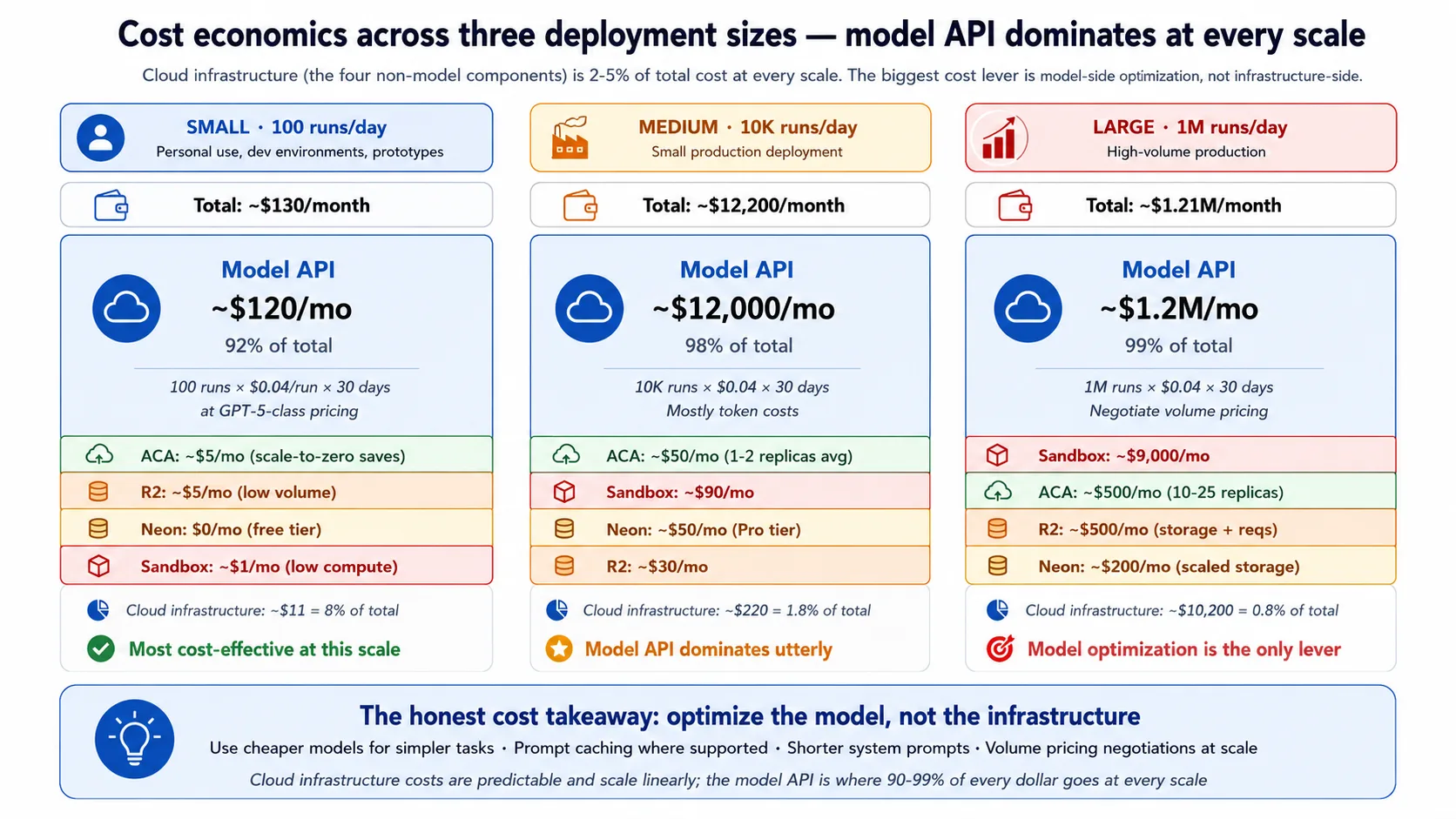
把数字当作粗略范围,而不是精确报价。小规模(每天约 100 runs)时,总账单大约每月一百多美元,model API 约占九成。中等规模(每天约 10,000 runs)时,账单进入每月低几万美元,model API 约占 98%。大规模(每天约一百万 runs)时,账单进入每月七位数,几乎全是 model API。Infrastructure layers 也会增长,但全程保持在总额 5% 以下。
诚实结论可以直接推出。云基础设施几乎总是低于账单的 5%,所以最高杠杆的成本杠杆是 model,而不是 infrastructure:简单决策用更便宜的 model,在 SDK 支持时 cache prompts,并保持 system prompts 简短。Infrastructure cost 可预测,并且大致随流量线性增长;它不会给你 surprise bills。R2 的 free egress 对 file-heavy workloads 最重要,对 Maya 这类 text-heavy workload 几乎没有存在感。Sandbox cost 随 active execution time 扩展,所以 compute-heavy agents 在这里更贵,而大部分时间都在等 model 的 agents 会保持便宜。
Concept 14:Multi-region considerations
这份 recipe 有意部署到单一区域。Multi-region active-active 是难得多的问题,而大多数部署并不需要。你只有出于三个原因之一才需要它:latency,也就是用户遍布全球,单一区域带来明显 round-trip delay;availability,也就是 uptime commitment 达到 99.99% 或更高,单一区域 outage 不可接受;或者 compliance,也就是 data-residency rules 要求 user data 留在特定区域。
各组件 multi-region 难度不同。R2 和 sandbox 已经在 Cloudflare network 上全球化,所以不需要额外工作。ACA 每个 environment 是 single-region,因此 multi-region 意味着多个 environments 放在 global load balancer 后面。Neon 支持其他区域的 read replicas,但 writes 仍然进入 primary,所以 write-heavy agent state 需要更复杂的 database design。诚实 recipe 是更多 environments、read replicas 和 global front door,operational cost 随每个 region 增加。如果用户主要集中在一个 region、uptime target 是 99.9%、且一个 region 满足 data rules,single-region 就是正确答案;不要为不需要的复杂度付费。
Concept 15:什么时候迁出这份 recipe
这份 recipe 是 opinionated 的,适合特定规模和形状。五个 triggers 会告诉你什么时候该离开它。架构 pattern(control plane 与 execution plane 分离)会贯穿每一次迁移;变化的只是具体组件。
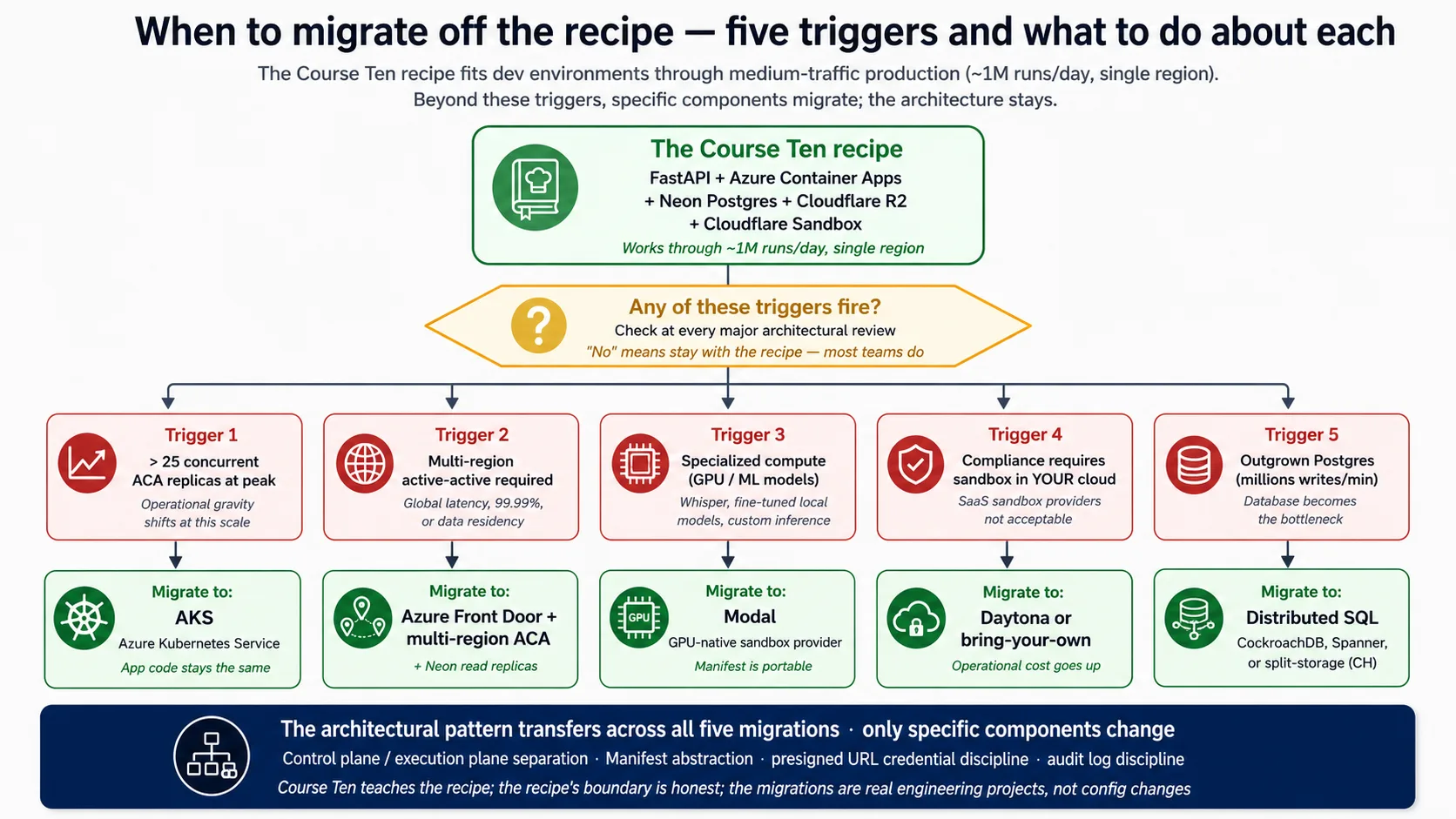
这些 triggers 是:持续重并发超过约 25 个 ACA replicas,此时 economics 和 connection math 都倾向于把 harness 迁到 Kubernetes(app code 不变)。按 Concept 14 所说进入 multi-region active-active。GPU work 这类 specialized compute,此时 GPU-native sandbox provider 更合适,而 portable Manifest 会跟着你走。Compliance rule 要求 sandbox 必须运行在你自己的 cloud 中,这会排除 SaaS sandbox,并推动你选择 bring-your-own provider。以及在极高 write volume 下让 Postgres 不再适合作为 primary store,此时会指向 distributed SQL 或 split storage,也是五个变化中侵入性最大的一个。
Concept 16:部署没有解决什么
Lab 会产出真实的生产纪律,但不会解决一切。点名这些缺口,可以避免虚假自信,也告诉你什么工作能补上它们。
它不会产生 compliance certification。你会得到 SOC2 这类框架期待的 technical controls,但 certification 需要 third-party audit 和数月 evidence;把它当作独立 workstream 规划。它不会给你 incident-response program。Runbook 覆盖 technical remediation,但谁被 page、如何宣布 incident、post-mortem 如何运行,这个人和流程层需要你自己构建。它不会解决 agent 行为的 legal liability。audit log 会记录发生了什么,但围绕 agent decisions 的法律框架仍在形成。它不会在行为层面阻止 prompt injection。Harness/sandbox 分离会让 injected code 够不到你的 secrets,但它无法阻止精心设计的 message 引导 agent reply;这需要 guardrails、input checks 和 red-teaming,其中很大一部分是 eval suite 的工作。它不会替你处理 model upgrades;eval suite 才是在切换前测试新 model 的纪律。它也不会阻止 cost runaway;monitoring 会捕捉 hours spike,但 daily caps 和 kill switches 是你在其上添加的额外防御。
五件不要做的事
这份 recipe 避开五个 anti-pattern。点名它们有助于团队在部署发布后避免倒退。
- 不要在 harness 中运行 agent-generated code。 在 harness process 中调用
exec(model_output)比 SQL injection 更糟,因为 attack surface 是整个 model reasoning。Sandbox boundary 不可谈判;harness 持有 keys,agent code 没资格碰它们。 - 不要把 root credentials 放进 Manifest。 Manifest 中的任何东西都会进入 sandbox。只有 presigned URLs 和 short-lived tokens 跨过边界;database strings 和 API keys 留在 harness。
- 不要在 development 中跳过 scale-to-zero。 一个 dev app 全天保持 warm,再乘以人数和 services,会悄悄为大部分时间 idle 的 compute 每月花掉数百美元。在 dev 中接受 cold start。
- 不要在没有接入 eval suite 时部署。 跳过它是 agent deployment 中最昂贵的捷径:你会发布通过 code review 的 changes,却让行为回归,并在几周后以投诉形式暴露出来。eval gate 是「部署 agents」和「部署能长期保持好的 agents」之间的区别。
- 不要让 harness 在没有 rate limiting 的情况下运行。 Day-one deployment 没有它,团队会在一次 viral mention 后才发现自己一天之内向 model provider 支付了一大笔钱。Generous limits 没问题;no limit 才是危险设置。
Part 7:结语
Concept 17:部署后的 harness 是实现形态
manufacturing track 构建并衡量了一家 AI-native 公司:agent loop、system of record、workforce layer、delegate,以及让行为可衡量的纪律。本课把它发布出去。部署后的 harness 是这一切变成真实用户可访问服务的地方,它跨四个 surface 被观测,并持续由从 production traffic 中学习的 eval suite 评分。
整门课建立在一个想法上:harness 是 control plane,sandbox 是 execution plane,而这一次分离让部署变得安全、durable、可扩展。你在 lab 中接入的一切都服务于它。Harness 持有 keys、state 和 orchestration;sandbox 在没有 keys 的情况下运行高风险代码;presigned URLs 把跨边界的文件访问限定范围;observability 告诉你发生了什么;eval suite 告诉你它是否仍然正确。偏离 recipe 没问题。偏离 architecture 不行。让 harness 和 sandbox 在独立 planes 中运行,跨四个 surfaces 观测,并用从 production 增长出来的 eval suite 给行为评分,那么无论你选择哪些 cloud components,架构都能工作。
这之后要学的,是 build 之前的 design discipline:先选择哪种 agent shape 适合任务。如果你想学这个,请读 Choosing Agentic Architectures,它是 agent design 与 production deployment 之间的 connective tissue。还有三个值得诚实点名的进一步前沿,它们都还没有在本课交付:agent-to-agent commerce,其中 agents 通过 payment protocols 作为 economic actors 行动;owner-delegate agent 的 deployment specifics,它的 signed delegation 和 governance ledger 比 worker 更重;以及更深入的 multi-cloud、active-active multi-region,那本身就是一个重大主题。
Try with AI。 打开你的 coding agent。粘贴:
"我已经完成 manufacturing track,一直到这门 deployment course。列出我在未来一年构建 agents 时最常用的三件事,以及我很少用但一旦用到就至关重要的三件事。简要解释每一项。然后,对于本课接好的 composition(Eval-Driven Development course 的 eval suite attached to a deployed harness),说出你预期实践中最难运营的部分是什么:当团队承受部署压力时,哪项 discipline 最容易被跳过?"
你正在学习什么。 这条 track 很宽,其中大多数内容你会不均匀地使用:有些每天用,有些很少用但关键。这次反思会迫使你诚实判断哪些部分匹配你的实际工作,并显露最常见的生产失败模式:压力下 eval discipline 被降级,直到 harness drift。
一日 workshop variant
如果把本课作为 one-day workshop 运行,完整 concepts 和 Decisions 太多,无法在一天内完成。用这张表按时间调整课程。
| Time available | Keep | Cut |
|---|---|---|
| 8 hours (1-day intensive) | Stack primer(只讲 Docker 和 FastAPI)· Concepts 1–3(architectural backbone)· Decisions 0–5(probe 到 R2)· Concept 13(cost)· Part 7 closing | Stack primer Neon 和 R2(自行阅读)· Concepts 4–12(作为 reference)· Decision 6(sandbox:demo,不构建)· Decisions 7–9(defer)· Concepts 14–16(defer) |
| 2 days | 加 Decisions 6–7(sandbox 和 observability)· Concepts 8–11 | Decisions 8–9 deferred · Concepts 12、14–16 deferred |
| 3–4 days | 加 Decision 8(eval suite)· Concept 12 | Decision 9 deferred · Concepts 14–16 deferred |
| Full week (5–7 days) | 全部内容:完整 Advanced track | 不删减 |
对于短 workshop,保留 architectural backbone(harness/sandbox split 和 five-component stack)以及最小 deployment path(Decisions 0–5)。Hardening 和 honest-frontiers material 可作为之后自学。学生离开时必须带走 architectural understanding;implementation depth 可以之后逐步增长。
Cheat sheet
| # | Concept | Key takeaway |
|---|---|---|
| 1 | "Works on my machine" is not deployment | Production 意味着把 agent 重新架构为 harness(control plane)加 sandbox(execution plane),不是给 laptop script 套 wrapper |
| 2 | Harness/sandbox separation | Backbone:harness 带 secrets 和 state 做 orchestration;sandbox 执行代码;边界是 network 和 security |
| 3 | What the SDK needs from infra | 五个 surfaces(HTTP service、durable state、file storage、isolated execution、orchestration),每个映射到一个 stack component |
| 4 | FastAPI as the harness web layer | Async-native 以匹配 SDK、auto-generated API schemas、Pydantic models |
| 5 | Azure Container Apps as the runtime | Ingress、autoscale(包括 scale-to-zero)、secrets 和 revisions 作为 managed primitives |
| 6 | Neon Postgres for durable state | Postgres 用于 relational state;Neon 用于 serverless scaling 和 cheap branching |
| 7 | Cloudflare R2 for files | Egress-free、S3-compatible、presigned URLs 每次只限定一个文件 |
| 8 | Sandbox execution capabilities | Filesystem、shell、package install、mounted storage,全部隔离且 ephemeral |
| 9 | Choosing a sandbox provider | E2B 是免费路径;Cloudflare 是付费 primary;其他 provider 适配特定需求 |
| 10 | Harness-to-sandbox handoff | Manifest 声明 workspace;presigned URLs 限定 files;root credentials 永不跨界 |
| 11 | Observability as a surface | 四个 surfaces(Application Insights、OpenTelemetry、SDK trace、Phoenix),由共享 run_id 连接 |
| 12 | Evals as a surface | 由 Neon(durable)和 Phoenix(real-time)中的 traces 中介;eval frameworks 接在具体位置 |
| 13 | Cost economics | Infrastructure 低于账单 5%;model API 是 90–98%;优化 model,不要优先优化 infrastructure |
| 14 | Multi-region | 默认 single-region;只为 global latency、99.99%+ uptime 或 data residency 进入 multi-region |
| 15 | When to migrate off the recipe | Heavy concurrency、multi-region、GPU work、in-cloud-only sandbox 或 extreme write volume |
| 16 | What deployment doesn't solve | Compliance certification、incident process、legal liability、behavior-level prompt injection、model upgrades、cost runaway |
| 17 | The deployed harness as the realization | 本课发布 manufacturing track 构建的内容,并 operationally 接入 observability 和 eval suite |
| # | Decision | Deliverable |
|---|---|---|
| 0 | Probe the SDK | Installed version printed,brief reconciled against live docs,"What changed" note |
| 1 | Scaffold the harness | FastAPI app、agent、optional state and storage,只设置 OPENAI_API_KEY 就能启动 |
| 2 | Containerize | 小而可复现的 image,本地和云端运行一致 |
| 3 | Deploy to Azure Container Apps | Public HTTPS URL、scale-to-zero、secrets stored by name |
| 4 | Wire Neon Postgres | 五表 schema、pooled for the app、direct for migrations、channel_binding stripped |
| 5 | Wire Cloudflare R2 | Bucket、scoped credentials、short-lived presigned download URLs |
| 6 | Wire sandbox execution | E2B free-tier client 通过 RunConfig attached;Cloudflare 作为 paid alternative |
| 7 | Wire observability | 四个 surfaces 由共享 run_id 连接;fire-and-forget Phoenix sample |
| 8 | Wire the eval suite | CI regression gate、nightly behavior report、weekly trace-to-eval promotion |
| 9 | Production checklist | Secrets rotation、blue/green deploys、on-call runbook、backup and recovery、rate limits |
Quick reference:deployment commands
# Local dev (Beginner track)
uv sync                                         # install from the lockfile
uv run uvicorn maya_harness.main:app --reload   # boot the harness locally
# Pin: openai-agents>=0.17,<0.18
# Cloud deployment (Intermediate / Advanced): Azure Container Apps
az group create --name maya-rg --location eastus
az acr create --resource-group maya-rg --name <acr-name> --sku Basic --admin-enabled true
az acr build --registry <acr-name> --image maya-harness:latest .   # build in the cloud
az containerapp env create --name maya-env --resource-group maya-rg --location eastus
az containerapp create --name maya-harness --resource-group maya-rg \
  --environment maya-env --image <acr-name>.azurecr.io/maya-harness:latest \
  --target-port 8000 --ingress external --min-replicas 0 --max-replicas 3 \
  --secrets "openai-api-key=$OPENAI_API_KEY" \
  --env-vars "OPENAI_API_KEY=secretref:openai-api-key"

# Tear-down (cost discipline)
az group delete --name maya-rg --yes
# Neon Postgres (console.neon.com)
# asyncpg ignores channel_binding (not a libpq client), so the DSN works with it left in.
# Use the pooled endpoint for the app; the direct (non-pooled) endpoint for migrations.
psql "$DIRECT_BRANCH_URL" -f schema.sql          # migrations on the direct endpoint
Companion download
Companion zip 包含已启动的 harness、AGENTS.md(brief、project rules、architecture 和 SDK probe)、每个 backend 的 verified code、Dockerfile、Azure deploy shapes 和 schema.sql:deploying-agents-crash-course.zip。
References
URLs 截至 2026 年 5 月有效;在你自己的工作中引用前请验证。
agent-factory track:
- agent loop 和 SDK:Build AI Agents。
- 本课接到 harness 的 eval suite:Eval-Driven Development。
- operational envelope(durable execution、第五个 observability surface):Production Worker with a Nervous System。
- build 前的 design discipline:Choosing Agentic Architectures。
- track 背后的 thesis:/docs/thesis。
五组件技术栈:
- OpenAI Agents SDK (Python): package
openai-agents>=0.17,<0.18;docs at https://openai.github.io/openai-agents-python;Manifest 和 sandbox-provider reference 位于同一 source。Harness/sandbox separation 在 2026 年 4 月 15 日发布中作为 SDK 内置部分交付:https://openai.com/index/the-next-evolution-of-the-agents-sdk/。 - FastAPI: async request handling 和 auto-generated API schemas。https://fastapi.tiangolo.com
- Azure Container Apps: ingress、autoscale、secrets、revisions。https://learn.microsoft.com/en-us/azure/container-apps/
- Neon Postgres: serverless Postgres with branching;pooled endpoint 和
channel_bindingfootgun 是 Decision 4 的关键细节。https://neon.com - Cloudflare R2: S3-compatible storage with free egress;SDK 支持 R2 作为 Manifest mount。https://developers.cloudflare.com/r2/
- Code-execution sandbox: E2B(https://e2b.dev,free Hobby tier,native SDK client)是免费路径;Cloudflare Sandbox(Workers platform 的一部分)是付费 primary。Modal 和 Daytona 分别适合 GPU 和 in-your-cloud needs。
Operational and security references:
- OpenTelemetry:harness export 到的 tracing standard。https://opentelemetry.io
- OWASP API Security Top 10:Decision 9 大体覆盖的 security checklist。https://owasp.org/API-Security/editions/2023/en/0x11-t10/
Getting-started track 的第 41 课:agent-factory track 的端到端部署速成课。Harness、sandbox、observability 和 eval suite 组合起来,并为刚接触 Docker、FastAPI、Neon 和 R2 的读者提供 stack primer。